
Roblox players occasionally talk about Error Code 1001, but the message itself doesn’t appear in Roblox’s official documentation. Because of this, it often causes confusion, especially when screenshots circulate online or players encounter unusual pop-ups inside certain experiences.
The result is a combination of uncertainty and concern about whether something is actually wrong. In this guide, we’ll break down what Roblox Error Code 1001 really is, why it isn’t recognized as a legitimate error, and what you should do if you ever come across it.
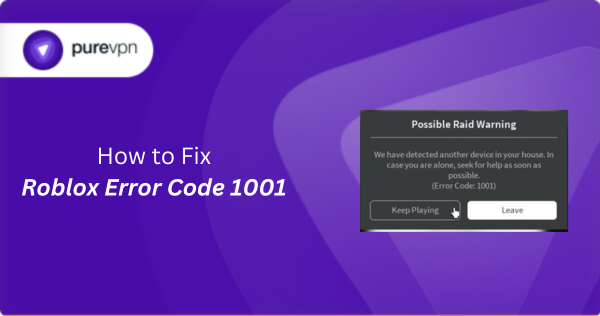
What Is Roblox Error Code 1001?
Error Code 1001 is a message players sometimes come across, but it isn’t an official error produced by the Roblox platform. You’ll usually see it mentioned in community posts or inside specific user-created experiences rather than in Roblox’s own documentation.
Since the message doesn’t match the format of real Roblox errors, it isn’t considered a platform issue or something the system actually generates. Understanding this makes it easier to ignore unofficial pop-ups and focus only on alerts that come from Roblox itself.
Is Roblox Error Code 1001 Real or Fake?
Error Code 1001 is considered fake because it behaves nothing like a real Roblox error. Genuine Roblox errors appear consistently across devices and follow a uniform naming and formatting style, while 1001 shows up only in isolated situations and never in the same form twice. That inconsistency is the first sign that it isn’t produced by the platform.
Players eventually identified it as fake because no one could reproduce the message through normal gameplay, and it never appeared during known outages, server issues, or client problems. Instead, the message often surfaced in edited screenshots, prank content, or experiences designed to mimic system alerts.
Where Did Roblox Error Code 1001 Come From?
Roblox Error Code 1001 became known after a community-run wiki page mentioned it in 2022, describing it as a message that reads: “We have detected another device in your house, in case you are alone, call 911 quickly.”
Shortly after, a TikTok creator posted a mock-up of the same warning in 2023, claiming it was tied to a discontinued Roblox error. The video spread quickly, leading many players to believe the message was real.
As clips and screenshots circulated across different sites like TikTok, Reddit, and YouTube, the “error” started appearing inside certain user-created experiences that mimic system pop-ups to create a prank or horror effect.
Because these versions all looked slightly different and never appeared through Roblox’s actual client or servers, the community eventually recognized Error Code 1001 as a player-created concept that spread through viral content.
What to Do If You See Roblox Error Code 1001
Since Error Code 1001 isn’t a real Roblox alert, a few quick checks can help you remove the pop-up and continue playing:
Leave the experience that displayed the message
If Error Code 1001 appears while you are playing a specific Roblox experience, the message is likely being displayed from inside that game rather than by Roblox itself. Leaving the experience removes the pop-up and prevents it from triggering again within that session.
Restart Roblox to clear any temporary pop-ups
Closing and reopening Roblox helps reset the game environment and removes any on-screen messages that were generated by the experience you were in. It’s a quick way to start fresh and confirm that nothing from the previous session is carrying over.
Check for browser extensions or overlays
Some players use add-ons, overlays, or tools that can display custom notifications on top of websites. If you saw Error Code 1001 while playing Roblox via a browser, temporarily disabling extensions may help you confirm whether the message came from outside the platform.
Avoid taking the message literally
Because Error Code 1001 is not an official Roblox alert, it should not be treated as a real system warning. If the message uses alarming language, ignore it and avoid responding to any prompts that request personal details or actions outside the platform.
Reinstall Roblox if pop-ups appear outside experiences
If you continue seeing unusual messages even after closing games and restarting Roblox, reinstalling the client gives you a clean copy of the platform’s files. Doing so helps rule out any corrupted or modified local files that may affect how Roblox displays content.
How to Check If an Error Code is Legitimate in Roblox
Here’s how to tell if an error message is actually coming from Roblox:
Look for the error in Roblox’s official support documentation
Roblox maintains a public list of recognized system errors, including connection issues, account problems, and gameplay interruptions. If an error code does not appear in that list, it is not considered an official Roblox error.
Check if the error appears consistently across sessions
Legitimate Roblox errors usually show up in the same format and under the same conditions, regardless of the device or experience you are using. If a message appears only once, changes wording, or shows up in isolated situations, it’s likely not system-generated.
Verify whether other players are reporting the same error
Real Roblox errors typically affect multiple players at the same time and are quickly discussed in community spaces. If you cannot find credible reports from other users, the message may be coming from an experience rather than from Roblox itself.
Compare the message format to Roblox’s error style
Roblox’s system alerts follow a consistent visual pattern and use specific wording across the platform. Messages that use unusual language, dramatic warnings, or non-standard layouts are usually not legitimate Roblox errors.
Frequently Asked Questions
Roblox Error Code 1001 is not listed in Roblox’s official error documentation and does not appear through the platform’s client or servers. Reports of it show inconsistent wording and formatting, which indicates it isn’t system-generated. It is treated as a community-created message rather than a legitimate Roblox error.
Since Error Code 1001 isn’t a real Roblox alert, leave the experience that displayed it and restart Roblox to clear any temporary pop-ups. If the message appeared in a browser, disable extensions to rule out outside overlays. Only reinstall Roblox if similar pop-ups appear outside individual games.
Real Roblox errors appear consistently, use standard formatting, and are documented on the platform’s support site. If a message looks unusual, shows up only once, or isn’t reported by other players, it may not be genuine. Comparing it to Roblox’s official error list is the quickest way to confirm.
Related Read:
- How to Fix Error Code 288 Roblox in Easy Steps
- Understanding and Fixing “Error Code 279” on Roblox
- How to Fix Roblox Error Code 529 on PC, Mobiles & Consoles
- How to Fix Error Code 403 on Roblox
- How to Fix Error Code 302 Roblox

PureVPN

December 15, 2025

3 months ago