PUREVPNGamingHow to Fix Roblox Error Code 529 on PC, Mobiles & Consoles in the UK
If you tried to join a game on Roblox and instead you got the dreaded “Error Code 529”, it’s one of the most frustrating messages you can face especially when you were all set to play. This post takes you step-by-step through what the error actually means, why it appears, and what you can do to fix it (on PC, mobile, or any platform). Think of it as your one-stop troubleshooting guide to get you back in the game fast.
What is “Error Code 529” on Roblox and Why It Happens
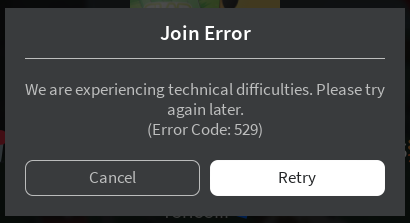
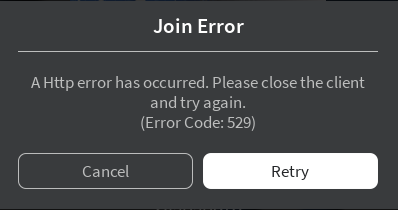
When Roblox shows Error Code 529, you’ll often see messages like:
“We are experiencing technical difficulties. Please try again later. (Error Code: 529)” or
“An HTTP error has occurred. Please close the client and try again. (Error Code: 529)”
In short: Roblox is unable to connect your game client to the servers properly. While that might sound like a network issue, Error 529 is often tied to server-side problems such as overload, maintenance, or backend instability.
But that doesn’t mean your setup is always blameless. In many cases, local issues like poor internet, firewall interference, or corrupted cache can worsen or trigger a 529 error even when servers are functional. Several sources cite both server- and client-side causes.
Because the root cause can vary, it’s useful to treat 529 as a dual-nature error: sometimes it’s on Roblox’s side sometimes on yours. This guide walks both paths.
Common Causes Behind Error Code 529
Let’s break down the common culprits on both ends that tend to trigger Error Code 529.
1. Server-side Overload, Maintenance or Outage
The most frequent root cause: Roblox’s servers may be overloaded with too many requests, particularly during peak hours, updates, or new content drops.
Alternatively, Roblox might be down for scheduled maintenance or experiencing unexpected internal errors.
In those situations, many players get 529 simultaneously the issue is widespread, not isolated.
2. Unstable or Poor Internet Connection
A shaky Wi-Fi signal or frequent packet loss can interrupt communication during login or data fetching, causing the client to timeout or fail.
Low bandwidth, high latency, intermittent drops all can exacerbate or even trigger 529, especially when servers are borderline overloaded.
3. Firewall, Antivirus or Network Filtering Interference
Overprotective firewall or antivirus configurations occasionally block or throttle Roblox traffic. If the client can’t reach the server properly or gets blocked halfway, 529 may appear.
Similarly, some routers or ISP-level filters (or even enterprise / school networks) that rewrite, inspect, or block packets can break the handshake.
4. DNS, Router or NAT Issues
DNS misconfigurations, slow DNS resolution, or problems with your router’s NAT/firewall settings may interfere with connecting to Roblox’s servers.
Older or buggy router firmware, strict NAT types, or improperly configured ports sometimes contribute to connection failures.
5. Corrupted Client Files, Cache or Temporary Data
On rare occasions, a corrupted installation of Roblox or damaged cache/files may lead to connection failure, especially when combined with other issues.
Browser-based login (if using Roblox through browser) with corrupted cookies or cache could also lead to authentication or resource fetch failures, potentially triggering the error.
6. Combination of Issues: Client + Server or Network
Sometimes, server-side strain combined with a slightly weak or unstable connection on your end can push things over the edge resulting in 529.
That complexity explains why some players consistently get 529 only on certain days, sessions, or while on specific networks (e.g. Wi-Fi vs mobile data).
How to Fix Error Code 529: Device-by-Device Troubleshooting
Here’s a detailed, platform-by-platform breakdown, starting from easy fixes to more advanced steps. Begin at the top of each list and proceed downward until the issue is resolved.
General Fixes (All Devices)
Check Roblox Server Status
Before fiddling with your setup, check whether Roblox is down or experiencing issues (via community/status page or social media). If servers are down, the only real solution is to wait.
Restart Router and Your Device
Rebooting your modem/router and device clears transient network glitches or cache that may block Roblox connections.
Switch Connection Type — Try Wired or Mobile Data
If you’re on Wi-Fi, try switching to a wired (Ethernet) connection or mobile hotspot. This helps isolate whether the error is due to your Wi-Fi signal or ISP.
Temporarily Disable VPNs / Proxies
VPNs or proxies sometimes help bypass ISP issues but sometimes they interfere. Try launching Roblox without VPN or proxy to test.
Allow Roblox Through Firewall / Antivirus
Make sure Roblox client (or browser) is whitelisted in firewall or antivirus software so that its traffic isn’t blocked or throttled.
Clear DNS / Flush DNS Cache
On PC, run ipconfig /flushdns or equivalent commands to clear DNS cache. This helps if DNS resolution is stuck or misbehaving. Some users reported success after doing this when facing 529.
How to Fix Error Code 529 On PC (Windows / macOS)
Fully close Roblox (client and browser), then restart — sometimes session mismatches cause failures.
Clear Roblox cache / temp data — on Windows, remove folders under %LOCALAPPDATA% related to Roblox; on macOS, delete cache folders and reinstall. This removes corrupted files that may block connections.
Reinstall Roblox — if cache clearing doesn’t help, reinstalling ensures you’re running a clean, up-to-date client.
Update network drivers (Wi-Fi / Ethernet) — outdated or buggy drivers may cause connectivity instability.
If using browser login: clear browser cache/cookies, disable privacy extensions (ad-blockers, script-blockers) and try again or switch to a different browser. This helps in case the browser is stripping or blocking necessary authentication or asset-loading requests.
How to Fix Error Code 529 On Mobile (Android / iOS)
Force-close and re-open the Roblox app — occasionally the app’s internal cache or temporary data becomes faulty.
Clear app cache (if possible) or reinstall the app — deletes any corrupted data that might interfere with network requests.
Switch between Wi-Fi and mobile data — this helps check whether the issue is with your local network or data connection.
Disable VPNs or proxy apps on mobile — some VPN apps modify traffic in ways that trigger 529.
Avoid battery-saving / data-saving modes — these can restrict background data or throttle network requests, which might affect Roblox’s ability to connect properly.
How to Fix Error Code 529 On Consoles or Other Platforms
Use wired connections if possible — more stable than Wi-Fi.
Restart the router and console — basic but often effective in clearing stuck sessions or network hiccups.
Switch your network (e.g. to a mobile hotspot) to test whether home router/ISP is the root cause.
If the console or platform supports it, clear cache or temporary storage and reinstall Roblox client.
When Fixes Don’t Work: What Else Could Be Going On
If you’ve tried all the above and still get Error Code 529, consider the following possibilities:
Roblox servers are overloaded or down: As many sources indicate, 529 is often triggered when Roblox experiences high traffic, server instability, or maintenance.
Regional/outage-specific issues: Sometimes certain regions get hit harder if players in your area repeatedly get 529, it might be an ISP routing issue or regional server problem.
ISP, router, or NAT/firewall restrictions: If your ISP is throttling, applying strict NAT, or blocking certain ports, Roblox may fail to connect. Unless the ISP or router is reconfigured, the error may persist.
Corrupted or outdated Roblox servers (for a specific game or instance): If one particular game or world is broken (e.g. its servers or data stores are down), you may get 529 when trying that game even if other games work fine.
Combination of multiple minor issues: Sometimes server strain + local network weakness + firewall/VPN interference all combine to create persistent 529 very tricky to isolate.
If none of the troubleshooting works, your best bet is to wait a few hours and try again, or see if other players are experiencing the same issue often 529 resolves when server load normalizes.
If you create or host on Roblox as a developer or server owner:
Error 529 might indicate your game’s backend (data stores, asset servers, or instance servers) is down. Some developers have reported that certain service outages (DataStores, authentication servers) cause 529 for their players.
If you have custom server logic (heavy scripts, frequent join/leave triggers, asset-intensive games), server overload may trigger 529 more often consider optimizing or scaling resources.
For advanced troubleshooting: check server logs, monitor Roblox service status, and communicate with players when outages or known issues occur.
Summary
Roblox Error Code 529 is most often a server-side or service-side problem caused by overload, maintenance, or backend instability but it can also be triggered or worsened by local issues like unstable internet, firewall/VPN interference, or corrupted client data.
The good news: many times, simple steps restarting router/device, switching networks, disabling VPNs, clearing cache, or reinstalling Roblox will get you back in within minutes. When the problem is server-side or due to backend load, patience is your only real fix; the issue often clears once traffic subsides or maintenance completes.
If you still face 529, try switching networks (mobile data, another ISP), check community or status pages for widespread outages, and consider reaching out to Roblox Support if the problem persists for many hours/days.
Frequently Asked Questions (FAQ)
Is Error Code 529 a ban or account suspension?
No. 529 typically indicates a connection or server-side issue, not a disciplinary action. It doesn’t mean your account is banned.
Why does 529 appear only on certain days or certain games?
Because server load or regional outages fluctuate. If a specific game is overloaded or its backend is unstable, or if Roblox servers overall are under heavy load, 529 becomes more likely. Also, local network stability (internet strength, time of day, router load) can influence it.
Will reinstalling Roblox always fix 529?
Not always. Reinstalling helps when the error is due to corrupted cache or client files. But if the root cause is server-side (overload, outage), reinstalling won’t help, you’ll need to wait for servers to stabilize.
Can using a VPN or proxy fix 529?
Sometimes, if your ISP routing is problematic or if Roblox has regional server issues. However, VPNs may also introduce latency, packet loss, or IP reputation issues, which could worsen the problem. It depends a lot on the VPN quality and routing.
What if I only get 529 on one device but others work fine on the same network?
That suggests the issue is likely on your device’s side (corrupted cache, firewall settings, client-specific data). Try clearing cache, reinstalling, or disabling security software and/or use a different device to test.
PureVPN is a leading VPN service provider that excels in providing easy solutions for online privacy and security. With 6000+ servers in 65+ countries, It helps consumers and businesses in keeping their online identity secured.