

- iOS entitlement is self-serve: The Network Extension entitlement for standard VPN apps has not required Apple’s individual approval since 2016, contrary to common assumption.
- Android requires a declaration: Any app using VpnService must file a Play Console declaration and show an in-app disclosure before requesting the permission, not just in a privacy policy.
- The SDK does not cover everything: Billing logic, per-tenant provisioning, and session revocation on offboarding stay on your team’s roadmap regardless of vendor.
- Timelines run in phases: SDK integration itself takes one to two weeks, but provisioning logic and store review add separate, parallel timelines most teams underestimate.
- Ask about the provisioning API first: Whether the vendor exposes a documented API for account lifecycle events matters more at scoping stage than server count or launch speed.
Most product teams treat VPN SDK integration mobile app work as a checklist item. One engineer gets a sprint and a vendor’s quickstart guide. That assumption breaks down the moment the build reaches store review.
A VPN SDK integration mobile app project touches more than code. It touches your app’s platform entitlements. It touches your store listing disclosures. It also touches parts of your account infrastructure the SDK itself never provisions. None of that shows up in a typical vendor quickstart guide.
This piece walks through what actually changes once you commit to a VPN SDK integration mobile app rollout. That includes the platform-level requirements Apple and Google enforce. It includes what the SDK hands you, and what your own team still has to build. It ends with a realistic timeline, not the “less than an hour” claims some resellers advertise.
What Changes Once You Add a VPN SDK
Adding VPN functionality is not the same as adding an analytics SDK or a payment library. A VPN SDK integration mobile app project asks your app to request a system-level networking capability. Both iOS and Android treat that request differently than a normal permission prompt.
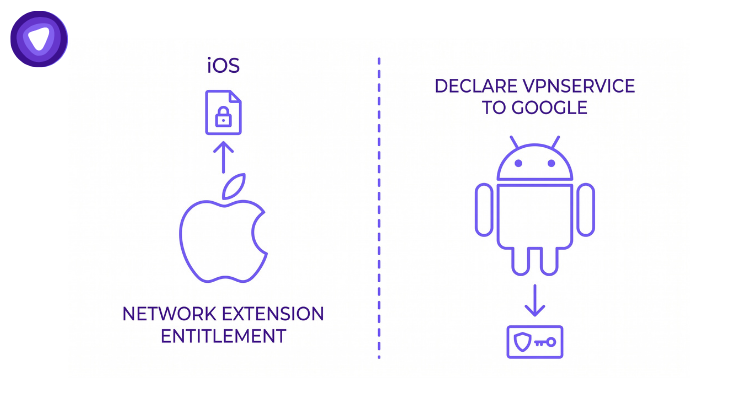
On iOS, your app needs the Network Extension entitlement before it can run a packet tunnel. That VPN network extension entitlement is what lets the operating system trust your app with tunnel traffic. On Android, your app needs to declare its use of Vpn Service to Google. It also needs to disclose that use inside the app itself. Skipping either step does not just risk a rejection.
It risks a re-submission cycle. That cycle can push your launch date by a week or more. Meanwhile your team sits idle on a feature that is otherwise finished. Product teams who treat a VPN SDK integration mobile app roll out as pure engineering work usually discover this too late. They find out only after their first submission bounces. Treating platform requirements as day-one planning items avoids that loss entirely.
What the SDK Provides and What Your Team Still Owns
A white label VPN SDK covers the parts of the stack that are expensive to build. Those parts are also easy to get wrong. Choosing to embed VPN in a mobile app, rather than building from scratch, is what makes this stack accessible. That means encryption protocols, authentication handshakes, and server selection logic. It does not cover the business logic connecting VPN access to your product’s own account system.
That gap is where most integration timelines slip, so it is worth separating clearly.
What Ships Ready
The SDK layer typically includes protocol support. Depending on the vendor, that means OpenVPN, IKEv2, or WireGuard. It includes a branded connection interface matching your app’s design. It also includes server routing logic tuned for mobile network conditions.
PureVPN White Label’s account-management API extends this further. It covers account creation, renewal, and status checks. It also covers retrieval of subscribed countries, cities, protocols, and channels. This layer is not something your engineers need to write from scratch.
What Your Team Still Builds
Three pieces stay on your roadmap regardless of which vendor you choose. Missing any of them is a common pitfall teams run into after launch. The first is billing logic that ties a VPN entitlement to your existing subscription tiers. The second is per-tenant account provisioning. That means the calls that create, extend, or disable a VPN account when a user upgrades, downgrades, or cancels.
The third is offboarding and session revocation. A canceled user’s access needs to actually end. It should not linger on an old token. Teams that assume the SDK covers all three usually find the gap during QA. That is a more expensive place to find it than during planning.
iOS Requirements: What Is Actually Self-Serve
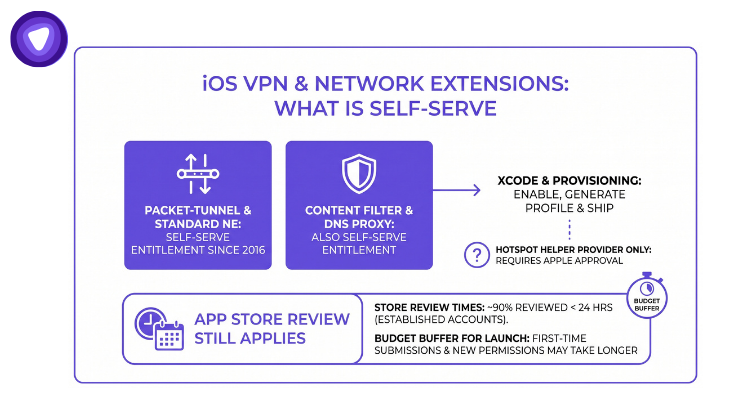
A common misconception is that Apple must individually approve every app requesting VPN capability. That is not accurate for the standard case. The Network Extension entitlement covers packet-tunnel VPN providers, content filters, and DNS proxies. It has been self-serve since 2016.
Any developer on a paid Apple Developer account can enable the Network Extensions capability in Xcode. From there, generating a provisioning profile and shipping is straightforward. Apple’s own developer support confirms the entitlement is restricted by provisioning profile. It is not gated behind a manual approval queue for this provider type.
The exception is the Hotspot Helper provider type. That one still requires a request submitted directly to Apple. A standard VPN SDK integration mobile app project using the packet-tunnel provider does not need this step. Confirming which provider type your SDK vendor uses saves a planning cycle. Many teams add that extra cycle unnecessarily, simply because they assume the older process still applies.
Store review timing still matters even without an entitlement request. Apple states that roughly 90 percent of submissions are reviewed within 24 hours. That figure applies best to established developer accounts submitting routine updates. A first-time submission carrying new networking permissions can run longer. Budgeting a buffer around your launch date remains sensible, even when no manual entitlement approval is required.
Android Requirements: The Declaration and Disclosure You Cannot Skip
Android treats VpnService differently from a standard permission. Google Play requires any app using VpnService to complete a declaration form in Play Console. That form confirms the app qualifies for one of the policy’s approved use cases. VPN functionality is the most direct one for this scenario.
Beyond the declaration, Google requires a prominent in-app disclosure. That disclosure has to appear before the permission request fires. It must sit inside the app’s normal usage flow, not the privacy policy or the store listing description. It must also describe what data the VPN capability accesses.
Apps that collect consent only through a privacy policy link do not meet this requirement. That gap risks enforcement action even after the app is already live. Neither the iOS entitlement process nor the Android declaration is difficult on its own. The risk is discovering either one during a submission. Finding out a week before a planned launch date costs far more than finding out during scoping.
A Realistic VPN SDK Integration Mobile App Timeline
Vendor marketing promises a VPN SDK integration mobile app rollout in under an hour. That claim describes something narrower than it sounds. It describes wiring the SDK into a test build, not shipping a production release. The table below breaks the process into the phases that actually determine your launch date.
| Phase | Typical Duration | Primary Owner |
| SDK integration and UI branding | 1 to 2 weeks | Mobile engineering |
| Provisioning, billing, and offboarding logic | 1 to 3 weeks | Backend engineering |
| QA across network conditions and OS versions | 1 week | QA team |
| iOS Network Extension setup and submission | Days, plus review queue | Mobile engineering |
| Android VpnService declaration and disclosure build | Days, plus review queue | Mobile engineering, legal or compliance review |
The SDK integration and UI branding phase is genuinely fast, which is likely where the “under an hour” claims originate. The phases most teams underestimate are provisioning logic and the platform-specific review requirements. Both can run in parallel with engineering rather than after it, but only if they are planned from the start.
Where iOS and Android Integration Paths Diverge
The two platforms diverge in where the friction actually sits. iOS friction is almost entirely technical. It means correctly configuring the Network Extension entitlement. It also means packaging the packet-tunnel provider as an app extension with matching bundle identifiers.
Android friction is more procedural, and the platform-specific details go deeper than store policy alone. A separate Android integration guide covers session management, authentication alignment, and protocol efficiency testing in more depth. At the store-review layer specifically, the friction means the VpnService declaration, the prominent disclosure requirement, and review timing. Google’s review for apps using sensitive permissions can extend beyond the standard window. That happens when the reviewer needs to verify the disclosure is implemented correctly, not just present.
Planning a launch on both platforms at once means budgeting two kinds of delay, not one. It is not one shared delay applied evenly to both. Teams that plan a single combined buffer often find one platform ready. The other is still cycling through review.
What to Verify With Your SDK Vendor Before You Start
The vendor conversation usually focuses on protocol support and server count. Those numbers matter, but they answer the wrong question at the scoping stage. The better question is what happens after the SDK ships. What happens when a user upgrades, cancels, or needs an account disabled mid-cycle?
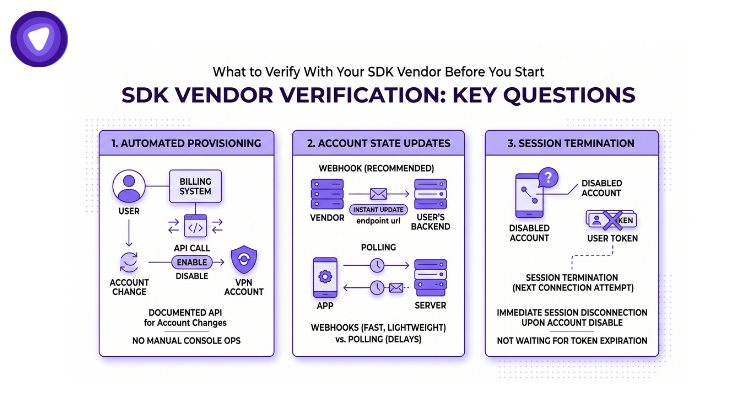
Ask whether the provisioning layer exposes a documented API for account creation, renewal, and status checks. A manual console your team operates by hand does not scale. A documented API lets your billing system trigger a VPN account change automatically. Otherwise the change routes through a support ticket.
Ask how account state changes reach your app. Some vendors push updates through a webhook the moment an account status changes. Others expect your app to poll for status on an interval. Webhook delivery is faster and lighter on your infrastructure. It does require your backend to expose an endpoint the vendor can reach. Polling is simpler to implement. It adds a delay between the account change and your app reflecting it, and that delay matters most during offboarding.
Ask what happens to a session already in progress when an account is disabled. A canceled user whose device still holds a valid session token should lose access at the next connection attempt. Waiting for the token to expire on its own is not enough. This detail rarely appears on a vendor’s marketing page. It almost always appears in a support escalation months later if it was never confirmed upfront.
Finally, ask which protocols the SDK ships with on each platform. iOS and Android do not always get identical protocol support from the same vendor. A mismatch here can mean rebuilding part of the connection logic later for one platform only.
How PureVPN White Label VPN Solution Supports This
PureVPN White Label VPN Solution provides the SDK layer and protocol support. It also provides the account-management API that covers provisioning calls your team would otherwise build from scratch. The infrastructure behind it spans 17-plus years in privacy infrastructure and 150-plus partners worldwide.
A managed service provider bundled PureVPN White Label VPN Solution alongside an existing antivirus product. It documented a 20 percent increase in enterprise clientele. The same rollout produced a 32 percent reduction in operational costs. Revenue grew 25 percent within two months of launch. These figures are the partner’s own reported results, not independently audited beyond the case study itself.
That outcome depends on integration depth, not integration speed. A vendor that documents its provisioning API, protocols, and account lifecycle endpoints upfront changes the shape of the project. It becomes a rollout your engineering team can plan around. Otherwise the real requirements surface only after submission.
Final Thoughts
Teams evaluating a VPN SDK integration mobile app vendor get more predictable results by asking for that documentation before signing. Asking how fast the SDK drops in is the wrong first question. Asking what still needs to be built after it drops in is the right one.
Building a VPN SDK integration mobile app plan around actual platform requirements keeps a launch date real. Vendor marketing claims do not. The entitlement and declaration steps are not hard on their own. They are just easy to discover too late, once a launch date is already public.