


- A password manager only checks credentials already stored in its vault, so it misses non-vaulted accounts, shadow IT logins, and employee identifiers entirely.
- Standalone credential monitoring covers that identifier-scope gap, scanning breach dumps and infostealer logs regardless of whether a credential was ever vaulted.
- The two overlap only on stored passwords that later appear in a breach. Past that point, one detects exposure and the other stores and generates credentials.
- Selling both as connected line items gives partners a stronger pitch than bundling a basic breach check into one SKU, especially as the password management market grows toward $27 billion by 2035.
- The strongest offering links the two operationally: a monitoring hit triggers a forced credential rotation inside the password manager, closing the loop instead of leaving it to the client.
A password manager’s built-in breach alert only checks credentials already stored in that vault. Standalone credential monitoring scans far beyond it, covering identifiers, accounts, and logins the vault never touched. Treating credential monitoring vs white label password manager as a choice between substitutes leaves a real coverage gap open, not a duplicate feature closed. Partners who understand where each tool stops, and where the other picks up, sell more than one add-on. They sell a complete answer to a problem clients already have.
Most vendor content treats this as a feature checklist. It is not. It is a partner decision about which risk gets covered, which gets missed, and how two separate product lines turn into one connected revenue stream instead of two overlapping ones.
What a Password Manager’s Breach Alert Actually Checks
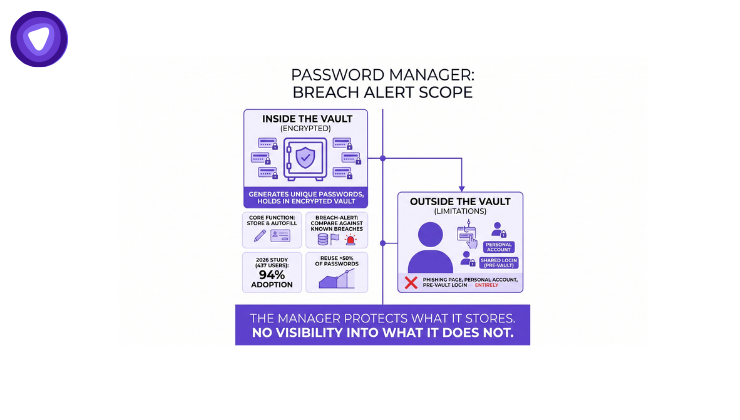
A password manager secures the credentials a user actually stores in it. It generates unique passwords, holds them in an encrypted vault, and autofills them on login. Many password managers, including branded white label builds, add a breach-alert feature on top of that core function. The alert compares stored vault entries against known breach databases and flags a match.
That scope is the limitation. The alert only checks what is already in the vault. A 2026 academic study covering 437 students, faculty, and staff found that participants reused more than half of their passwords despite 94% reporting password manager use, and only 26% regularly used the manager to generate new ones. Adoption alone does not close the gap. A password sitting in a personal account never added to the vault, a shared login used before the platform launched, or a credential typed into a phishing page bypasses the alert entirely. The manager protects what it stores. It has no visibility into what it does not.
What Standalone Credential Monitoring Covers That a Vault Cannot
Standalone credential monitoring scans for exposure regardless of where a credential lives. It checks emails, phone numbers, employee identifiers, and account pairs against breach dumps, infostealer logs, and dark web listings, whether or not that credential was ever stored in a password manager. This is the identifier-scope gap that separates the two products, and it is the part most vendor comparisons skip entirely.
The scale of what falls outside a vault is significant. The 2026 Credential Risk Report found that 73% of organizations identified employee or contractor credentials in third-party breach data, dark web sources, or infostealer logs within the past year, and only 19% of those organizations continuously monitor and automatically remediate that exposure. That leaves the majority relying on a reactive response instead of ongoing detection.
Credential monitoring also catches exposure the 2025 DBIR ties directly to attacker success. Stolen credentials were the single most common initial access vector, present in 22% of breaches, and 88% of breaches against basic web applications involved stolen credentials specifically. Those figures include credentials that were never sitting in any vault when they were compromised, which is exactly the blind spot standalone monitoring is designed to close.
Where the Two Overlap, and Where the Overlap Ends
Overlap exists. A stored password that later shows up in a breach can trigger an alert from either tool. Past that single overlap point, the two diverge sharply, since one handles vault management and the other handles exposure detection.
| Coverage Scope | Password Manager Alert | Standalone Credential Monitoring | Gap |
| Vault-stored passwords | Covered | Covered | None |
| Non-vaulted personal accounts | Not covered | Covered | Full |
| Employee identifiers (email, phone, SSN) | Not covered | Covered | Full |
| Shadow IT and unapproved logins | Not covered | Covered | Full |
| Infostealer log matches | Rarely covered | Covered | Large |
| Password generation and storage | Core function | Not applicable | None |
| Secure credential sharing | Core function | Not applicable | None |
| Automated rotation after a hit | Manual | Manual (feeds the manager) | Operational, closed together |
The last row matters most for partners. Credential monitoring finds the exposure. The password manager is where the fix actually happens, through a forced password change and a freshly generated, unique credential. Neither tool completes that loop alone.
The Partner Economics of Selling Two Lines Instead of One Feature
Some vendors bundle a basic breach check into their password manager and call the coverage complete. Partners who understand the identifier-scope gap have a stronger pitch available: sell credential monitoring vs white label password manager as two connected line items, not one feature buried inside a single SKU.
The password management market itself is not shrinking room for that pitch. It was valued at $3.72 billion in 2025 and is projected to reach $27.00 billion by 2035, growing at a 21.92% compound annual rate, according to Precedence Research. Demand for the password manager side of the offering is expanding regardless of what a partner does with monitoring. The opportunity is positioning the two together instead of choosing one.
A partner selling only a password manager is competing on storage and convenience, a crowded and commoditized pitch. A partner selling only credential monitoring is selling an alert with no built-in remediation path, which stalls at the moment a client actually needs to act. Selling both closes that gap and gives a partner two separate line items to price, rather than one feature a client can find bundled elsewhere for less.
How the Two Products Work Together in Practice
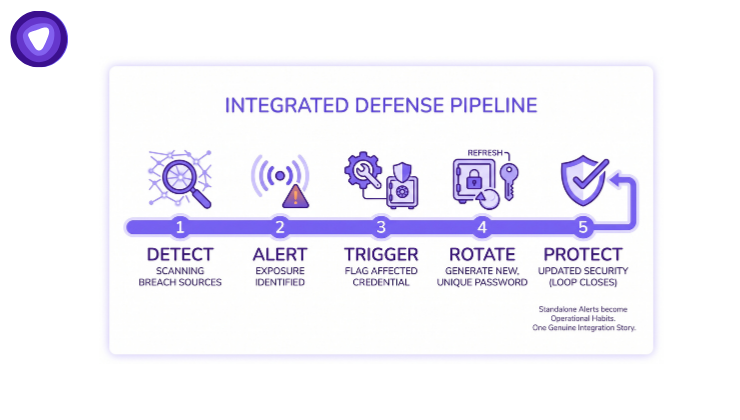
The strongest version of this offering is not two disconnected dashboards. It is a pipeline where detection triggers prevention-layer action.
- Standalone credential monitoring scans breach sources, infostealer logs, and dark web listings for a match tied to the client’s domain or employee identifiers.
- A match generates an alert with the specific exposed identifier and, where available, the associated account.
- The alert routes to the password manager, flagging the affected credential for immediate rotation.
- The password manager generates a new, unique password and updates the stored entry.
- Monitoring continues scanning, closing the loop until the next exposure event.
This sequence turns a standalone alert into an operational habit rather than a one-time notification a client has to act on manually. It also gives a partner a genuine integration story to sell, not just two adjacent products on the same pricing page.
Sequencing: Which to Introduce to a Client First
For a client with no existing coverage, credential monitoring surfaces the problem first: it shows a prospect or existing client concrete evidence of exposed credentials tied to their own domain, which creates urgency a generic password manager pitch does not. The password manager becomes the immediate next step, giving the client a place to act on what monitoring just found.
For a client who already runs a password manager from another provider, credential monitoring is the stronger standalone entry point, since it exposes the identifier-scope gap in whatever they already have. For a client with neither, bundling both from day one avoids the awkward follow-up conversation about why the first product they bought does not cover what the second one does.
The Business Case for MSPs and MSSPs
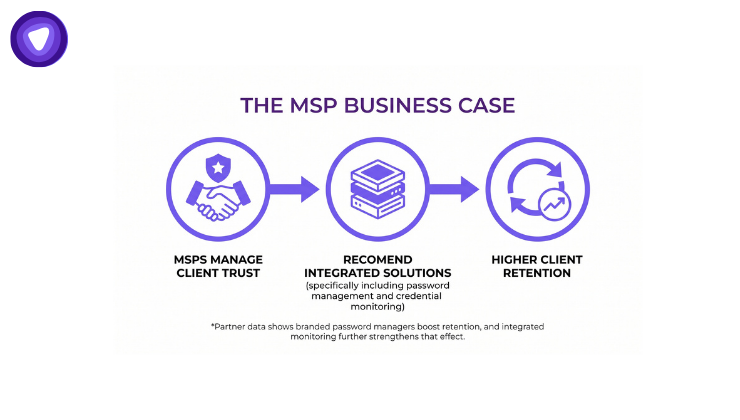
MSPs and MSSPs already manage the client relationship where this sequencing matters most. A client onboarding through an MSP is not evaluating credential monitoring vs white label password manager as two separate research projects. They are trusting the MSP to recommend the right stack, which puts the MSP in a strong position to sell both as one coordinated add-on rather than let a client discover the gap later and blame the MSP for missing it.
PureVPN White Label’s own partner network reports that MSPs and SaaS vendors adopting branded password managers see meaningfully better subscription retention, a figure PureVPN reports as its own partner data rather than third-party audited. That retention effect strengthens further once monitoring sits alongside it, since a client who sees an active alert-to-remediation loop has a harder time treating either product as disposable at renewal time.
What Partners Should Look for in a Combined Offering
Before packaging the two as one recurring service for managed service providers and other resellers, confirm the platform actually connects them rather than shipping two unrelated dashboards under one invoice. The same vendor-accountability standard that applies to a VPN procurement decision applies here too: compliance documentation and audit rights should not be assumed, they should be checked.
- White label branding on both products, not just one
- A single admin console covering monitoring alerts and vault management together
- Automated alert-to-rotation workflow, not a manual export-and-email process
- Multi-tenant administration for managing several clients from one partner account
- Zero-knowledge vault architecture so the provider itself cannot read stored credentials
- API and SDK access deep enough to embed both under the partner’s own product, not just a cosmetic skin
How PureVPN White Label Helps
PureVPN White Label Dark Web Monitoring scans breach sources, infostealer logs, and dark web listings for identifiers tied to a client’s domain, independent of anything stored in a password vault. It is built to catch exactly the exposure category a vault-only alert misses.
PureVPN White Label Password Manager pairs with it as the remediation layer, built on AES-256 encryption and a zero-knowledge architecture so credentials remain unreadable even to PureVPN itself. Partners can offer both under one brand, with full API and SDK access for deeper integration rather than a surface-level reskin, giving a client one coordinated detection-to-remediation experience instead of two disconnected tools.