

- Dark web monitoring only alerts you to exposed data; it does not remove it, since removal requires a separate data broker opt-out service.
- No provider scans the entire dark web, since many forums require invitation or vetting that automated tools cannot pass.
- Alert speed depends on scan method: API-based scanning can notify within hours, while manual-search services may take several days.
- Dark web monitoring, antivirus, and data broker removal each do a distinct job and none substitutes for the other two.
- Dark web monitoring can run as an embedded API feature inside another product, checking identifiers and returning exposure data without in-house scanning infrastructure.
Quick answer: Dark web monitoring is a scanning service that checks breach dumps, criminal marketplaces, and closed forums for exposed emails, passwords, and other personal or business data. It sends an alert when a match appears. It does not remove the data, and it cannot guarantee full coverage of the dark web, since much of it stays closed to automated tools.
A stolen password rarely sits still. Within hours it gets bundled with thousands of others. It gets packaged into a file called a log. Then it gets listed for a few dollars on a marketplace almost nobody outside cybercrime circles ever sees. That gap sits between the moment data leaks and the moment its owner finds out. It is the entire reason dark web monitoring exists.
If you have started researching what is dark web monitoring, you have probably read a dozen definitions already. Most say the same thing. It scans hidden parts of the internet for your information. That much is true. But it skips the parts that actually matter. What gets scanned. What gets missed. How fast an alert actually arrives. Whether monitoring removes anything at all. This guide answers what is dark web monitoring using how the technology is actually built. Not a marketing summary of it.
What Dark Web Monitoring Actually Means
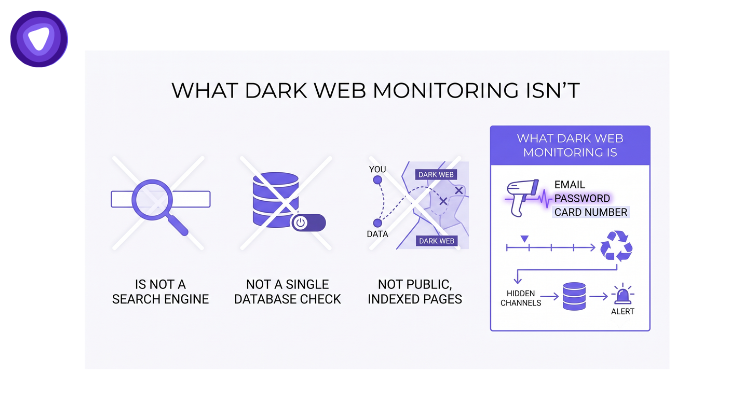
Dark web monitoring is a scanning process. It checks specific, hard to reach corners of the internet for exposed personal or business data. It looks for email addresses, passwords, credit card numbers, and other identifiers inside breach dumps, criminal marketplaces, and closed forums. When a match appears, the system generates an alert.
That is the mechanical answer to what is dark web monitoring. The more useful answer is what the process is not. It is not a search engine. Also, it is not a single database you query once. It is an ongoing check against sources that shift daily. Sometimes hourly, as stolen data gets posted and old listings get pulled or resold.
Understanding what is dark web monitoring also means understanding where the dark web sits in the wider internet. It is a small, deliberately hidden layer. Reaching it requires specialized software such as Tor. Most stolen data does not sit on public, indexed pages. It moves through channels built to stay invisible to normal browsing and to search engines.
Dark Web vs Deep Web vs Surface Web
These three terms get used interchangeably, and that confusion shows up in almost every comparison of monitoring tools.
- Surface web: everything a normal search engine can index and show in results, roughly 5 percent of the internet by most estimates.
- Deep web: pages that exist online but are not indexed, including bank account portals, private cloud drives, and paywalled content. Most of the deep web is mundane, not criminal.
- Dark web: a small, deliberately hidden segment of the deep web that requires specialized software such as Tor or I2P to reach. This is where stolen credentials, breach dumps, and criminal marketplaces actually live.
Dark web monitoring targets that last layer specifically. A tool that only scans public breach databases or paste sites is not fully covering the dark web. That is true even if the tool uses the term in its name.
What Gets Scanned, and What Gets Missed
Dark web monitoring tools do not crawl the dark web the way Google crawls the open internet. There is no central index to query. Coverage depends entirely on which sources a provider has built access to. And how often those sources actually get checked.
Where the Exposed Data Actually Comes From
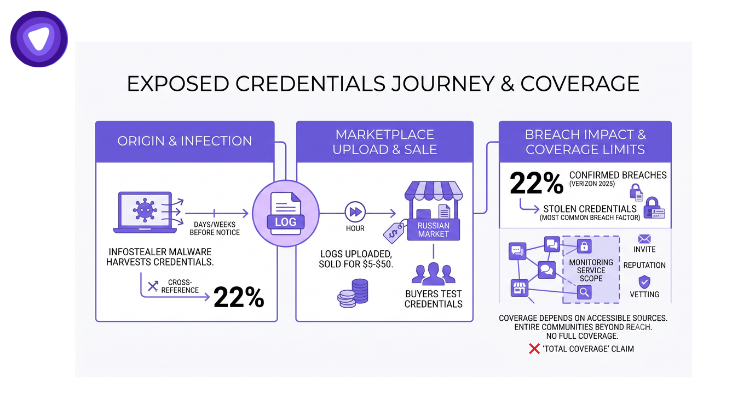
Most exposed credentials do not start on the dark web at all. They start on an infected device, days or weeks before anyone notices.
- Infostealer malware harvests browser-saved passwords, session cookies, and stored logins from an infected machine.
- The stolen file, called a log, gets uploaded to a marketplace such as Russian Market. This often happens within the first hour after infection.
- Individual logs sell for as little as $5 to $50 each, averaging close to $10 per infected machine.
- Buyers test the credentials against live services to confirm which ones still work. Verified access then resells at a markup.
Stolen credentials remain the single most common breach factor. Verizon’s 2025 investigation found stolen credentials were a factor in 22 percent of confirmed breaches. That one figure explains why monitoring for exposed logins sits at the center of most dark web monitoring products today. Exposed logins matter more than exposed documents in most real incidents.
Why No Provider Covers the Whole Dark Web
No monitoring service indexes every corner of the dark web, no matter the price attached to it. Many forums require an invitation, a reputation score, or a vetting conversation. A new member cannot view listings without clearing that bar. Automated scanners cannot pass those checks. Entire communities stay outside the reach of any single tool as a result.
This is the honest limitation most competitor content skips over. A monitoring service can only report what it can actually reach. Broad claims of full or total dark web coverage should be read as marketing language. Not as a technical fact about what any tool can genuinely do.
Alerts and Removal Are Two Different Jobs
One of the most common points of confusion, and one of the questions people ask most often, is simple. Does dark web monitoring remove exposed data, or does it only flag it?
It only flags it. Monitoring is a detection function, not a cleanup function. Once your email or password shows up in a breach dump or a marketplace listing, the tool sends an alert. That gives you a chance to act, typically by changing the password or freezing an account. It does not delete the listing. It cannot force a criminal marketplace to take anything down, and no honest provider claims that it can.
Removing personal data from data broker sites is a separate function entirely. It is usually called a data broker opt-out or removal service. That service submits requests to broker companies asking them to delete a person’s profile from their public databases. It targets legitimate, indexed broker sites, not dark web marketplaces. That is a different problem, with a different fix and a different success rate.
Vendors that bundle both functions under one name are combining two distinct services into a single package. Knowing which one you are actually being sold matters more than the marketing label wrapped around it.
How Fast Do Alerts Actually Arrive
Speed is where providers differ the most. It is rarely explained clearly on a pricing page.
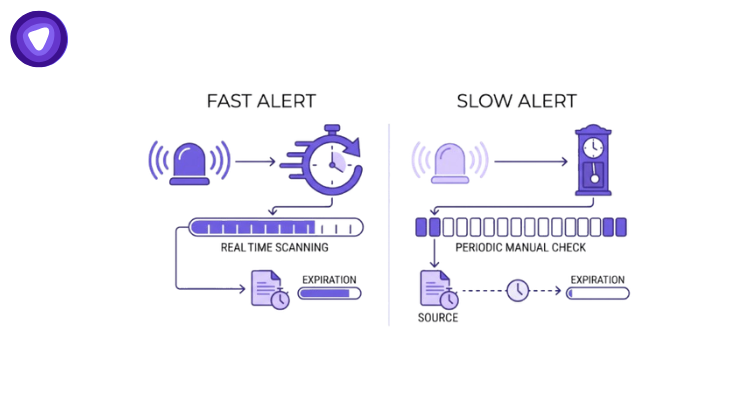
A log listed within 48 hours of infection commands a higher resale price than an older one. That premium exists because session tokens inside the log have not yet expired. This pricing detail matters for a simple reason. The value of stolen data drops fast. The value of an alert about that data drops just as fast. A notification that arrives a week after exposure helps far less than one that arrives within hours of it.
Providers built on API-based scanning can check new listings on an ongoing basis. Their alerts land close to real time, often within the same day a listing appears. Services built around periodic manual searches work differently. An analyst runs checks on a fixed schedule, so new exposures may only surface every few days. Before picking a provider, ask directly how often scans run. Ask how alerts actually get delivered, whether by webhook, email, or a dashboard alone.
Pricing usually follows the same split. Standalone monitoring tools often charge per user, per month, similar to a subscription. Products that embed monitoring as a feature usually pay per monitored identifier instead. One customer account can track several emails or phone numbers at once. That distinction changes the real cost of scaling monitoring across a large customer base. It rarely shows up on a public pricing page.
How to Check If Your Data Is Already Exposed
Before signing up for a paid tool, it helps to know what a basic exposure check actually involves.
- Search your email address in a free public breach-lookup tool to see which known breaches it appears in.
- Check whether you reuse the same password across multiple accounts, since one exposed password compounds the risk everywhere it is reused.
- Look for account activity you do not recognize, such as password reset emails you never requested.
- Turn on multi-factor authentication for email and financial accounts, since it blocks most account takeover attempts even after a password leaks.
- If you manage exposure for a customer base rather than a single account, a free lookup does not scale. That is where continuous, API-based monitoring earns its cost.
Dark Web Monitoring vs Antivirus vs Data Broker Removal
These three categories get grouped together constantly in marketing copy. Each one does an entirely separate job.
| Category | What It Actually Does | What It Does Not Do | When You Get Notified |
| Dark Web Monitoring | Scans breach dumps, marketplaces, and forums for exposed identifiers | Cannot remove or prevent the original data leak | When a matching identifier appears in a new source |
| Antivirus | Blocks and removes malware running on a device | Does not scan external marketplaces for data already stolen | When malicious activity is detected locally |
| Data Broker Removal | Submits opt-out requests to broker sites holding personal profiles | Does not scan the dark web or stop new data collection | When a broker confirms or denies a removal request |
Antivirus protects the device before data ever leaves it. Dark web monitoring checks what happens after data has already left. It works regardless of whether antivirus caught the original infection. Data broker removal cleans up a different category of exposure again. Public-facing broker profiles, rather than criminal marketplace listings. None of the three substitutes for the others. Buying one does not make the other two unnecessary.
Types of Dark Web Monitoring
Not every dark web monitoring product is built for the same buyer. The category splits into two practical tiers, and mixing them up is a common source of disappointment.
Personal and Free-Tier Monitoring
Most consumer tools, including free checks bundled into browsers and antivirus suites, watch a handful of known breach databases. They typically track one email address at a time. Coverage is narrow, and updates usually run on a schedule rather than continuously. This tier suits an individual checking their own exposure, not a business tracking many customers at once.
Business and API-Based Monitoring
Business-grade monitoring tracks many identifiers at once, across a wider source list. Alerts arrive through a webhook or dashboard rather than an email digest. This is the tier product teams, MSPs, and telecom brands actually need. It scales to thousands of accounts without manual lookups.
Running Dark Web Monitoring Inside Another Product
A growing share of people asking what is dark web monitoring are not shopping for a standalone app. They are product teams, MSPs, or platform builders. They are deciding whether to offer this capability inside something they already sell. That beats sending customers to a separate tool entirely.
What an Integration Actually Checks
Technically, this works through an API rather than a consumer dashboard. A partner submits an identifier, typically an email address, phone number, or username. The service returns a consolidated exposure report describing where and how that identifier turned up. Once an identifier is registered, monitoring continues on its own. New exposures trigger a webhook notification instead of requiring a manual recheck from anyone on the partner’s side.
This structure is what separates an embeddable feature from a standalone tool. One lives inside a product; the other needs its own login. It also explains why dark web monitoring has moved from a niche security add-on into a standard line item. It now shows up inside cybersecurity suites, telecom apps, and SaaS products with a security tab of their own.
The economics behind that shift are straightforward. Building this scanning infrastructure from scratch means sourcing breach data feeds and building marketplace access. It also means maintaining match logic against a constantly moving target. Most product and MSP teams find it faster, and cheaper, to plug into an existing API. Building and running that pipeline alone rarely pencils out. That gap is why the white label model around dark web monitoring keeps expanding alongside the underlying threat.
PureVPN White Label Dark Web Monitoring
PureVPN White Label Dark Web Monitoring provides the underlying detection layer through an API. Partners get this without building the scanning infrastructure themselves. Coverage spans 400+ data brokers and 150+ partners worldwide. The infrastructure runs on the architecture described above. That means identifier submission, continuous monitoring, and webhook-based alerts. A partner can offer monitoring under its own brand without operating the scanning pipeline directly.
Those are figures worth confirming with any vendor before committing to a partnership. Certification claims vary widely across this category, dark web monitoring included.
Final Thoughts
Dark web monitoring is not a mystery once the marketing language gets set aside. What is dark web monitoring, in practice, comes down to a small set of facts. It scans specific sources, not the entire internet. It alerts, and it does not remove. Its real usefulness depends on scan frequency and alert speed, not on vague claims of total coverage. Anyone evaluating this category is better served asking about sources, speed, and scope. That applies for personal protection or as a feature to offer customers. It beats asking whether a vendor simply covers the dark web.