

Key Takeaways
- Keep SSO, MFA, and encryption to your app free on every plan, because they protect your own product.
- Charge for protection that reaches beyond your product, such as a device-wide encrypted tunnel or a dedicated IP.
- If your provider bills per active user while you bill per seat, activation rate decides your margin.
- Apple and Google both apply VPN-specific store rules, so check eligibility before you plan the paywall.
- Map every billing event to a network account action, and disable accounts on failed payments instead of deleting them.
Most SaaS teams now chase growth inside the accounts they already have. Benchmarkit’s 2025 benchmark report found that expansion drove 40% of total new ARR for B2B SaaS companies in 2024. The same report found the cost of winning new customers rose 14% that year. Each expansion lever now matters more than it did two years ago.
Network security as a paid feature is one of the few levers backed by demand users already feel. In a July 2025 survey of 1,014 U.S. adults, two in three worried about public Wi-Fi safety. Yet nearly one in four used no protection at all. That gap is revenue your product leaves on the table each month.
There is a catch. Charge for the wrong type of security, and buyers call it a tax. This guide shows which features you can sell and how to price them. It also covers app store rules, billing sync, and the metrics that prove the feature works.
Why Network Security as a Paid Feature Avoids the Security Tax
Buyers have grown loud about paywalled security. Toolradar reviewed the pricing pages of 5,191 tools in its August 2026 report. Of the 1,112 tools that offer single sign-on, 61% put it only in their most expensive tier. Audit logs were top-tier only 68% of the time, and SLA guarantees 75%.
Public lists now track vendors that lock single sign-on behind enterprise tiers. That backlash has a name: the SSO tax.
The backlash does not cover every security feature. It targets controls that protect your own product. Network security as a paid feature sits in a different place, because it protects the user beyond your app.
The Baseline Test
Before a security feature goes behind a paywall, run three checks.
- Product protection: If the feature guards your product’s own data or accounts, ship it on every plan.
- Breach ownership: If a breach without it lands on your company first, treat it as baseline.
- Reach beyond your app: If it guards traffic outside your product, it can carry a price.
SSO, MFA, and encryption at rest fail the paywall test. They guard your platform, so customers expect them by default. An encrypted tunnel for the whole device passes the test. It guards activity your product never touches.
What Belongs on Each Side of the Line
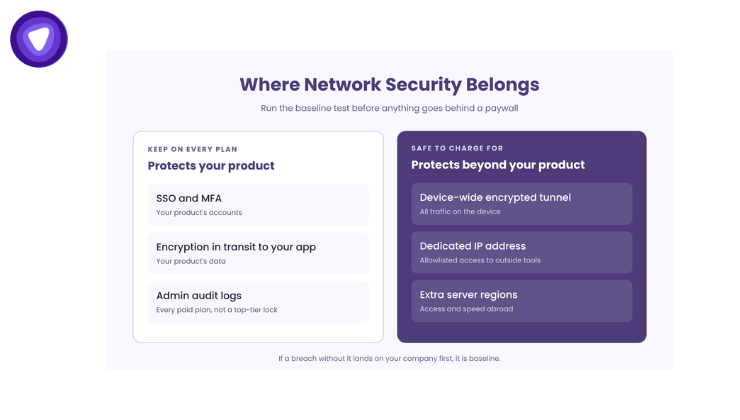
A short table makes the split easy to defend in a pricing review.
| Feature | What It Protects | Where It Belongs |
| SSO and MFA | Your product’s accounts | Every plan |
| Encryption in transit to your app | Your product’s data | Every plan |
| Admin audit logs | Your product’s records | Every paid plan |
| Device-wide encrypted tunnel | All user traffic on the device | Paid add-on or higher tier |
| Dedicated IP address | Allowlisted access to outside tools | Paid add-on |
| Extra server regions | Access and speed abroad | Paid add-on or usage tier |
Clear lines like these protect trust. Users see their core account guarded for free. As a result, the paid tier reads as an extra, not a ransom.
Matching Your Price Unit to Your Cost Unit
Pricing network security as a paid feature starts with units, not sticker prices. Your product may charge per seat, per workspace, or per plan. Usage-based providers bill per monthly active user or per gigabyte. When those units differ, the gap shapes your margin more than the list price does.
The common packaging formats all work: a tier gate, a standalone add-on, or a usage cap. What changes between them is how many paying users turn the feature on.
Illustrative Margin Math
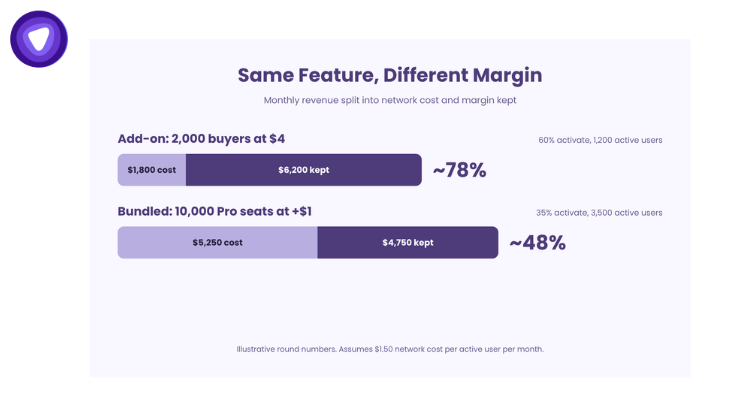
The figures below are illustrative round numbers, not quoted rates from any provider. Assume an infrastructure cost of $1.50 per active user per month.
- Add-on model: 2,000 seats buy a $4 add-on, for $8,000 in monthly revenue. If 60% use it, 1,200 active users cost $1,800. Margin lands near 78%.
- Bundled model: 10,000 Pro seats each pay $1 more per month, for $10,000. If 35% use it, 3,500 active users cost $5,250. Margin falls near 48%.
The bundle earns more total revenue but keeps less of each dollar. Its margin also shrinks as adoption climbs. In contrast, the add-on keeps margin steady, because only buyers create cost.
Which Model Fits Your Product
Each model suits a different usage pattern.
- Add-on: Best when a minority of users travel or work on shared networks.
- Tier gate: Best when the feature strengthens an upgrade story you already sell.
- Usage cap: Best when data volume swings widely between accounts.
Model your activation rate before you choose. Teams that skip this step can raise ARPU on paper while margin erodes underneath.
App Store Rules to Clear Before You Charge
App stores shape how you launch network security as a paid feature on mobile. Both Apple and Google treat VPN features as a special category. Check eligibility before you design the paywall, not after review rejects the build.
Apple
Section 5.4 of Apple’s review guidelines covers VPN apps. It requires VPN services to run through Apple’s own VPN framework. It also limits VPN apps to developers enrolled as an organization, not as individuals.
For most SaaS companies, the organization account already exists. The bigger task is the privacy label. Your label must cover the data the network layer handles, because Apple shows it under your brand.
Google Play
Google Play restricts its Android VPN service policy to apps with VPN as core functionality. A short list of other categories also qualifies, such as device security, enterprise management, and parental control. Every app that uses the service must file a declaration in Play Console.
The policy adds three more conditions:
- Disclosure: Any personal data collection through the service needs a separate, in-app disclosure with affirmative consent.
- Encryption: Traffic from the device to the tunnel endpoint must be encrypted.
- No ad tampering: The service cannot redirect or alter other apps’ traffic for monetization.
If your Android app does not fit a qualifying category, plan a branded companion app for the secure connection. The same paid entitlement can unlock both apps from one account.
Wiring Entitlements So Billing and Access Never Drift
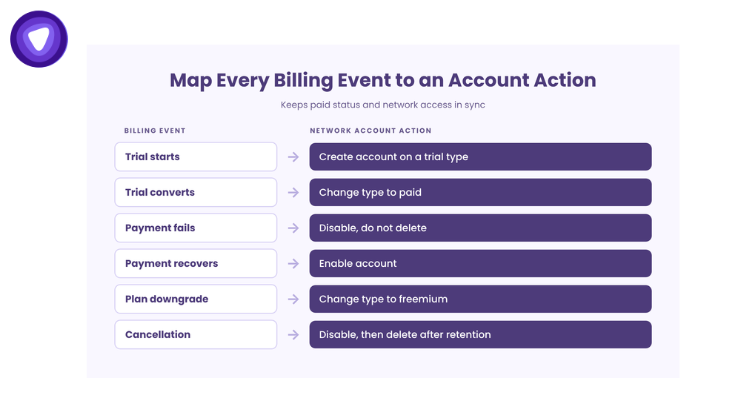
Selling network security as a paid feature fails fast when paid status and access fall out of sync. Drift costs money in both directions. Lapsed users who keep access burn your usage budget. Meanwhile, paying users who lose access flood your support queue.
Provider platforms expose account management calls for this job. Common actions include create, enable, disable, extend expiry, and change subscription type. Map each billing event to one of these calls.
| Billing Event | Network Account Action | Reason |
| Trial starts | Create account on a trial type | Access begins without a charge |
| Trial converts | Change type to paid | Keeps the same credentials |
| Payment fails | Disable, do not delete | Access pauses during recovery |
| Payment recovers | Enable account | Restores access with no new setup |
| Plan downgrade | Change type to freemium | Moves the user to free-tier limits |
| Cancellation | Disable, then delete after retention | Stops usage cost and clears data |
Trials That Convert Without Leaking Cost
A trial should prove value fast and end on schedule. Set a fixed expiry when you create the trial account. If a sales conversation runs long, extend the expiry for that account only. This keeps trial cost bounded and stops forgotten trials from running for months.
Grace Periods and Failed Payments
Do not cut access the moment a card fails. Pause the account after your dunning window ends, not before. Disable keeps the account intact, so a recovered payment restores service in one call. Delete only after your retention period ends.
Seat Changes in Business Accounts
B2B buyers add and remove people often. Tie each network account to a seat, not to a login. When an admin removes a seat, disable that account in the same job. This keeps your active user count, and your bill, aligned with what customers pay for.
Positioning the Feature Where Users Feel the Risk
Network security as a paid feature sells best at moments of real risk. Security.org’s 2025 consumer report found that 37% of VPN users cite safer public Wi-Fi as a reason. It also found that 28% rely on free VPN options despite the risks. Those users already want protection. They simply have not found a version they trust.
Only 8% of adults use a VPN solely for work, down from 13% in 2023. Fewer people get protection through an employer. That leaves room for the products they already use every day.
Show the offer at moments that match real risk:
- A login from a new network or a new country.
- A session on an open Wi-Fi network, where the device reports it.
- A large file sync on mobile data while abroad.
- A workspace invite from an outside domain.
Keep the control simple. An in-app toggle with a clear connected state beats a separate app users must find.
Your pricing page copy matters too. State that account security comes with every plan. Then describe the paid feature as protection for everything else on the device. This framing keeps you clear of the security tax label.
Metrics That Show the Feature Is Working
Revenue alone hides problems with network security as a paid feature. Track a short set of numbers from the first week, and review them monthly.
| Metric | What It Tells You | Warning Sign |
| Attach rate | Share of eligible accounts that buy | Flat after the first 90 days |
| Activation rate | Share of buyers who connect at least once | Buyers who never connect |
| Cost per active user | Your real unit cost | Rising faster than price |
| Margin per buyer | Profit left after network cost | Falling as adoption grows |
| Add-on churn | Buyers who drop the feature | Higher than base plan churn |
| Support tickets per 1,000 users | Setup and connection friction | Spikes after app releases |
Low activation is the most common hidden problem. Buyers who never connect will cancel at renewal. Prompt them at the next risk moment, not with a generic email.
Proof From Partners Who Built It In
Speed to launch matters, since network security as a paid feature earns nothing until it ships. Two anonymized partner testimonials show how fast SaaS teams ship this layer. These are self-reported quotes from partners, not independently audited results.
- An EdTech CTO reported launching a compliant network layer in six weeks, with on-call load cut by 90%.
- A fintech SaaS product leader reported giving 800K users secure network access without an infrastructure hire.
The Samsung partnership shows the same pattern at device scale. The privacy layer runs inside Samsung’s existing Secure Wi-Fi feature, with no second app. The case study text lists no revenue figures, so treat it as proof of the integration model only.
How PureVPN White Label VPN Solution Supports Paid Network Security
PureVPN White Label VPN Solution gives SaaS product teams the network layer behind network security as a paid feature. Usage-based pricing by monthly active user or gigabyte lets cost track adoption, which suits the add-on model above. Its account management calls cover trial, paid, freemium, disable, and enable states, so billing and access stay in sync.
The company reports SDKs for iOS, Android, desktop, and web on its white label VPN pages. It also reports 6,000+ servers and 99.9% uptime. It also lists SOC 2 and GDPR alignment, and these figures are company-reported. Before you sign with any provider, check for hidden scaling costs as your active user count grows.
Conclusion
Network security as a paid feature works when it protects users beyond your product, never your product itself. Keep account security free. Price the tunnel against activation, not seat count. Clear the app store rules first, then wire every billing event to an account action before launch.
Teams that settle these choices early ship a feature buyers see as fair. They also keep margin intact as adoption grows.
Request a 20-minute integration and margin review for your SaaS product.
Frequently Asked Questions
Should SaaS companies charge extra for security features?
Charge only for protection beyond your product, such as a device-wide tunnel, and keep SSO and MFA free.
What is the SSO tax?
The SSO tax is the practice of locking single sign-on behind a SaaS product’s most expensive plans.
How should a SaaS product price a VPN add-on?
Price it against activation-weighted cost, because usage-based providers bill per active user, not per seat.
Can a non-VPN app add a VPN feature on Google Play?
Only qualifying categories, such as device security, may use the VPN service, and each needs a Play Console declaration.
What happens to VPN access when a SaaS payment fails?
Disable the network account after the dunning window, then enable it in one call once payment recovers.