

Quick Answer: An eSIM protects a traveler only on cellular data. Public WiFi protection covers the hotel, airport, and café networks travelers join to save plan data. eSIM brands can add it as a branded VPN layer inside the same app and checkout.
Key Takeaways
- An eSIM protects cellular data only, not the hotel and airport WiFi travelers join.
- Small data plans push travelers onto public WiFi, so they need protection most.
- Four packaging models work: included, checkout add-on, premium tier, or trip pass plus home plan.
- Trigger protection on WiFi only, and reconnect it automatically after hotel login pages.
- Track WiFi coverage rate, not just attach rate, to see whether travelers keep protection on.
An eSIM brand sells a traveler a fixed data allowance. Then the traveler spends much of the trip on hotel WiFi to make that allowance last. Every hour on those networks happens outside the protection the brand sold, and outside its revenue.
The pattern is measurable. In a 2023 survey, 23% of regular public WiFi users said they connect to cut cellular data. A separate 2023 survey of 1,000 US travelers found 45% use unprotected public WiFi abroad. Only 31% of those travelers use VPNs while traveling.
That gap is a product opening. Public WiFi protection lets an eSIM brand cover the networks its plans push travelers toward. It also adds a second line item to every checkout. This guide covers packaging models, design details that decide adoption, and the revenue math behind each choice.
Why Data Plans Push Travelers Onto Public WiFi
Most travel eSIM brands sell data in fixed bundles, such as 3 GB for a week. Travelers ration that data. Free WiFi becomes the default for video calls, photo backups, and app updates.
The sections below explain how plan size shapes WiFi use, and what attackers do with that habit.
The Smaller the Plan, the Bigger the WiFi Gap
A traveler on an unlimited plan has little reason to join hotel WiFi. A traveler on a small plan joins every network available. So the cheapest plans in a catalog often create the most public WiFi exposure.
This matters for pricing teams. Entry-level plans drive volume, and they also drive the riskiest behavior. Public WiFi protection fits these plans best, because the WiFi time is highest there.
What Attackers Do With Travel WiFi
Fake networks are a well-documented threat on travel WiFi. An attacker names a hotspot after the real airport or hotel network. Devices then connect to the stronger signal and send traffic through the attacker.
This is not theory. In 2024, Australian Federal Police charged a man over fake free WiFi at Perth, Melbourne, and Adelaide airports. Police also allege he ran the same scheme on domestic flights.
Login pages on these fake networks ask for an email or social media password. Travelers type them in, because real airport networks often ask for something similar. Public WiFi protection encrypts traffic before it reaches the network, so a fake hotspot sees only scrambled data.
What Public WiFi Protection Covers That an eSIM Does Not
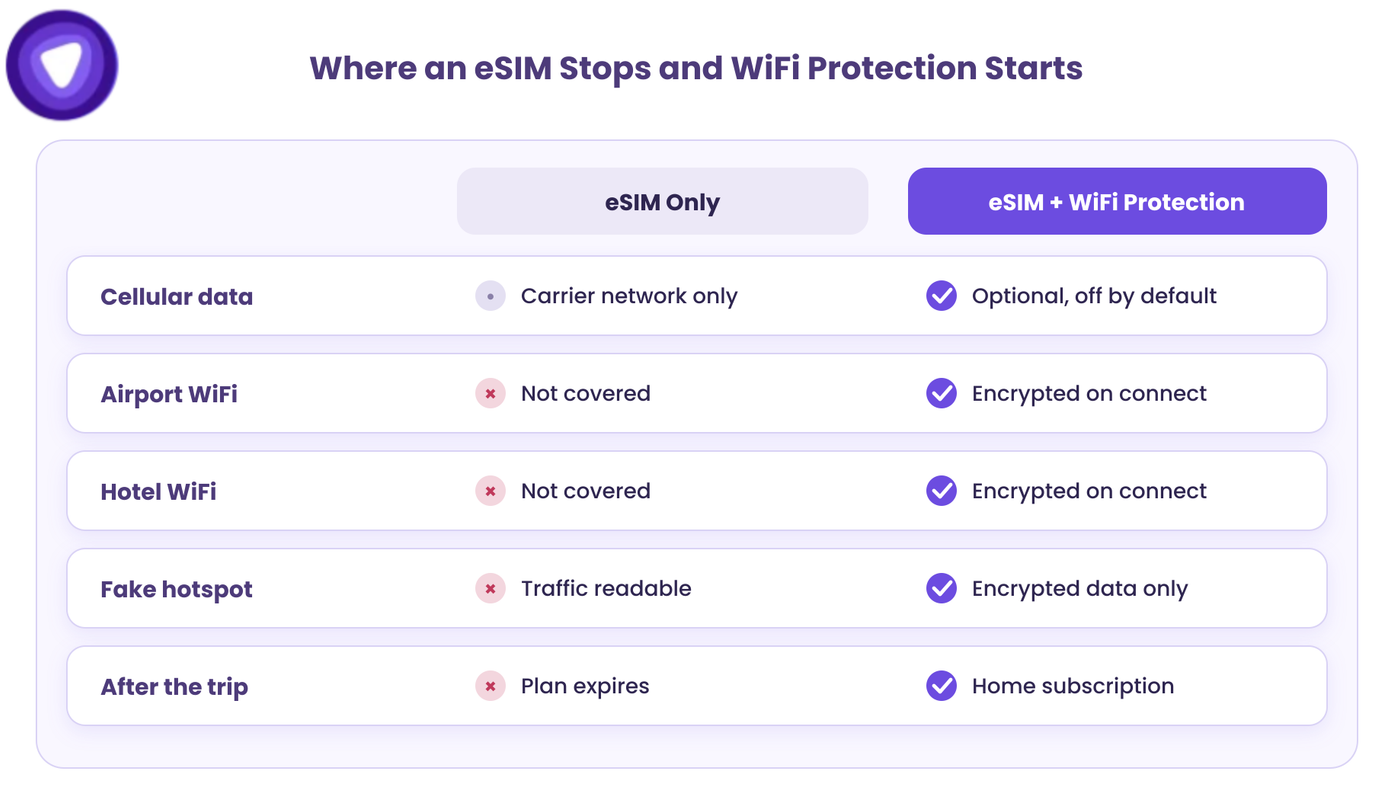
An eSIM and a VPN solve different problems. The eSIM provides a cellular connection on a local or roaming network. A VPN encrypts traffic on any connection, including WiFi. Earlier coverage of eSIM and VPN explains this split in detail.
The table below shows where each layer applies during a typical trip.
| Trip Moment | eSIM Only | eSIM Plus Public WiFi Protection |
|---|---|---|
| Browsing on cellular data | Carrier network, no extra encryption layer | Optional encryption, off by default to save data |
| Airport WiFi at arrival | Not covered | Encrypted on connect |
| Hotel WiFi for video calls | Not covered | Encrypted on connect |
| Fake hotspot with a copied name | Traffic readable by the attacker | Attacker sees encrypted data only |
| Banking app on café WiFi | Relies on the app alone | Two layers of encryption |
| Return home after the trip | Plan expires, relationship ends | Protection can continue as a home subscription |
The pattern is clear. The eSIM covers the network the brand sells. Public WiFi protection covers the networks the brand’s customers actually use.
Four Ways to Add Public WiFi Protection to Data Plans
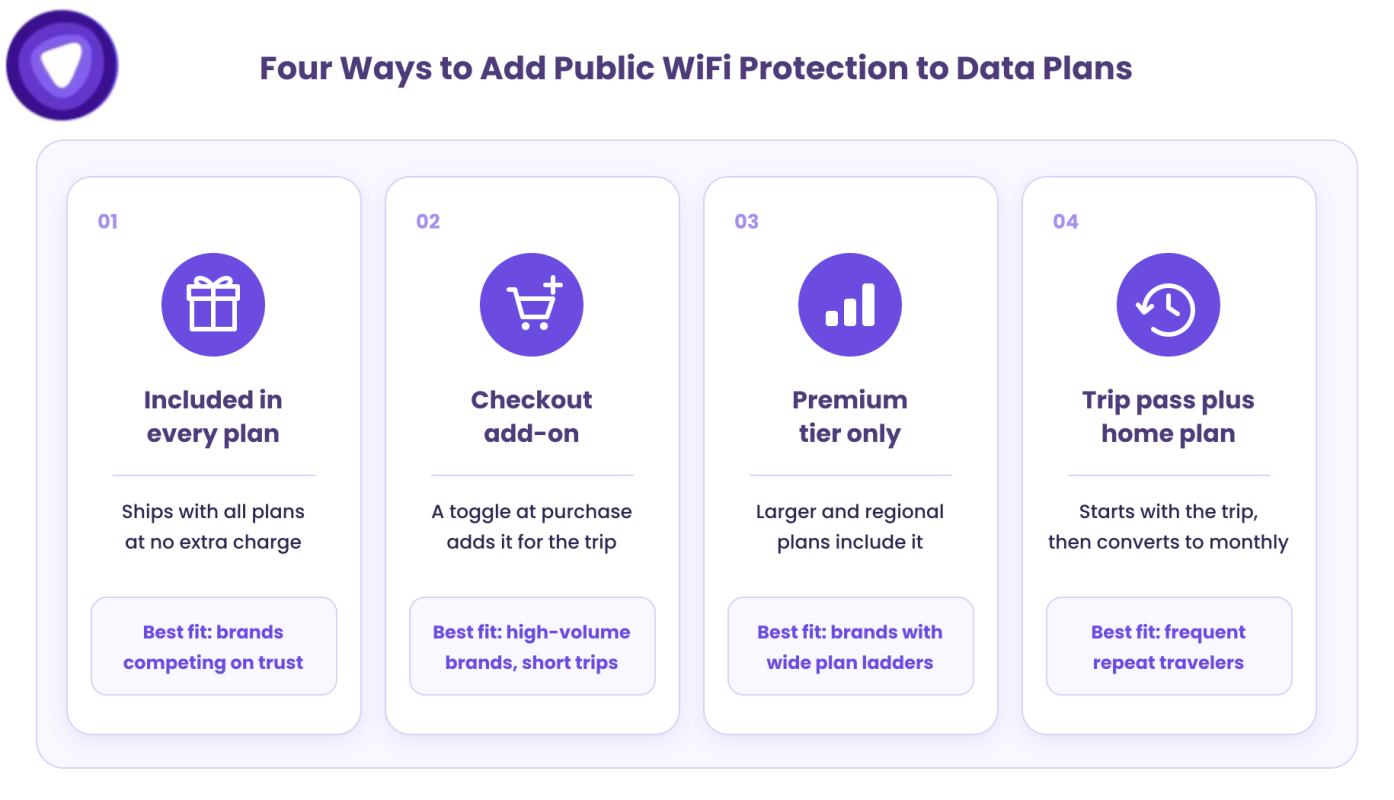
There is no single right package. The right model depends on plan pricing, average trip length, and how often customers return. The four models below cover most eSIM brands.
| Model | How It Works | Revenue Effect | Best Fit |
|---|---|---|---|
| Included in every plan | Protection ships with all plans at no extra charge | Raises plan value, protects price against cheaper rivals | Brands competing on trust, not lowest price |
| Checkout add-on | A toggle at purchase adds protection for the trip length | New line item on each order | High-volume brands with short trips |
| Premium tier only | Larger and regional plans include protection | Pushes buyers up to higher plans | Brands with wide plan ladders |
| Trip pass plus home plan | Protection starts with the trip, then converts to monthly | Recurring revenue between trips | Brands with frequent repeat travelers |
Illustrative Revenue Math
Consider an illustrative eSIM brand that sells 200,000 plans a year. Assume 10% of buyers accept a $3 checkout add-on. That produces 20,000 add-ons and $60,000 in new yearly revenue.
Now assume 15% of those buyers keep a $4 monthly plan for six months after returning home. That adds 3,000 subscribers and $72,000 in extra revenue. These figures are illustrative assumptions, not measured results.
The second number matters more than the first. Checkout add-ons end with the trip. A home plan keeps the brand on the traveler’s phone between trips. Earlier analysis of bundle economics covers the ARPU side in more depth.
Product Design Details That Decide Adoption
Packaging decides whether travelers buy public WiFi protection. Design decides whether they keep it on. Four details split the features travelers use from the ones they turn off on day one.
Trigger Protection on WiFi, Not on Cellular
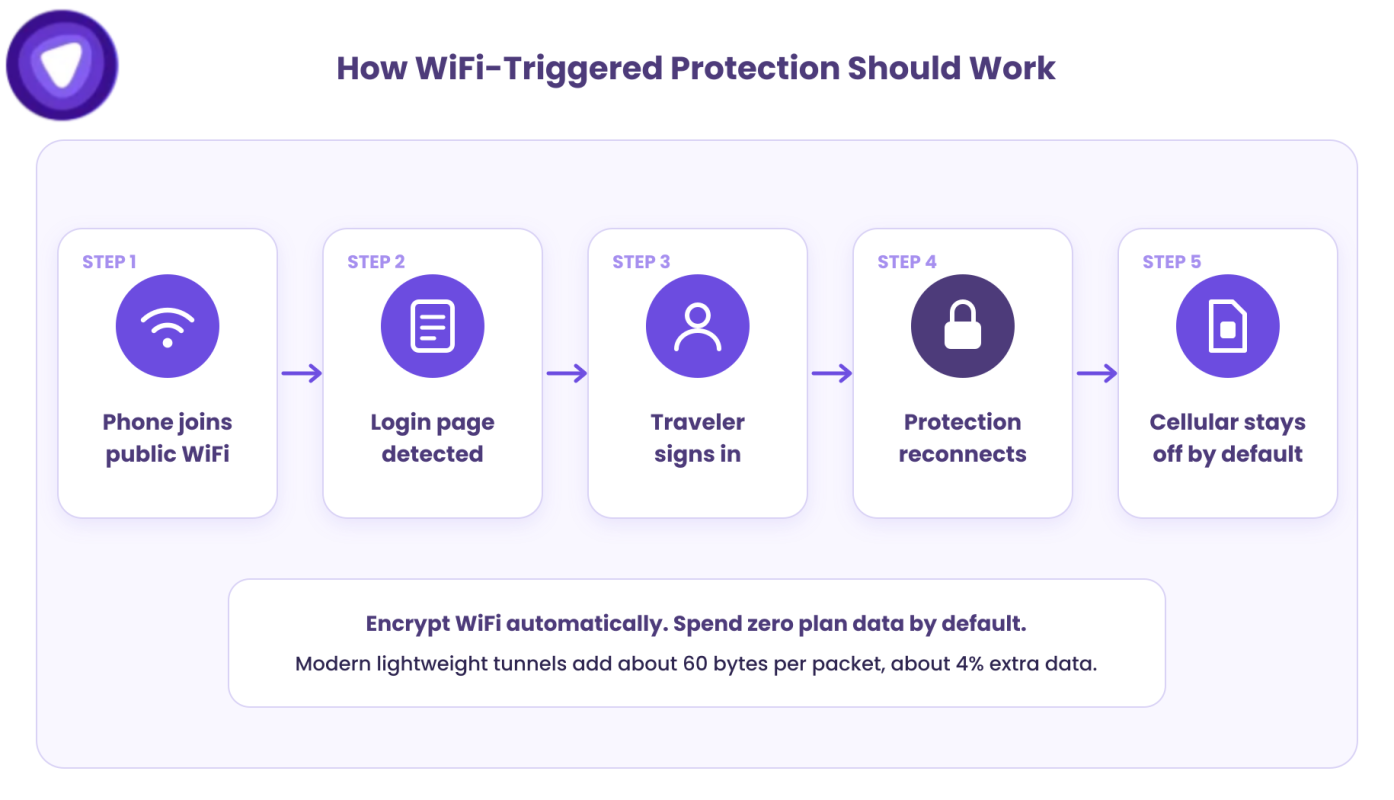
Every VPN adds a small amount of data to each packet. Modern lightweight tunnels add about 60 bytes per packet over standard internet addresses. On a full-size 1,500-byte packet, that is about 4% extra data.
Travelers on small plans notice every megabyte. So the default rule should be simple. Protection switches on automatically when the phone joins WiFi, and stays off on the eSIM’s cellular data. Mobile apps can detect the network type and start the tunnel only on WiFi.
A traveler can still turn on protection for cellular data by hand. The default, however, should use none of the plan.
Handle Hotel and Airport Login Pages
Most hotel and airport networks show a login page before granting internet access. These pages, often called captive portals, block encrypted traffic until the traveler signs in. A VPN that connects too early breaks the login page.
The usual workaround is to turn protection off, then forget to turn it back on. A good product spots the login page, waits for sign-in, then reconnects on its own. This one behavior decides whether public WiFi protection survives the first hotel check-in.
Keep Protection Alive After the Trip Ends
The eSIM plan expires on a fixed date. Public WiFi protection should run on its own schedule. Home WiFi, coffee shops, and gyms carry the same risks as hotel networks.
Separating the two lifecycles turns a trip purchase into a relationship. The traveler keeps the app for the protection, so the brand stays visible when the next trip comes.
Plan for Destinations With VPN Rules
Some destinations restrict or license VPN use. Travelers to restricted regions need protection that still connects on filtered networks. Product teams also need country-level rules for where the feature appears in the app.
The table below summarizes how tunnel choice affects each design goal.
| Design Goal | Recommended Approach | Why It Matters on Travel Plans |
|---|---|---|
| Low data use | WireGuard as the default protocol | About 60 bytes of overhead per packet |
| Stable roaming | IKEv2/IPsec for network switching | Fewer drops between WiFi and cellular |
| Filtered networks | OpenVPN or obfuscated modes | Connects on networks that block newer protocols |
| Login pages | Portal detection with auto-reconnect | Protection stays on after hotel sign-in |
| Battery life | WiFi-only trigger by default | Fewer active tunnel hours per day |
Metrics to Track After Launch
Launch is the start, not the finish. A few numbers show whether public WiFi protection earns its place in the catalog. Track them from the first week.
- Attach rate: the share of plan buyers who add protection at checkout
- WiFi coverage rate: the share of WiFi sessions where protection was on
- Login page recovery: how often protection comes back on after a hotel sign-in
- Post-trip retention: the share of buyers who keep protection after the plan ends
- Repeat purchase rate: how often protected buyers return for the next trip
The WiFi coverage rate deserves the most attention. A high attach rate with low coverage means travelers bought protection but switched it off. That points to a design problem, usually at the hotel login page.
Review these numbers by plan size as well. Small plans should show the highest WiFi use. If they do not, the default trigger rule needs another look.
Why eSIM Brands Should Decide Before Next Travel Season
The travel eSIM market is growing fast, and new sellers keep arriving. Juniper Research projected travel eSIM revenue at $1.8 billion by the end of 2025. That figure is 85% above 2024 revenue of $989 million.
Juniper Research also expected more mobile carriers to launch their own travel eSIMs in 2026. More sellers push data prices down. When data looks the same everywhere, public WiFi protection gives buyers a reason to pick one brand.
Devices are moving the same way. Apple made the iPhone 17 lineup eSIM-only in a dozen countries, including the US, Canada, and Japan. The iPhone Air ships with eSIM only worldwide.
More eSIM-only phones mean more first-time eSIM buyers. Those buyers form brand habits on their first trip. Decide on public WiFi protection before your next plan catalog refresh, not after a rival bundles it first.
Proof: Attaching Protection to an Existing Subscription
The core challenge for eSIM brands is attachment. Protection must ride on a purchase the customer already makes, with no second checkout.
One software company faced this exact problem. It sells more than 40 iOS apps under one auto-renewable subscription. It wanted to add a VPN with public WiFi security without building infrastructure or a second checkout.
The app bundle partner integrated a branded VPN SDK into its existing subscription system. It also added a free tier with a path to the paid bundle. The partner reports these results:
- Subscription sales doubled
- Conversion rate rose 40%
- Acquisition cost fell 56%
- The app holds a 4.7-star rating
These figures come from the partner’s own reporting, not an independent audit. The partner is an app bundle business, not an eSIM brand. The mechanism still transfers directly: protection attached to an existing purchase, under the seller’s own brand.
How PureVPN White Label VPN Solution Supports eSIM Brands
PureVPN White Label VPN Solution lets eSIM brands add public WiFi protection under their own name. Partners use branded apps or SDKs for iOS and Android, plus APIs for provisioning and account lifecycle. PureVPN also works with a large global eSIM platform that provisions VPN access during eSIM activation.
The network spans 6,500+ servers across 80+ countries, per PureVPN’s own reported figures. The infrastructure carries SOC 2 Type II and ISO 27001 certification, plus an independently audited no-log policy. These capabilities serve telecom operators, MVNOs, and eSIM brands through one partner program. Partners keep pricing, billing, and the customer relationship.
Conclusion
Public WiFi protection closes the gap between the network an eSIM brand sells and the networks travelers actually use. Small plans push travelers onto hotel and airport WiFi. Fake hotspots wait on those networks.
The packaging model sets the revenue. The design details decide whether travelers keep protection switched on. Before signing with any provider, work through these questions to ask about protocols, uptime, and branding. A white label VPN lets the brand add public WiFi protection without building servers or apps.
Request a 20-minute revenue and churn-impact review.
Frequently Asked Questions
Is an eSIM safer than public WiFi?
Yes. An eSIM uses a carrier network, but it gives no protection once a traveler joins hotel WiFi.
Do travelers need a VPN if they have an eSIM?
Yes. An eSIM covers cellular data only, so airport and hotel WiFi still need encryption.
Does a VPN use more eSIM data?
Yes. A modern lightweight tunnel adds about 60 bytes per packet, roughly 4% on full packets.
Can an eSIM brand sell a VPN under its own name?
Yes. A white label VPN supplies branded apps or SDKs, while the eSIM brand keeps pricing and customers.
Does a VPN work with hotel WiFi login pages?
Yes. Login page detection waits for sign-in, then reconnects protection automatically.