
Passwords are still the front door to most corporate systems, cloud dashboards, VPNs, servers, databases, SaaS apps, and even developer tools.
And the truth is, most security breaches don’t start with advanced hacking. They start with abused or misused credentials. That’s why security teams today don’t just store passwords securely. They audit every interaction with them.
In this guide, we’ll break down how security teams audit password access using a password manager, what they look for, the tools involved, and why modern password managers have quietly become one of the most powerful security visibility tools.
Why Password Auditing Matters?
Security teams aren’t being overly cautious, they’re responding to how the world actually works today. Remote and hybrid work mean credentials are being used from countless locations and devices, often outside traditional network perimeters.
Cloud-first infrastructure has multiplied login points across SaaS platforms, admin panels, and third-party tools, while shared credentials continue to blur accountability when something goes wrong. On top of that, insider threats, whether accidental or malicious, are far more difficult to spot than external attacks.
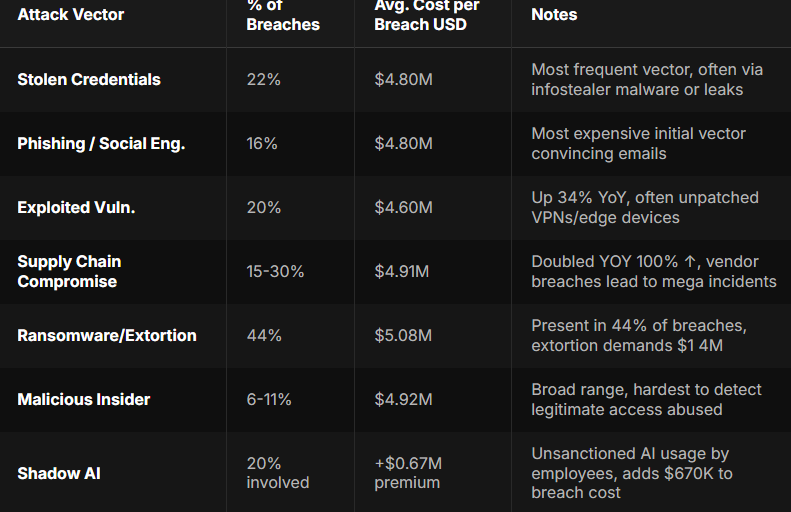
Recent breach analyses consistently show that compromised credentials are still the number one entry point for attackers, surpassing malware and even zero-day exploits. That’s exactly why modern password managers have evolved beyond simple storage tools.
In 2026, they function as full-fledged audit engines, giving security teams the visibility and control they need to detect misuse early, prove compliance, and reduce credential-based risk before it turns into a breach.
What Does Auditing Password Access Mean?
Password auditing isn’t about spying. It’s about visibility and accountability. When security teams audit password access, they’re answering questions like:
- Who accessed a password?
- When was it accessed?
- From which device or location?
- Was it viewed, copied, shared, or used?
- Did that access align with company policy?
A modern password manager makes all of this measurable, without exposing the actual passwords.
How Password Managers Enable Secure Auditing
Let’s break down the key mechanisms security teams rely on.
1. Centralized Password Storage
Before auditing can happen, passwords must live in one controlled environment. Without a password manager:
- Passwords are scattered across browsers, spreadsheets, Slack messages, and memory
- There’s no reliable audit trail
- Revoking access becomes nearly impossible
With a password manager:
- All credentials live in encrypted vaults
- Access flows through one system
- Every action becomes loggable
This centralized design is what allows audits to exist in the first place.
2. Detailed Access Logs and Audit Trails
A well-designed password manager logs events such as:
- Vault access attempts
- Password views
- Password copies
- Password edits
- Password sharing actions
- Failed authentication attempts
Each log entry includes:
- User identity
- Timestamp
- Device type
- IP address or region
- Action performed
These logs let security teams reconstruct exactly what happened during an incident.

3. Role-Based Access Controls (RBAC)
Not everyone should have access to everything, and security teams enforce this using roles. Common role structures
- Admins: full access and policy control
- IT/security teams: audit and monitoring rights
- Employees: limited vault access
- Contractors: time-restricted access
By tying password access to roles, audits become meaningful:
- If a junior employee accesses admin credentials, it’s immediately suspicious
- If a contractor accesses data after contract expiration, alerts fire
RBAC turns audits from passive logs into active security signals.
4. Read-Only and Masked Password Access
One underrated auditing feature is password invisibility. Modern password managers allow:
- Autofill without revealing passwords
- Masked password fields
- Copy restrictions
- View-once access
This means:
- Users can log in
- Passwords are never exposed
- Audits track usage, not secrets
If a password was never visible, it can’t be leaked, and auditors love that.
5. Real-Time Alerts for Suspicious Activity
Audits aren’t just about reviewing history. They’re about early detection. Examples of red-flag events:
- Access from a new country
- Multiple failed vault login attempts
- Password access outside business hours
- Bulk password exports
- Repeated copy actions
When these occur, password managers can trigger instant alerts, force re-authentication, temporarily lock vaults and notify security teams.
6. Integration With SIEM and Security Tools
In larger organizations, password audits don’t live in isolation. Common integrations
- SIEM platforms (Splunk, Sentinel, Elastic)
- Identity providers (SSO, MFA systems)
- Endpoint security tools
- VPN and network logs
When password manager logs feed into SIEM tools:
- Teams can correlate password access with network behavior
- Insider threats become easier to detect
- Incident response becomes faster
That’s how password managers quietly become core security infrastructure.
7. Policy Enforcement and Compliance Audits
Auditing isn’t just about attacks; it’s also about compliance. Policies security teams enforce:
- Minimum password strength
- Mandatory MFA
- Password rotation schedules
- Prohibited reuse
- Restricted sharing
Password managers automatically enforce these policies and generate reports for:
- SOC 2
- ISO 27001
- GDPR
- HIPAA
- Internal audits
Instead of manual checks, compliance becomes continuous and provable.
8. Offboarding and Access Revocation Audits
Employee exits are one of the riskiest moments for credential abuse. How password managers help:
- Instantly revoke vault access
- Rotate shared credentials automatically
- Log post-departure access attempts
Auditors can verify:
- No credentials remained accessible
- No unauthorized access occurred after exit
- Policies were enforced correctly
This alone prevents countless insider incidents.
How PureVPN’s Password Manager Strengthens Security Audits
Today’s security teams need tools that do more than just store passwords; they need solutions that combine strong encryption, clear audit logs, intuitive access controls, and minimal friction for users.
Password managers that integrate seamlessly with VPNs, multi-factor authentication (MFA), and identity management systems help eliminate blind spots, particularly for remote or hybrid teams.
When password access, network security, and identity verification work together, auditing transforms from a tedious compliance task into actionable, real-time security intelligence, giving teams the visibility and control they need to prevent breaches before they happen.
Wrap Up
Security teams don’t audit passwords because they distrust employees. They audit because credentials are powerful, mistakes happen, and threats evolve. A password manager gives teams something they’ve always needed but never had before, which is privacy clarity.
In 2026, the question isn’t whether security teams audit password access, it’s how well they do it! And for organizations serious about protecting users, infrastructure, and trust, password managers are important.
Frequently Asked Questions
No. Properly designed password managers never expose plaintext passwords to admins. Audits track access events, not secrets.
Yes. Audits focus on system access, not personal behavior. They’re essential for compliance, breach prevention, and incident response.
This depends on organizational policy. Many companies retain logs from 90 days to several years for compliance and forensic purposes.
Modern tools are designed to be invisible to users. Autofill, SSO, and background logging keep workflows fast.
No. It should work alongside MFA, VPNs, endpoint security, and identity systems for full coverage.