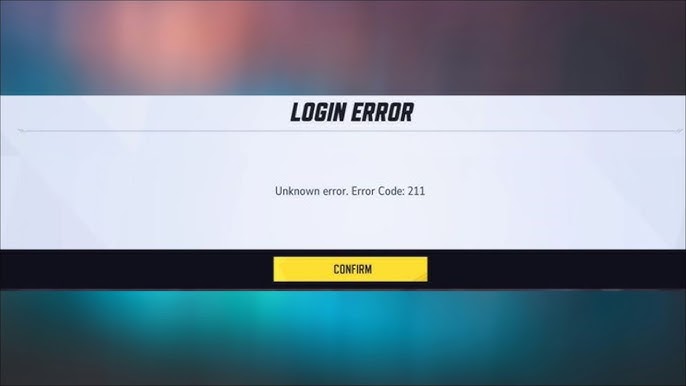
Marvel Rivals Error Code 211 often appears when the game can’t establish a stable connection through the Steam client, leaving players stuck at login or unable to reach the servers. In this guide, we’ll break down what Error Code 211 actually means, why it happens, and reliable fixes reported by players that can help you resolve the issue.

What Is Marvel Rivals Error Code 211?
Marvel Rivals Error Code 211 is a connection-related error that appears when the game fails to communicate properly with its servers through the Steam client. Players usually see it during login or when trying to reach matchmaking, and the error stops the game from progressing any further.
The message itself doesn’t explain what went wrong, which makes the issue frustrating to troubleshoot. However, it simply means the game tried to reach its servers and couldn’t due to either a network problem, temporary server issue, or something on your device blocking the connection.
Causes of Error Code 211 in Marvel Rivals
Error Code 211 doesn’t point to one specific issue, so the root cause can differ from player to player. Here are the most common reasons it appears:
- Temporary server issues or maintenance: When Marvel Rivals’ servers are overloaded or undergoing updates, the login request may not go through. Many players report Error Code 211 appearing only during server-side hiccups.
- Unstable or slow internet connection: If your connection drops, lags, or has high packet loss, the game may time out before reaching the servers. Even brief interruptions can trigger this error during login or matchmaking.
- Firewall or antivirus blocking the game: Security tools sometimes flag online games by mistake and block their network requests. If Marvel Rivals isn’t whitelisted, it may fail to connect the moment it tries to reach the servers.
- Corrupted or incomplete game files: If certain files didn’t install correctly or became damaged after an update, the game may struggle to start its login process. Verifying the game files often resolves this.
- DNS or routing problems: Slow or unreliable DNS services can prevent the game from finding the correct server endpoints. Switching DNS or resetting network settings has helped many players clear the error.
- Outdated game version: Players running an older build sometimes encounter Error 211 after the game updates its servers. Updating Marvel Rivals to the latest version can resolve mismatched client-server communication.
Ways to Fix Error Code 211 on Marvel Rivals
As Error Code 211 signals a failed connection attempt, the solution depends on where that failure occurs. These fixes cover the most frequent points of failure:
Check if Marvel Rivals’ servers are experiencing issues
Error Code 211 often appears during maintenance or server instability. If many players are reporting the same error at the same time, the issue is likely on the server side. In that case, waiting for the servers to stabilize is usually the only fix.
Restart your router to refresh your network connection
A quick router reboot can clear temporary network issues such as packet loss or momentary disconnects, which helps restore a clean connection path to the game’s servers. After the network comes back online, try launching the game again.
Verify Marvel Rivals’ game files through Steam
Corrupted or missing files can cause the game to fail during login. Using Steam’s “verify integrity” tool repairs damaged content and replaces anything incomplete. This fix has resolved Error Code 211 for many players after updates.
Allow Marvel Rivals through your firewall or antivirus
Security software can occasionally block the game’s network requests. Check your firewall or antivirus settings and make sure Marvel Rivals is whitelisted. If the game was being restricted, removing the block should allow it to connect to the servers properly.
Change your DNS to a more reliable provider
Unreliable DNS services can prevent the game from locating its server endpoints. Switching to Google DNS or Cloudflare often improves connection stability. Restart your device after changing DNS settings to apply the update fully.
Update Marvel Rivals to the latest version
Players running an outdated build may experience connection failures if the servers require a newer version. Check for updates in Steam and install them for full compatibility. Once updated, the login process usually completes without errors.
Restart the Steam client or your PC
Temporary launcher glitches can interrupt the game’s connection. Restarting Steam or rebooting your system resets the session and clears minor communication issues. This simple step has resolved Error Code 211 for a number of players.
Frequently Asked Questions
Error 211 indicates that the game was unable to establish a stable connection with its servers during login or matchmaking. It doesn’t specify the exact cause but points to a communication failure somewhere between your device and the game’s servers.
It can be a server issue, especially during maintenance or periods of instability, but not always. The error also appears due to local network problems, blocked connections, or corrupted game files on the player’s side.
Start by checking server status, restarting your router, and verifying your game files in Steam. Whitelisting the game in your firewall, updating the client, switching DNS, or restarting Steam have also helped many players resolve the error.
Reinstalling can help if the error is caused by corrupted or missing game files that verification didn’t repair. However, it won’t fix server outages, network problems, or blocked connections, so it should be tried only after other steps.
If none of the standard fixes work, you can reach support through the game’s in-game feedback menu, the official Marvel Rivals support links on Steam, or the community Discord where moderators provide guidance.

PureVPN

December 24, 2025

3 months ago