Phishing has entered a new era, and it’s powered by artificial intelligence. What used to be easy-to-spot scam emails filled with typos has evolved into highly personalized, grammatically perfect traps that even experienced users struggle to detect. AI-generated phishing emails now achieve click-through rates comparable to human-designed attacks, highly increasing risk.
At the same time, defenders aren’t standing still! Modern password managers have quietly become one of the most effective front-line defenses against credential theft particularly when facing AI-driven phishing campaigns.
In this guide, we’ll break down why AI phishing is more dangerous, how password managers block phishing attempts and how to build a phishing-resistant security stack.
The Rise of AI-Powered Phishing
AI has changed the phishing strategy. Traditional phishing relied heavily on human error. Attackers counted on:
- Poor grammar
- Obvious domain spoofing and
- Generic messaging
AI has erased many of those signals. Security research shows:
- 82% of phishing emails now use AI assistance.
- AI-generated phishing emails achieve ~54% click rates vs. 12% for older campaigns.
- More than 95% of security professionals say LLMs make phishing harder to detect.
Attackers are scaling faster and sounding more human. Humans are struggling to keep up
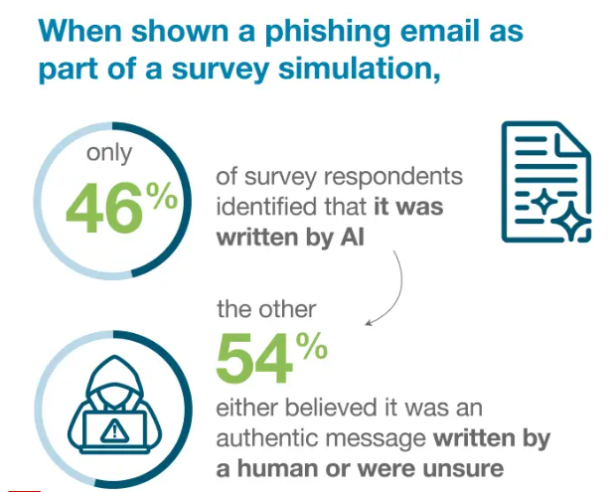
User detection is failing at scale. A global survey found that only 46% of people correctly identified AI phishing emails, highlighting how convincing these attacks have become.
Why AI phishing works so well:
- Perfect grammar and tone
- Personalization at scale
- Context-aware messaging
- Rapid campaign automation
- Polymorphic (constantly changing) templates
This is exactly where password managers are important to use.
Why Password Managers Are a Powerful Anti-Phishing Tool
Most people think password managers are just digital vaults, but security professionals know better.
Their real superpower is origin-bound credential protection, meaning they only release your login details to the correct website. When configured properly, password managers act like an automated phishing detector running silently in your browser.
How Password Managers Block AI Phishing Attacks
Password managers are really helpful to prevent AI phishing attacks:
1. Domain Matching (The #1 Defense)
This is the most important protection. Modern password managers:
- Store the exact domain where credentials were created
- Compare the current site’s URL
- Refuse to autofill on mismatches
Why this works
AI phishing emails often send victims to look-alike domains:
- paypaI.com (capital i)
- secure-bank-login[.]net
- microsoft-verify[.]co
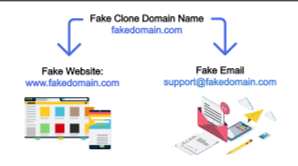
Even highly convincing pages fail the domain check. Recent product updates in the industry show managers now explicitly warn users when a saved login doesn’t match the site URL, preventing silent credential leaks. AI can fake language, but it can’t easily fake domain ownership.
2. Autofill Friction (Preventing Credential Leakage)
Well-designed password managers do not automatically fill credentials everywhere.
Instead, they require:
- User interaction
- Exact domain match
- Form field validation
This creates security friction, which is good. Research simulations show teams using AI-enhanced password managers can recover compromised credentials in under 7 minutes in 94% of cases, far faster than browser-only setups. That speed matters when phishing slips through.
3. Unique Password Generation (Containing Breach Fallout)
AI phishing often succeeds because users reuse passwords. Password managers solve this structurally by generating:
- Long
- random
- unique credentials
Even if one site is compromised:
- Attackers cannot reuse credentials elsewhere
- Credential stuffing fails
- Lateral movement is blocked
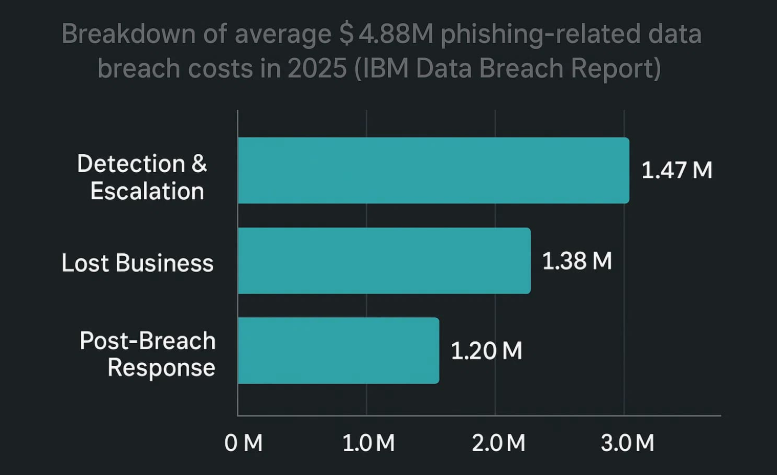
Given that phishing remains a top initial breach vector with rising costs nearing $4.88 million per incident, containment is critical.
4. Credential Monitoring and Breach Alerts
Modern password managers increasingly include:
- Dark web monitoring
- Breach detection
- Password health dashboards
- Automated rotation workflows
This turns phishing from a silent failure into a visible, actionable event. Password managers exist to make compromise observable and reversible, not just memorable.
5. Anti-Phishing Warnings and Smart Detection
The newest generation of password managers is adding AI of its own. Capabilities now include:
- Suspicious domain alerts
- Look-alike URL detection
- Risk scoring
- Browser extension warnings
Industry moves show vendors actively deploying pop-up alerts when users visit phishing sites, an important usability improvement. This is the beginning of AI vs. AI in credential security.
Building a Phishing-Resistant Security Stack in 2026
Password managers are foundational, but here’s what you need to do. Here’s what modern protection looks like.
Use Phishing-Resistant MFA
Prioritize hardware security keys, passkeys, and FIDO2 authentication. These stop many credential-harvesting attacks entirely.
Enable Browser Isolation (When Possible)
Browser-based phishing has grown significantly year over year. Isolation reduces exposure to:
- Malicious scripts
- Form injection
- Session hijacking
Monitor Identity Signals Continuously
Remember: 90% of breaches involve identity weaknesses, according to recent incident response analysis. Watch for:
- Impossible travel
- Device anomalies
- Risky sign-ins
Why Network Privacy Still Matters Alongside Password Managers
Even perfect credential hygiene doesn’t protect:
- Your IP address
- Your browsing metadata
- Your network exposure
- Your session traffic
AI-driven phishing campaigns increasingly combine credential theft with traffic analysis and tracking. That’s why many security-focused users pair a password manager with encrypted network protection.
A privacy-first VPN adds important layers such as:
- Encrypted tunnel protection on public Wi-Fi
- Reduced ISP visibility
- Protection against session interception
- Safer remote access environments
PureVPN password manager, along with VPN encryption, is designed to work together, helping you secure both identity and connection without adding friction.
Best Practices to Maximize Password Protection
Although using a password manager keeps you intact with privacy, you must:
- Turn off automatic blind autofill, and require manual confirmation where possible.
- Always verify the domain before login, even with autofill protections.
- Use unique passwords everywhere, and let the manager generate them.
- Enable dark web monitoring, catch breaches early.
- Pair with MFA or passkeys to reduce phishing success.
- Keep extensions updated; many vulnerabilities get patched quickly.
Wrap Up
AI has fundamentally changed phishing. Human detection alone is no longer reliable.
Password managers are crucial for automated protection, enforcing domain checks, preventing credential reuse, and turning silent compromises into visible events.
When used correctly and combined with modern privacy protections, password managers remain one of the most effective ways to stay ahead of AI-powered phishing.
Frequently Asked Questions
No, but they reduce success rates. They are effective against credential harvesting pages, look-alike domains, and mass phishing campaigns. However, user behavior still matters.
Built-in browser managers are better than nothing but lack advanced phishing detection, security alerts, cross-platform controls, and enterprise visibility. Dedicated managers generally provide stronger protection.
Yes, particularly through domain matching. Even highly personalized AI phishing emails usually redirect to fake domains, which managers can detect.
No. Modern best practice is to use a password manager, phishing-resistant MFA, endpoint protection, network encryption, and user awareness training. Layering controls is what you need in the AI era.
Yes, when properly configured and updated, password manager is the most effective strategy against password hacking and AI phishing attacks.