
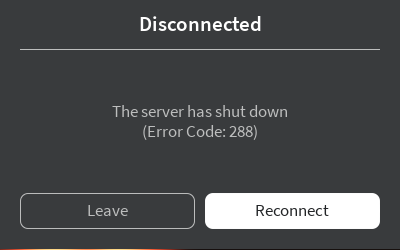
Roblox Error Code 288 usually shows up without warning, cutting you out of a game with a message saying the server has shut down. It can feel confusing at first, especially if everything on your end seems to be working normally.
The error actually has nothing to do with your device, internet, or Roblox app. It’s triggered entirely on the server side, meaning the game you were in either restarted, crashed, or was closed by the developer. Learn what the error means, why it happens, and how you can get back into the game quickly.
What Is Roblox Error Code 288?
Roblox Error Code 288 appears when the server you were playing on shuts down. It isn’t caused by your device or internet, and it doesn’t point to a problem with the Roblox app. The error only shows up because the server you joined is no longer running.
There are several reasons why servers shut down, such as updates, restarts, or unexpected crashes. Since the issue happens on the server side, the only way to continue playing is to join another active server.
What Causes Error Code 288 on Roblox?
Roblox Error Code 288 only appears when something causes the server you’re playing on to shut down. Here are the most common reasons why it happens:
- Server restarts during updates: Developers restart servers when pushing new updates or making changes, which ends active sessions and triggers Error 288.
- Unexpected server crashes: Bugs, script issues, or overload can cause a server to crash, disconnecting all players with this error.
- Developer-initiated shutdowns: Some games shut down servers on purpose to reset sessions or roll out fixes, leading to Error 288.
- Roblox closing unstable servers: In some cases, Roblox shuts down servers that become unstable or unresponsive, producing the same error.
Related Read: How to Fix Error Code 403 on Roblox
How to Fix Roblox Error Code 288
Roblox Error Code 288 can’t be fixed by restarting your device or changing network settings, because the issue comes from the game server itself. Here’s what you can do:
Rejoin the game in a new server
Error 288 shows up because the server you were on is no longer running, so rejoining a fresh server is the fastest way to continue playing. The previous session cannot be restored once it shuts down. Joining a different instance immediately fixes the error for most players.
Wait if developers are pushing an update
Some games shut down all servers temporarily when developers release new updates or patches. If you keep getting Error 288 across all servers, the game may be in the middle of a restart cycle. Waiting a short time before reconnecting usually resolves the issue.
Check Roblox server status
If multiple games show Error 288 at once, Roblox may be restarting or cycling servers globally. Checking the official Roblox status page helps confirm whether the platform is experiencing server-side issues. In these cases, the error clears once Roblox stabilizes the affected servers.
Avoid unstable private servers
Private or community-hosted servers are more likely to crash due to script errors or limited resources. If Error 288 is happening repeatedly on a specific private server, switching to an official or public server can prevent further interruptions.
Report recurring shutdowns
If Error 288 keeps appearing in one particular game, it may indicate a bug or server-side performance issue. Reporting the shutdowns to the developers gives them the information needed to investigate crashes or unstable server behavior and push a patch to resolve it.
Can You Prevent Error Code 288 on Roblox?
Roblox Error Code 288 can’t be prevented on the player side because it occurs when the game server shuts down. Your device, internet connection, or Roblox settings have no impact on when a server restarts or crashes.
The only way to avoid repeated interruptions is to join more stable servers or wait for developers to finish updates or maintenance. If one specific game shows the error often, reporting it to the developer is the only meaningful step.
Frequently Asked Questions
Error Code 288 appears when the server you were playing on shuts down. It isn’t caused by your device or internet because the game server itself has stopped running. To continue, you’ll need to join a different, active server.
The error lasts only as long as the affected server is offline. Once developers finish updates, restart the game, or replace crashed servers with new ones, you can rejoin. In most cases, it clears quickly by joining another server.
Yes. Private or community-hosted servers are more likely to shut down due to script issues, limited resources, or crashes. If Error 288 happens repeatedly in a private server, switching to an official or public server can help avoid interruptions.
Final Word
Roblox Error Code 288 is a server-side issue, so nothing on your device causes it or can prevent it. Once the server shuts down, the only option is to join another active session or wait for developers to finish updates or fix crashes.

PureVPN

December 11, 2025

3 months ago


