
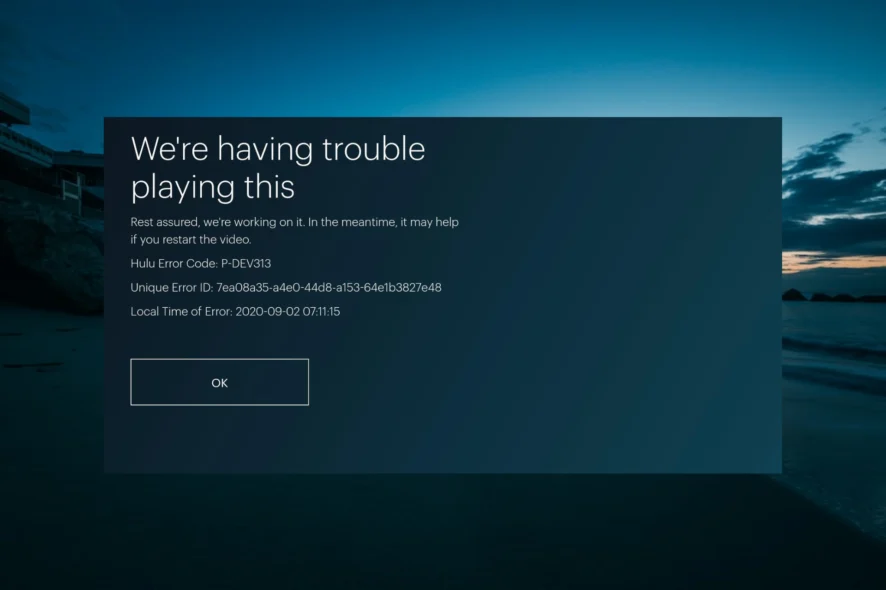
Error code P-DEV320 usually appears when the app can’t communicate properly with Hulu’s servers. It shows up during live TV, on-demand titles, or even when navigating menus, and it can happen on any device that supports the Hulu app.
Fortunately, this error is almost always related to a network, app, or temporary server issue, meaning you can solve it with a few quick steps. Find out how to fix Hulu error code P-DEV320 in our guide below.

Table of Contents
What is Hulu error code P-DEV320?
In simple terms, it’s a playback and communication error that appears when the Hulu app fails to receive the data it needs from Hulu’s servers. Instead of loading a show or refreshing content, the app returns this code because something is interrupting that connection.
You may also see similar variations like P-DEV318 or P-DEV322, which point to the same underlying issue. The error can appear on any device like smart TVs, Roku, Fire TV, mobile phones, or even browsers and usually indicates a temporary problem with the app, your network, or Hulu’s own servers.
What causes Hulu error code P-DEV320?
A few different issues can lead to Hulu error code P-DEV320, and most are easy to fix. Here’s what typically causes it:
- Network or internet problems: Slow speeds, unstable Wi-Fi, high latency, or temporary disconnects can stop the Hulu app from sending or receiving the data it needs, leading to P-DEV320.
- Outdated Hulu app: Older app versions might fail to communicate with Hulu’s servers correctly. If your device hasn’t updated the app in a while, the error is more likely to appear.
- Hulu service outage or server-side issues: If Hulu’s servers are down or experiencing a temporary problem, the app may show P-DEV320 across all devices until the service is restored.
- Corrupted app cache or data: Damaged temporary files can disrupt playback requests, account syncing, or server communication, triggering P-DEV320.
- Device communication conflicts: Occasional software glitches, firmware bugs, or OS-level issues can break the connection between your device and Hulu’s servers.
How to fix Hulu error code P-DEV320
Now that you know what causes the Hulu error code P-DEV320, here are some fixes that usually resolve it:
Check your internet connection
A weak or unstable internet connection is one of the most common triggers of P-DEV320. Run a speed test and make sure you’re getting at least 3–5 Mbps for standard streaming or 8–16 Mbps for HD. If speeds are fluctuating, try switching to the 5 GHz band, moving closer to the router, or disconnecting other devices that may be using bandwidth.
Restart your device
Temporary software glitches can break the connection between your device and Hulu’s servers. Restarting clears cached processes, refreshes your system memory, and reboots the Hulu app from scratch. Power off your device completely for 30 seconds and then reopen Hulu to see if the error clears.
Restart your router or modem
Network interruptions, packet loss, or outdated routing tables can cause server communication errors. Unplug your modem/router for 20–30 seconds, plug it back in, and wait for a full reconnection. This resets your network session and often restores Hulu’s ability to reach its servers.
Update the Hulu app
Outdated app versions may fail to communicate with Hulu’s servers properly, especially after new service updates. Go to your device’s app store, check for Hulu updates, and install the latest version. This ensures you’re using the current playback engine and API calls needed to avoid P-DEV errors.
Clear the Hulu app cache or data
Corrupted cache files can interfere with video requests, account syncing, and general playback. Clearing the app’s cache forces Hulu to rebuild fresh data files. On devices like Fire TV, Android, and some smart TVs, you can clear both cache and app data. On others, reinstalling the app has the same effect.
Check if Hulu is down
Sometimes the issue isn’t on your end at all. If Hulu’s servers are experiencing an outage, you’ll see P-DEV320 across all your devices. Visit Hulu’s official support page or a service checker like DownDetector to confirm. If an outage is confirmed, you’ll need to wait for Hulu to restore service.
Log out of Hulu and log back in
Your session token may expire or fail to refresh, which can trigger the P-DEV320 family of errors. Logging out forces Hulu to regenerate your account session and refresh authorization details. Sign out of Hulu on all devices, then sign back in and attempt streaming again.
Try streaming on another device
Switch to a different device like your phone, laptop, or another TV to see if the problem persists. If Hulu works elsewhere, the issue is device-specific and likely tied to software, cache, or firmware, not your Hulu account or network.
Update your device software or firmware
Outdated OS versions can trigger app instability or prevent Hulu from communicating with servers. Check for system updates on your device whether it’s Roku, Fire TV, a smart TV, or a mobile device, and install any available updates before trying Hulu again.
Temporarily disable your VPN or proxy
Some proxies or older VPN protocols can interfere with Hulu’s ability to verify your location or account status. Temporarily disable them to check if the error clears. If using PureVPN, switch to WireGuard to avoid conflicts.
Reinstall the Hulu app
If none of the above steps work, a full reinstall removes every corrupted or outdated file tied to the app. Delete Hulu, restart your device, and install it again from your app store. This is one of the most effective final fixes for persistent P-DEV320 issues.
When to contact Hulu support
If you’ve tried every fix and the P-DEV320 error keeps returning, the issue may be on Hulu’s side rather than yours. Here’s when it’s worth reaching out to Hulu support:
- The error appears on every device you own: If P-DEV320 shows up on your TV, phone, laptop, and tablet, the problem is likely tied to your Hulu account or Hulu’s servers, not your setup.
- Hulu works on other networks but not your home Wi-Fi: If the app works fine on mobile data or a different Wi-Fi connection, Hulu may need to refresh your account session or help diagnose a network-related conflict.
- Your account has billing or subscription issues: Payment failures, expired subscriptions, or region restrictions can sometimes trigger server communication errors like P-DEV320.
- Hulu confirms a service issue or outage: If Hulu is experiencing a partial outage, you may keep seeing P-DEV320 until they resolve it. Contacting support can help confirm the timeline.
- None of the standard troubleshooting steps work: If the error persists after restarting devices, reinstalling the app, clearing cache, checking internet speeds, and updating software, Hulu support will need to investigate on their end.
Final word
Hulu error code P-DEV320 is usually easy to fix once you narrow down what’s causing the interruption. Most of the time, updating the app, checking your connection, or clearing the cache is enough to get streaming working again. And if the error shows up across every device, Hulu support can quickly confirm whether there’s an account or service issue behind it.

PureVPN

December 1, 2025

4 months ago


