
A man-in-the-middle (MITM) attack is when someone quietly slips between you and the website, app, or service you’re using. You might be logging into your email or checking your bank account, and everything looks normal, even though someone else is watching or altering the data being sent.
These attacks don’t break into your device but rather take advantage of how data moves across networks, especially on unsecured or poorly protected connections. In this guide, we’ll break down what a man-in-the-middle attack is, how it works, and what you can do to keep your data and devices safe.
What is a man-in-the-middle attack?
A MITM attack, also called an on-path attack, occurs when a hacker secretly inserts themselves between two communicating parties, such as a client and a server. Once the attacker is in the middle, they can silently access the data being exchanged.
Your online traffic no longer travels directly, meaning it’s routed through the attacker first. That gives them the ability to see transmitted data such as passwords, payment information, or messages, and in some cases even modify it.
Cybercriminals use this attack to steal sensitive data to commit financial fraud, support social engineering scams, or spread malware. Victims are often unaware that their connection is compromised until the damage is already done.
How does a MITM attack work?
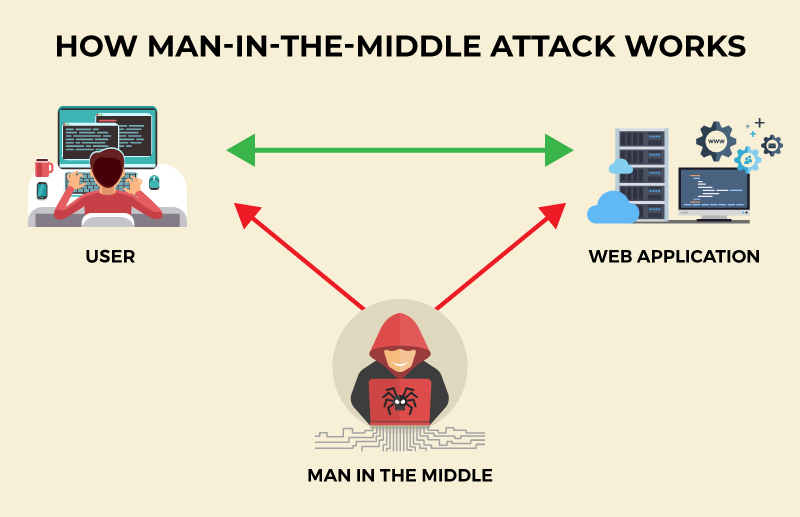
Here’s how a man-in-the-middle attack typically unfolds:
Stage #1: Interception
The first step is getting between the victim and the network. Attackers usually target unsecured or poorly protected connections, such as public Wi-Fi. Using techniques like ARP spoofing or DNS spoofing, they can quietly redirect traffic so it passes through them instead of going straight to its destination.
Stage #2: Decryption
Once traffic is flowing through the attacker, the next step is to make the data readable. If the connection isn’t encrypted, this is easy. However, if it uses encryption (HTTPS), attackers may use techniques such as SSL stripping to weaken the connection and expose sensitive information in plain text.
Stage #3: Eavesdropping and manipulation
With access to the data stream, the attacker can monitor what’s being sent, including login details, financial information, and other personal data. They may also change that data in transit, which can be used to redirect users to fake websites, alter transactions, or inject malicious content like malware.
Common types of man-in-the-middle attacks
Not all man-in-the-middle attacks work the same way. While the goal is always to intercept data, how attackers position themselves inside a connection differs. Here are the top MITM variants you need to know about:
HTTPS spoofing
HTTPS spoofers create a fake version of a legitimate website using an HTTP connection instead of HTTPS. Victims are often led to this fake site via phishing emails or malicious ads. The page looks identical to the real one, so users enter their sensitive data without realizing the connection is no longer protected, allowing the attacker to capture everything in plain text.
IP spoofing
Hackers change the source IP address of network packets so they appear to come from a trusted device or server. That tricks systems and users into accepting the connection as legitimate, even though the attacker is actually in control. Once in place, the attacker can intercept data or inject malicious traffic without being noticed.
Email hijacking
Email hijacking works by intercepting login credentials or session data for an email account. Once they gain access, they can read private conversations or reset passwords for other services. This is often used for business email compromise scams to alter payment instructions or send fake invoices that appear to come from a trusted colleague or vendor.
DNS spoofing
DNS spoofing attacks redirect users away from legitimate websites by corrupting how domain names are resolved. Even if you type in the correct website address, the DNS system sends you to a fake version controlled by the attacker. These fake sites are often designed to look identical to the real ones, making it easy to steal credentials, payment details, and more.
SSL stripping
SSL stripping attacks target websites that normally use encryption. When a user tries to connect to a secure HTTPS page, the attacker intercepts the request and silently switches the connection to HTTP instead. The browser still loads the page, but without encryption, meaning anything typed into forms like passwords or card numbers can be read and recorded.
ARP spoofing
ARP spoofing attacks manipulate how devices on a local network identify each other. The attacker sends false ARP messages to convince devices that their machine is the network’s gateway or another trusted system. As a result, traffic is silently redirected through the attacker, allowing them to monitor or modify data without disrupting the connection.
Session hijacking
Session hijacking occurs when attackers steal session tokens or cookies that prove a user is logged in. With these tokens, the attacker can take over an active session without needing a password. This allows them to access accounts, make changes, or perform transactions while appearing to be the legitimate user.
Related Read: What is Session Hijacking and How to Prevent It
Replay attacks
Cybercriminals capture valid login or transaction data and send it again later to impersonate the user or repeat an action. Given the data was originally legitimate, systems may accept it a second time, allowing attackers to duplicate payments, gain unauthorized access, or perform actions as the victim even after they’ve logged out.
Evil twin attacks
An evil twin attack involves setting up a fake Wi-Fi hotspot that looks like a legitimate public network, such as one in a café, airport, or hotel. When users connect, their internet traffic flows through the attacker’s device, giving them full visibility into browsing activity and the ability to intercept login credentials, messages, and financial data.
Signs of a man-in-the-middle attack
These red flags don’t always mean a MITM attack is happening, but when several appear together, it’s a strong indication that a connection may have been compromised:
- Frequent security warnings or certificate errors when visiting websites you normally trust.
- Web addresses switching from HTTPS to HTTP or missing the padlock icon in your browser.
- Being logged out of accounts unexpectedly or seeing login alerts you don’t recognize.
- Duplicate transactions or unexplained charges on bank or payment accounts.
- Strange redirects that send you to unfamiliar or look-alike websites.
- Unusual Wi-Fi behavior like sudden disconnects or repeated requests to reconnect.
- Emails or messages sent from your accounts that you didn’t write or authorize.
- Pop-ups or warnings asking you to re-enter passwords or payment details.
Examples of MITM attacks
MITM attacks have been used in real incidents that affected millions of users and organizations around the world. Let’s take a look at some of them:
DigiNotar certificate authority breach (2011)
Hackers broke into the Dutch certificate authority DigiNotar and issued fraudulent SSL certificates for sites like Google and Facebook. These certificates were then used in MITM attacks to spy on users, by making fake websites appear secure.
NSA QUANTUM attacks (2013)
Leaked documents revealed that the NSA used a system called QUANTUM to inject fake responses into internet traffic. These responses redirected users to FoxAcid servers, allowing encrypted communications to be intercepted and exploited through MITM-style attacks.
Superfish adware on Lenovo laptops (2015)
Lenovo shipped some laptops with Superfish adware that installed its own trusted certificate and intercepted HTTPS traffic to inject ads, which also created a serious man-in-the-middle vulnerability that attackers could exploit.
How to prevent man-in-the-middle attacks
MITM attacks can lead to consequences like identity theft and financial fraud. The following methods help reduce your risk of becoming a victim:
Use a VPN on public and shared networks
A VPN encrypts your internet traffic and routes it through a secure tunnel, preventing attackers on the same Wi-Fi network from seeing or altering what you send. If you use public hotspots in cafés, airports, hotels, and coworking spaces, always use a VPN as MITM attacks are most likely to occur in these places.
Always check for HTTPS and valid certificates
Websites that use HTTPS encrypt the data exchanged between your browser and the server. Before entering login details or payment information, make sure the site shows a valid security certificate and the padlock icon in the address bar. If the certificate is missing or looks wrong, the connection may be compromised.
Don’t connect to unknown or suspicious Wi-Fi
Fake or malicious Wi-Fi hotspots are a common way attackers carry out MITM attacks. Stick to networks you trust, and be cautious of open networks with generic names or no password, especially in public places where attackers can easily set up look-alike hotspots.
Keep your devices and software up to date
Operating system updates, browser patches, and app updates often include fixes for security flaws that attackers use to intercept traffic. Keeping everything updated helps close the gaps that MITM attacks depend on to get into a connection.
Add extra security layers to your accounts
Multi-factor authentication, strong passwords, and password managers make it harder for attackers to take over accounts even if some data is intercepted. These layers limit the damage MITM attacks can do if login details are exposed.
Be cautious with links, downloads, and pop-ups
Phishing links, fake updates, and unexpected pop-ups are often used to redirect users into MITM traps. Only download software from official sources, avoid clicking suspicious links, and be wary of any request to re-enter passwords or payment details.
Secure your router and network
Use strong Wi-Fi encryption, change default router passwords, and keep firmware updated to protect your local network from ARP spoofing and other MITM techniques. A properly secured router makes it much harder for attackers to position themselves inside your traffic.
Final word
Man-in-the-middle attacks happen when someone messes with the path your data takes online. They’re easy to miss, but simple habits like using a VPN on public Wi-Fi, checking for secure connections, and keeping your devices updated make a real difference.

Arsalan Rashid

January 16, 2026

2 months ago


