
If you just walked out of a cafe and unknowingly carried a tracking device someone slipped into your backpack. You go home, commute, and travel, and the person watching knows your every move. How would you react?
Apple’s AirTags seem like a simple, smart solution for forgetful moments, helping you track down lost keys or misplaced bags. But it could lead to a privacy risk called AirTag stalking.
We’ll discuss what AirTags are, how they work, and how this handy tech is being misused. Plus, why you should prioritize your privacy to stay safe.
What is an AirTag?
An Apple AirTag is a small, button-sized tracking device designed to help you locate lost items. It works seamlessly with Apple, using the “Find My” network to pinpoint the location of your belongings, working like a digital tracker for real-world objects.
How Does an AirTag Work?
AirTags uses Bluetooth and Apple’s Find My network to communicate with nearby Apple devices. When an AirTag is out of your phone’s range, it sends anonymous signals that nearby iPhones, iPads, or Macs can detect. These devices then relay the AirTag’s location back to you.
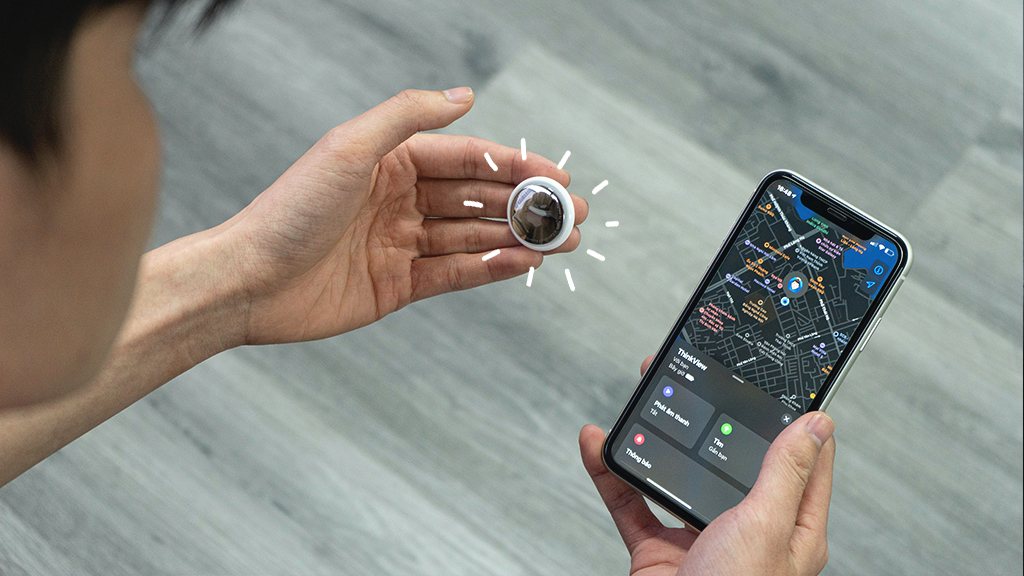
Apple’s massive device network and system allow real-time updates even when you’re far from the AirTag, making it ideal for tracking lost or stolen items.
What is AirTag Stalking?
AirTag stalking happens when someone places an AirTag on a person or in their belongings without permission to secretly track their movements. Because AirTags are small and affordable, they can be misused by bad actors to monitor your location covertly.
The stalking has raised serious safety and privacy concerns, particularly among women and marginalized groups.

How Can You Know If You’re Being AirTag Stalked?
Apple has built several features into the iPhone to help you detect if an AirTag is secretly following you. Here’s how:
1. Phone Notifications (iPhone)
If you’re using an iPhone, Apple will automatically notify you if an unknown AirTag appears to be traveling with you and is away from its owner’s device. This will trigger an “AirTag Detected Near You” alert, which can be a key warning sign of stalking.
To ensure these notifications are enabled, check the following settings:
1.Enable Find My iPhone
- Go to Settings
- Privacy & Security
- Location Services
- System Services
- Turn on Find My iPhone.
2. Turn On Significant Locations
In the same menu, ensure Significant Locations is enabled.

3. Enable Bluetooth
Go to Settings > Bluetooth and make sure it’s turned on.
4. Allow Tracking Notifications
- Open the Find My app
- Tap Me
- Customize Tracking Notifications
- Enable Allow Notifications.
2. AirTag Sound Alerts
When separated from their owner for a certain period, AirTags are designed to emit a chime. If you receive an iPhone alert, you can also manually play a sound on the suspicious AirTag to help locate it.
Here’s how:
- Tap the alert on your iPhone.
- Select Continue, then choose Play Sound.
- Follow the sound to locate the AirTag. You can replay it as many times as needed.

3. Manual Scanning With Your Smartphone
If you haven’t received any notifications but suspect you’re being tracked, you can manually scan for AirTags within Bluetooth range (~50 feet or 15 meters).
On iPhone:
- Open the Find My app and go to the Items tab.
- Look for messages like “Items Detected With You” or “Unknown Item Found”.
- Tap on the notification and follow the steps to find and disable the AirTag.
On Android:
- Install and open Apple’s Tracker Detect app (available on the Google Play Store).
- Alternatively, go to Settings > Safety and Emergency > Unknown Tracker Alerts > Tap Scan Now.
- If a tracker is found, the app will guide you through locating and disabling it.
Android scans must be performed manually as they won’t automatically alert you to unknown AirTags.
4. Conduct a Physical Search
If your phone indicates an unknown AirTag, or you just have a strong suspicion, do a thorough physical check of your belongings and surroundings. AirTags are small and can be hidden in common or overlooked spots, such as clothing, bags, luggage, vehicles and personal items, such as Purses, laptop cases, or even shoeboxes could be hiding spots.
If you find an AirTag and it doesn’t belong to you, follow Apple’s instructions to disable it and consider contacting law enforcement, especially if you suspect malicious intent.
What to Do If You Detect a ‘Lost’ AirTag Near You?
If you receive a warning or find a suspicious AirTag, take the following steps:
- Don’t panic, it might be a genuine mistake.
- Tap the notification or scan the tag using NFC or Tracker Detect to see its serial number.
- Check your belongings, bags, pockets, car compartments.
- Disable the AirTag by removing the battery (twist the back counterclockwise).
- Report the incident to local law enforcement and provide the serial number for investigation.
What Can You Track with an AirTag?
AirTags are designed for personal item tracking, not people. You can track:
- Keys and wallets: Slip in your wallets or key holders.
- Luggage: Attach to suitcases while traveling.
- Pets: Clip to a collar (though Apple doesn’t officially recommend it).
- Backpacks and bags: Perfect for school, work, or travel.
- Bicycles and vehicles: Hidden tags can help retrieve stolen items.

AirTag Features and Specs
Let’s look at the core specifications that make AirTags so effective:
| Feature | Details |
| Size | 1.26 inches in diameter, weighs 11 grams |
| Battery | CR2032 coin battery, replaceable |
| Battery Life | Up to 1 year |
| Water Resistance | IP67 rated (up to 1 meter for 30 minutes) |
| Connectivity | Bluetooth LE + U1 chip (UWB for precision tracking) |
| Compatibility | iPhone 6s or later, iOS 14.5+ |
Setting Up an AirTag: A Step-by-Step Guide
Setting up an AirTag is simple and takes less than a minute:
- Unbox and pull the tab to activate the battery.
- Hold your iPhone near it, and a pop-up will appear.
- Tap Connect.
- Choose a preset name or create a custom one (e.g., “Purse”).

- Assign it to your Apple ID.
- Done! Now track the item via the Find My app.
AirTag Privacy and Security Features
Apple has integrated several privacy safeguards into the AirTag system:
- Rotating Bluetooth identifiers: AirTags frequently change their Bluetooth signal to prevent tracking over time.
- End-to-end encryption: Location data is anonymous and encrypted.
- Sound alerts: Separated AirTags will play a chime after 8–24 hours.
- “Found Moving With You” notification: Alerts users to unfamiliar tags following them.
While these measures are proactive, they’re not foolproof, especially if you are an Android user.
Can Android Users Detect AirTags?
Yes, but it could be less integrated. Apple released the Tracker Detect app on the Play Store, so that Android users can scan for unknown AirTags. But,
- It requires manual scans, meaning you must actively check.
- There are no automatic notifications like on iPhones.
- The effectiveness is limited, especially if the person being tracked is unaware of the threat.
How to Disable or Remove an AirTag
To disable a suspicious AirTag:
- Twist the stainless steel back counterclockwise to open it.
- Remove the CR2032 battery.
- This cuts off its ability to track.
- If it’s not yours, avoid pairing or tampering too much and report it to law enforcement.
To remove it from your Apple ID (if it’s yours):
- Open the Find My app
- Items tab
- Tap the AirTag
- Remove Item
AirTag Notifications: What They Mean
If you know Apple’s AirTag notifications well, you could stay safe and act in time and prevent stalking and accidental loss.
| Notification | Meaning | Action |
| AirTag Found Moving With You | An unknown AirTag is traveling with you | Check for hidden tags |
| Safety Alert | You’re near an AirTag that doesn’t belong to you | Use Find My to locate it |
| Left Behind | You’ve left an item behind | Go retrieve it |
Legal and Ethical Concerns Around AirTag Use
Using AirTags without consent to track someone is a violation of privacy laws in many countries.
Legal implications may include:
- Harassment or stalking charges
- Civil lawsuits for emotional distress
- Violation of wiretapping or surveillance laws
Ethically, the use of AirTags must be informed. Tracking employees, partners, or children without transparency can have severe consequences, both legally and morally.
Alternatives to Apple AirTags
Several brands offer similar item-tracking solutions, each with pros and cons:
| Brand | Pros | Cons |
| Tile | Works with both iOS & Android, a wider variety of form factors | No UWB for precision |
| Samsung SmartTag | Deep integration with Samsung Galaxy devices | Android-only |
| Chipolo ONE | Loud alerts, water-resistant, eco-friendly | Less precise than AirTag |
| Eufy SmartTrack | Apple Find My compatible, good battery life | Limited availability |
AirTag Use in Travel and Airports
AirTags are becoming popular for tracking checked luggage due to frequent airport delays and baggage mishandling. You can use it smartly:
- Place AirTags inside your suitcase liner or pocket.
- Ensure TSA-compliant placement (don’t hide in restricted areas).
- Use multiple tags for larger luggage sets.
- Monitor baggage movement during layovers and delays.
Airlines usually allow AirTags, and their low-energy Bluetooth emissions fall well within FAA and TSA regulations.
AirTag Battery Replacement: How and When
AirTags uses a standard CR2032 coin-cell battery, available in most stores. When your iPhone notifies you of a low battery:
- Twist open the AirTag’s back.
- Remove and replace the battery.
- Close it by aligning the metal cover and twisting it clockwise.

Batteries generally last about a year with regular usage.
How Accurate is AirTag Location Tracking?
The accuracy of AirTags depends on the technology in use:
- Bluetooth-only mode provides a general location (within ~30 feet).
- Ultra-Wideband (UWB) via the U1 chip gives precise, directional tracking — only available on newer iPhones (iPhone 11+).
- Indoor interference, walls, and lack of nearby Apple devices may impact accuracy.
For urban areas with many Apple users, AirTags are surprisingly precise.
How Reliable is Apple AirTag?
Apple’s AirTag is a smart tool to help you track lost items, but it has now become a privacy concern. AirTag-related stalking incidents surged in 2024, highlighting how easily this technology can be misused.
While AirTags were marketed as harmless Bluetooth trackers, their precise tracking capabilities quickly made them a tool of choice for stalkers and abusers. Real-life tragedies, including fatal stalking, are on the rise.
Despite Apple’s updates, such as sound alerts and iOS notifications, these developments can be bypassed.
Android users have historically had limited protection, relying on manual scans, though efforts like the Apple-Google joint initiative aim to address this gap with a cross-platform tracker detection standard.
Frequently Asked Questions
Yes, but Apple’s security features will alert you if an unknown AirTag is moving with you if you’re using an iPhone.
No. It is illegal to track someone without their consent in most jurisdictions and can lead to criminal charges.
AirTags have a Bluetooth range of about 30–50 feet for nearby tracking. For longer distances, they rely on Apple’s Find My network, which uses other Apple devices to relay location. This means tracking can work globally, as long as the AirTag is near any active Apple device.
Between 8 to 24 hours, depending on Apple’s algorithms and device interactions.
Yes, many pet owners use AirTag-compatible collars, but it’s not officially supported by Apple.
Final Thoughts
AirTags are powerful tools for item tracking but come with serious privacy implications. While Apple has taken steps to prevent misuse, no system is completely secure. Whether you use an AirTag or simply want to stay safe from unwanted tracking, understanding how they work, and how to detect them, is key.

Arsalan Rashid

June 17, 2025

9 months ago


