Buying a residential proxy with a credit card is the most straightforward way to get started. It’s secure, familiar, and instantly processes your payment so you can move straight to setup without the hassle of crypto or bank transfers. A residential proxy routes your traffic through real ISP-assigned IPs, letting you appear as a genuine user from another region.
With PureVPN’s Residential Network add-on, you can get verified residential IPs from the US and UK to manage multiple social media accounts without blocks, browse with improved anonymity, and access region-locked content more reliably. In this guide, we’ll show you how to buy a residential proxy with a credit card from anywhere in the world:

Benefits of Using a Credit Card to Buy a Residential Proxy
Here are some reasons why buying a residential proxy with a credit card is a smart decision:
- Instant and hassle-free payments: Credit card payments process within seconds, so you can move from checkout to setup without waiting for manual confirmations or external wallet approvals.
- Extra layer of security: Major card networks such as Visa and Mastercard use advanced fraud protection, encryption, and verification systems to keep every transaction safe.
- Works in most countries: Credit cards are accepted across the world making it easy to purchase PureVPN’s Residential Network from anywhere, whether you’re at home or traveling abroad.
- Easier refunds and tracking: Using a credit card keeps your purchase record simple. You can easily track payments, request refunds, or manage renewals through your bank if needed.
- No Hidden Fees or Conversions: Unlike crypto or wire transfers, card payments show exact amounts upfront, so you know exactly what you’re paying before you hit the “Pay with Credit Card” button.
How to Buy a Residential Proxy with Credit Card: Step-by-Step Guide
Buying PureVPN’s Residential Network using your credit card only takes a few minutes. Follow these simple steps to complete your purchase:
Step #1: Visit the Residential Network page
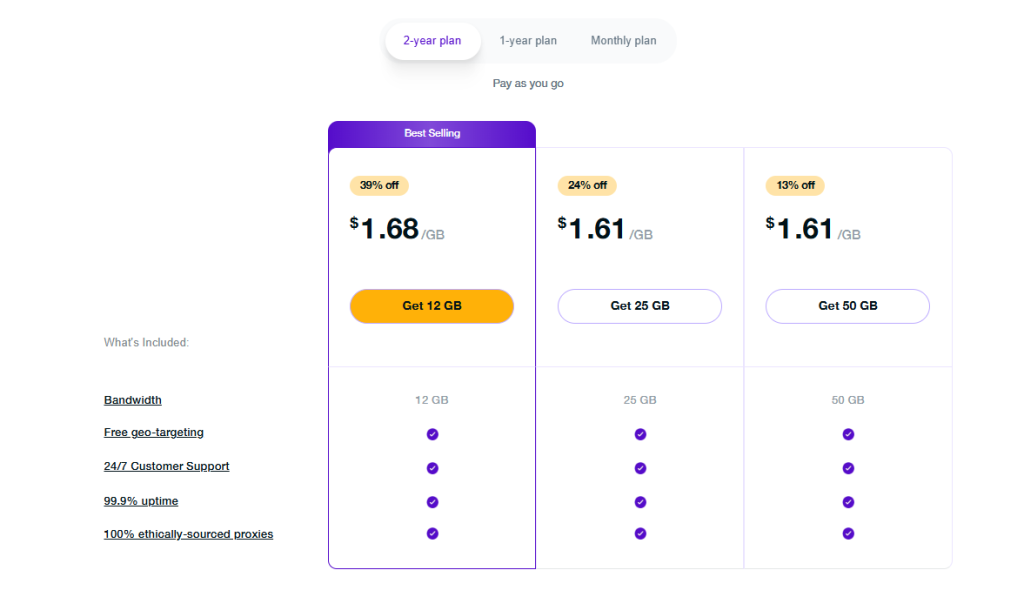
You’ll see all available bandwidth packages and plan durations listed on the Residential Network page. Choose the duration and data package that best fit your needs before proceeding to checkout.
Step #2: Enter Your Account Details
Next, enter your email address and set up a password to create your PureVPN account. If you’re already a user, simply log into the Member Area and add Residential Network to your existing account.

Step #3: Select Credit Card as Payment Method
On the payment screen, choose Credit Card from the list of available methods. PureVPN supports major providers like Visa, Mastercard, American Express, and Discover. Make sure to enter your card details carefully.

Step #4: Complete Your Checkout
Review your order summary to confirm the selected plan duration and bandwidth package. Once you’re ready, click the “Pay with Credit Card” button. The payment processes instantly, and your Residential Network access activates right away.
Why Choose PureVPN’s Residential Network?
Many users prefer PureVPN’s Residential Network add-on for their residential proxy needs because it offers:
Huge US & UK IP Pool
Get access to thousands of verified residential IPs from the US and UK. Every IP comes from a legitimate ISP, giving you consistent performance and a genuine online presence .
Automatic IP Rotation
Switch automatically between multiple residential IPs to reduce detection and prevent websites from flagging repeated activity from a single address.
Seamless Integration
Residential Network is built directly into the PureVPN app, meaning you don’t need to install extra software. Once added to your plan, it activates instantly.
Real User Appearance
Each connection runs through actual household IPs, making your traffic look completely authentic, so you’re seen and treated as a real user.
Frequently Asked Questions
PureVPN’s Residential Network add-on starts at a small additional cost on top of your base VPN plan. Pricing depends on the bandwidth you choose, with flexible packages available for light or heavy usage.
Yes. PureVPN accepts all major credit cards, including Visa, Mastercard, American Express, and Discover.
Yes. Once your payment is confirmed, your Residential Network add-on is activated immediately, and you can start using residential IPs right from the PureVPN app.
Debit cards are also accepted, as long as they’re enabled for international or online transactions. You’ll enjoy the same instant processing and security as with credit cards.
Yes. All payments made to PureVPN are processed through trusted third-party providers that handle transactions securely. PureVPN itself does not store your credit card details, and every checkout takes place over an encrypted connection to protect your information.

PureVPN

October 16, 2025

6 months ago