
Getting frequent calls labelled as “Scam Likely,” “Spam Risk,” or “Suspected Spam” can be extremely frustrating, hearing your phone ring only to realize it’s likely another robocall or scammer isn’t just annoying; it can pose real privacy and safety risks. Fortunately, there are several effective methods to dramatically reduce or even eliminate these unwanted calls.
This guide explains exactly why these calls happen, how scam/spam detection and blocking works, and walks you through how to stop them, whether you use an iPhone or an Android device.
What Are “Scam Likely” Calls, And Why You Get Them
“Scam Likely” calls are typically robocalls, telemarketers, or phone-scam attempts coming through phone carriers or call networks. Many of these calls use Caller ID spoofing or auto-dialing software to mask their identity, often making them appear as a local number.
These calls often rely on the “neighbor spoofing” tactic, the scammer uses a phone number with the same area code (or one close to yours) to make the call appear more legitimate.
Because the spam or scam networks constantly generate new numbers, it’s difficult to rely on blocking individual numbers only, making broader protections necessary if you want to stop “Scam Likely” calls for good.
How to Stop Scam Calls on iPhone
If you use an iPhone, Apple provides several built-in tools to help stop unwanted or “Scam Likely” calls:
- Open Settings → Phone → Silence Unknown Callers.
- Turn on the Silence Unknown Callers feature.
- Calls from numbers not found in your contacts, recent calls, or messages will be silenced and sent directly to voicemail.
If a scam call still appears:
- Open the Phone app → Recents.
- Tap the “i” icon next to the suspicious number.
- Select Block this Caller → Block Contact to prevent future calls from that number.
If you don’t want to silence all unknown callers:
- Install a trusted call-filtering or spam-blocking app from the App Store.
- These apps maintain large, updated spam-number databases to automatically filter or block likely scam calls.
How to Stop Scam Calls on Android Phones
Android phones also include built-in tools for spam detection, call screening, and blocking. Here’s how to use them on most Android devices:
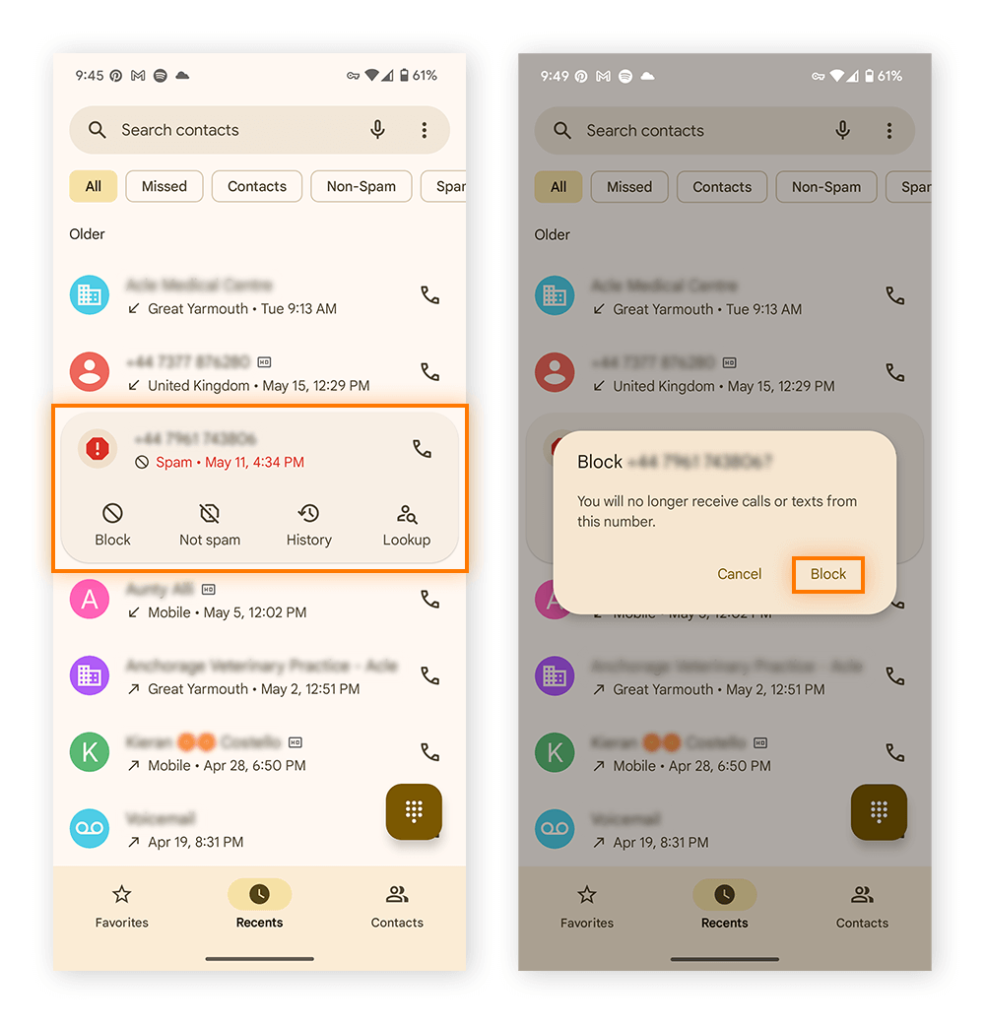
- Open the Phone app → Recents.
- Press and hold the suspicious number.
- Select Block or Block / Report Spam.
- This blocks the number and helps your device identify it as potentially malicious in the future.
To block broader spam:
- In Phone app settings → go to Caller ID & Spam Protection (or similar) → enable Spam call detection or Filter spam calls.
- Some Android phones, like Google Pixel offer automatic screening or call-screen features that detect and block likely scam calls before your phone even rings.
If you prefer more control, you can also use third-party call-blocking apps (see below) which maintain massive global spam-number databases and update in real time.
How to Activate Android’s Built-In Spam Filters
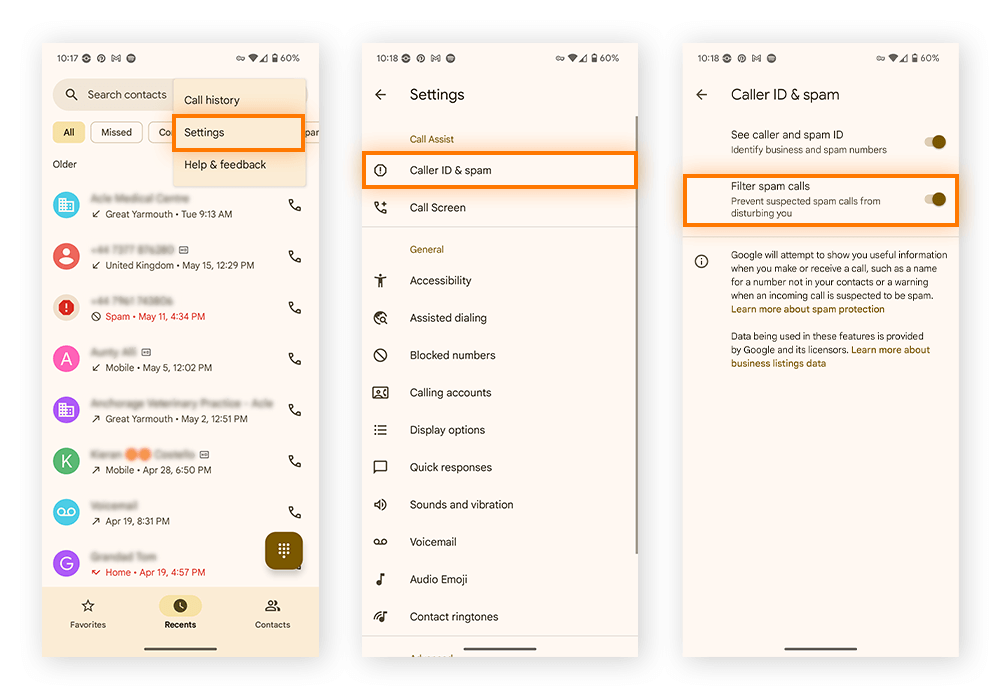
Android devices come with a powerful, built-in spam protection system designed to detect and block “Scam Likely” calls before they ever reach you. Instead of manually blocking suspicious numbers one by one, enabling Android’s spam filters allows your phone to automatically identify known spam callers using Google’s constantly updated scam database. This reduces interruptions, prevents you from accidentally answering fraudulent calls, and adds an extra layer of protection against phone-based scams.
If you use a Google Pixel or most modern Android phones, turning on spam filtering is simple. Here’s how you can activate it:
- Open the Phone app
- Tap the three vertical dots (menu) in the top-right corner
- Go to Settings → Caller ID & spam
- Toggle on “See caller and spam ID”
- Toggle on “Filter spam calls”
Once enabled, your phone will automatically screen suspicious callers, send high-risk scam calls straight to voicemail, and provide warnings when unknown callers look unsafe. This feature works silently in the background, giving you smoother, safer calling without constant interruptions.
How Are Calls Flagged as “Scam Likely”?
Phone carriers and technology providers use a mix of advanced systems, real-time data, and intelligent algorithms to identify calls that may be fraudulent. When patterns suggest suspicious activity, the incoming call is automatically labeled as “Scam Likely” to warn you before you answer.
Carriers begin by analyzing overall caller behavior. If a phone number is responsible for unusually high call volumes, extremely short call durations, or mass hang-ups that resemble robocall activity, it can quickly be flagged as a potential scam. These behaviors match the red flags seen in known scam and telemarketing operations.
Another important tool is STIR/SHAKEN authentication, a U.S. carrier-required verification framework. It uses cryptographic signatures to confirm whether a caller is genuinely associated with the phone number they’re using. When the system cannot verify the number often because scammers spoof or fake phone numbers the call may be marked as suspicious.
Crowdsourced reporting also plays a major role. Many users report spam numbers directly through their phone app or carrier service. When a number receives multiple complaints, it’s added to a shared spam database and may be flagged across different devices and networks.
Carriers also rely on third-party databases like Hiya, which track robocall patterns and maintain global spam lists. These partners help carriers identify newly emerging scam tactics and update their detection systems in real time.
Finally, each carrier uses its own specialized tools such as T-Mobile Scam Shield, Verizon Call Filter, and AT&T Call Protect combining all of these data sources to warn you about dangerous calls. While the system is highly effective, it’s not perfect. Some scam calls may still slip through, and occasionally legitimate callers may get mistakenly flagged. The “Scam Likely” tag serves as a warning, not a guarantee.
How to Check If a Call Was Incorrectly Flagged
Although “Scam Likely” labels are helpful, legitimate calls can occasionally be marked as spam. Here’s how to safely verify if the call was genuine:
- Review the caller ID or number. Check the area code or name to see if it matches a familiar business or location.
- Listen to the voicemail. Legitimate callers usually leave context, reference details, or reasons for contacting you.
- Consider timing and frequency. Multiple attempts or urgent messages may indicate a real appointment, delivery, or bank notice.
- Search the number online. Use tools like Truecaller or Hiya to see if others reported it as spam or if it belongs to a real business.
- Verify using official contacts. If the call appears to be from a company, avoid calling back from your call log. Instead, contact the business using the phone number listed on their official website.
- Mark the number as safe. Once confirmed, whitelist the number in your phone settings or call-filtering app to prevent future false flags.
Leveraging Carrier Tools & Network-Level Blocking
Sometimes your phone’s built-in features are not enough, that’s when carrier-level tools become valuable. Many major mobile carriers worldwide offer scam-filtering or call-protection services. For example, carriers may offer services like Scam Shield, Call Protect, or Call Filter/Block.
These services work at the network level, meaning suspicious calls are intercepted before they reach your phone. Depending on your carrier, they may be free or part of a low-cost subscription. On phones where the feature is supported, you may also activate it easily using special dial codes provided by your carrier.
If your carrier offers such a feature, it’s often one of the most effective ways to reduce scam calls because it blocks calls upstream before they even ring on your device.
Use Trusted Call-Blocking Apps
Relying solely on your phone’s built-in tools or carrier protections may not catch all scam calls. That’s why many experts recommend installing a dedicated call-blocking app. These apps use large global databases of known spam or scam numbers, crowd-sourced reporting, and real-time updates to filter or block suspicious calls and robocalls automatically.
Some popular apps known for effectiveness include widely used global apps with caller-ID, spam filtering, and call-blocking capabilities.
When using such apps:
- Allow necessary permissions (caller-ID, call log access) so the app can filter calls correctly.
- Keep the app updated and spammer phone numbers change frequently.
- Periodically review blocked calls to make sure no legitimate call was accidentally filtered.
General Best Practices to Minimize Scam Calls
Even with blocking tools, scammers may sometimes find a way through often exploiting human error or distraction rather than technical weakness. To minimize your exposure:
- Don’t answer calls labeled “Scam Likely” or “Unknown Caller.” If it’s important, they’ll leave a voicemail.
- Avoid picking up calls from numbers you don’t recognize, especially if they appear suspiciously local (neighbor-spoofing).
- Never provide personal information (bank details, OTPs, SSNs, IDs) over the phone unless you initiated the call and you’re sure about the recipient.
- Keep your phone’s OS and security software up to date, so built-in protections and anti-spam features remain effective.
- Consider using a second number or virtual number for public listings or online ads, so your personal number remains private.
FAQs
Your carrier flagged the call as potentially fraudulent or spam based on past reports.
No. Scammers rotate numbers, so you still need broader spam-blocking tools.
Yes. They filter most scam calls using large spam-number databases.
Sometimes. Review blocked lists and whitelist important contacts.
Not fully. It only stops legitimate telemarketers and scammers from ignoring it.
No. Answering confirms your number is active and invites more scam calls.
To enable iphone allow calls from unknown numbers, go to Settings, open Phone, and turn off Silence Unknown Callers.
Iphone allow calls from unknown numbers means your iPhone will ring for calls from numbers that are not saved in your contacts.