Identity and Access Management (IAM) automation is more than a buzzword! It’s rapidly becoming a cybersecurity backbone for modern enterprises. As organizations scale, traditional IAM processes like manual onboarding, access reviews, and privilege revocation are too slow, insecure, and error-prone.
In this blog, we unpack everything about IAM automation, its benefits, challenges, implementation strategies, top tools, and emerging trends, so you can understand why it’s essential for cybersecurity today.
What is IAM Automation?
IAM automation is a way to automatically control who can access what systems, apps, or data inside an organization, without relying on manual approvals or IT tickets.
In simple terms, IAM automation ensures that the right people get the right access at the right time, and lose it immediately when they no longer need it. For example, when a new employee joins, the system automatically gives them access to required tools. When they leave, all access is removed instantly, no delays, no human errors.
This automated approach improves security, speed, and compliance, making it valuable for cloud-based businesses, remote teams, and companies handling sensitive data.
Your email could be compromised.
Scan it on the dark web for free – no signup required.
Why Does IAM Automation Matter?
Companies operate across cloud platforms, SaaS applications, hybrid systems, and remote environments. Each user, human or machine, needs timely access managed securely:
- New hires need access on day one.
- Departed employees must lose access immediately.
- Privileged accounts must be tightly controlled.
- Audits must be evidence-ready at all times.
Manual IAM systems struggle with this scale, introducing delays, errors, and vulnerabilities. IAM automation not only reduces risk but also boosts efficiency and compliance, enabling tighter cybersecurity with less effort.
How Does IAM Automation Work
IAM automation uses software workflows triggered by events, like HR updates or access requests, to automatically:
- Provision or revoke user access
- Enforce role-based access controls
- Perform scheduled access reviews
- Log actions for audit and compliance
It connects with identity stores (Active Directory, Azure AD, etc.), HR systems, SaaS apps, and cloud environments to ensure access policies are applied uniformly.
| IAM Manual | IAM Automated |
| Human-driven | Policy-driven |
| Time-consuming | Fast & scalable |
| Error-prone | Consistent & auditable |
| Siloed | Integrated across systems |
Automation enhances every aspect of identity management, from onboarding to compliance, without replacing the strategy or security principles underlying IAM.
IAM Automation Use Cases
IAM automation really shines when you see how it works in everyday business scenarios. These common use cases show why organizations adopt it in the first place.
Employee Onboarding & Offboarding
IAM automation removes delays and security gaps during employee lifecycle changes. When a new hire joins, access to email, internal tools, cloud apps, and VPNs is automatically provisioned based on their role.
When someone leaves, all access is revoked instantly, eliminating orphaned accounts, reducing insider risk, and ensuring compliance without manual effort.
Contractor and Third-Party Access
Contractors and vendors often need temporary access, which makes them risky to manage manually. IAM automation assigns time-bound and role-specific permissions, automatically expiring access when contracts end. This ensures third parties only access what they need, and nothing more, without relying on IT to track timelines manually.
Privileged Access Automation
Admin and high-level accounts are prime targets for attackers. IAM automation integrates with Privileged Access Management (PAM) to provide Just-in-Time access, approval workflows, and session logging. Instead of permanent admin rights, users get elevated access only when required, dramatically reducing the attack surface.
Cloud Workload and Service Account Access
Modern environments rely heavily on cloud workloads, APIs, and service accounts. IAM automation manages these non-human identities by rotating credentials, enforcing least privilege, and monitoring access continuously. By doing so, you can prevent hardcoded credentials and over-privileged service accounts from becoming silent security risks.
Compliance-Driven Access Reviews
Regulatory frameworks require organizations to regularly review who has access to sensitive systems. IAM automation simplifies this by running scheduled access certifications, flagging excessive permissions, and generating audit-ready reports. What once took weeks of manual reviews can now be completed in hours, accurately and consistently.
Benefits of IAM Automation
IAM automation delivers measurable gains across security, compliance, operational efficiency, and user experience, all of which help reduce risk and cost.
1. Enhanced Security and Reduced Risk
Automated IAM consistently enforces security policies, eliminating gaps caused by manual inconsistency. For example:
- Timely deprovisioning removes access instantly when an employee departs
- Policy enforcement avoids privilege creep
- Multi-factor authentication (MFA) and role checks are applied automatically
This strengthens defenses against breaches and unauthorized access. According to Gartner, around 40% of data breaches stem from access management issues, often due to forgotten accounts or improper permissions, a problem IAM automation directly mitigates.
2. Operational Efficiency & Time Savings
Mundane tasks like user provisioning, access reviews, password resets, and approvals are automated. This:
- Saves hours of manual work
- Reduces help desk backlogs
- Frees IT teams for strategic priorities
Some companies report substantial time savings after implementing automation workflows because processes that once took days now take minutes.
3. Better Compliance & Audit Readiness
Automated IAM generates detailed logs and audit trails automatically, vital for proving adherence to compliance frameworks like GDPR, HIPAA, SOC 2, and ISO 27001. Instead of manual evidence collection, automated systems provide instant access to reports for audits, reducing stress and audit costs.
4. Scalability for Growing Organizations
Whether you’re adding 50 or 50,000 users per year, IAM automation scales effortlessly, handling identity lifecycles across cloud and on-premises systems without linear increases in staffing.
5. Better User Experience
Automation speeds up access provisioning while enabling features like:
- Single Sign-On (SSO)
- Self-service access requests
- Just-in-Time privileged access
This improves productivity and user satisfaction.
6. Improved Cost Efficiency
By reducing manual work and tightening security, IAM automation cuts operational expenses and reduces losses from security incidents, delivering strong ROI.
Real-World Challenges & Considerations When Deploying IAM
While IAM automation is powerful, it isn’t without hurdles. Keeping in mind the following ensure success:
1. Integration Complexity
Connecting IAM automation to existing legacy systems, HR platforms, cloud services, and directories can be technically challenging and require careful planning.
2. Data Quality & Governance
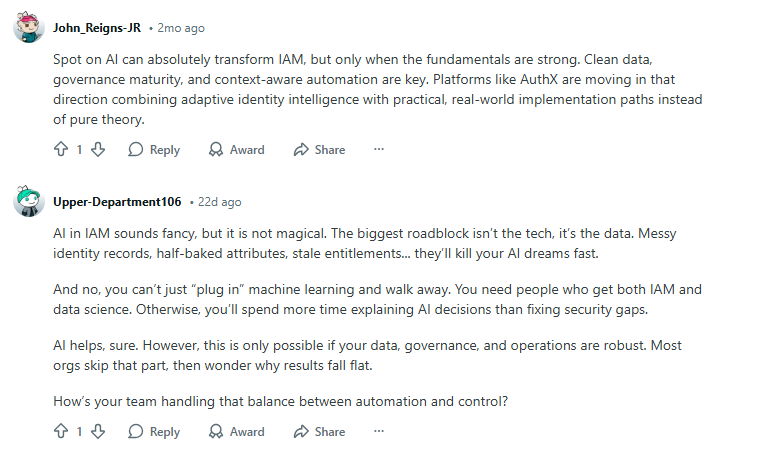
Automation depends on accurate identity data. Dirty or inconsistent data (e.g., duplicate accounts or outdated roles) will result in mis-provisioning or compliance failures. One of the Reddit users discussed the issue where IAM systems fail because data isn’t synced properly, leading to orphaned accounts or inconsistent access between systems (e.g., AD and Azure).
3. Skills and Change Management
IAM automation isn’t plug-and-play. It requires expertise in security, workflows, scripting, and sometimes data science for AI-driven access decisions.
4. Security Configuration Risks
Misconfigured automation can accidentally grant excessive access or fail to revoke it, especially if policies are poorly defined. Continuous testing and oversight are essential.
5. Non-Human Identities & RPA Challenges
Robotic Process Automation (RPA) bots are creating new “non-human identities” (NHIs) that need to be governed. This emerging trend adds complexity to IAM automation strategies.
RPA is changing IAM by introducing non-human identities (bots) that need strong access controls. If bots aren’t properly managed, they can gain excessive permissions and create security risks. To stay secure, organizations must treat bots like human users, using least-privilege access, Just-in-Time permissions, secrets management, and PAM to prevent unauthorized access and data breaches.
How to Implement IAM Automation Successfully
A well-structured approach ensures the best outcomes:
1. Assess Your Current State
Map out current manual IAM processes, pain points, data health, identity sources, and systems. This provides a clear automation roadmap.
2. Define Clear Objectives
Identify goals, faster onboarding, stronger compliance, reduced help desk tickets, or security hardening, and measure initial baselines.
3. Choose the Right Tools
Select tools that integrate with your infrastructure and support scalability. Look for robust APIs, workflow editors, and strong security features (see tool section below).
4. Pilot & Scale
Start with a pilot in one department or process (e.g., onboarding). Use pilot learnings to refine workflows before enterprise-wide rollout.
5. Monitor, Audit & Improve
Track automation performance, provisioning times, incident frequency, user feedback, and adjust workflows continuously.
Top IAM Automation Tools and Platforms
Here’s a curated list of leading tools that help companies implement IAM automation today:
| Tool | Best For |
| Okta | Cloud-first IAM with strong automation workflows |
| Azure Active Directory | Integrated access automation for Microsoft environments |
| SailPoint | Governance and identity lifecycle automation |
| OneLogin | Unified SSO & automation for hybrid apps |
| CyberArk | Privileged access automation |
| Ping Identity | API-friendly IAM automation workflows |
IAM Automation Trends to Watch (2026 and Beyond)
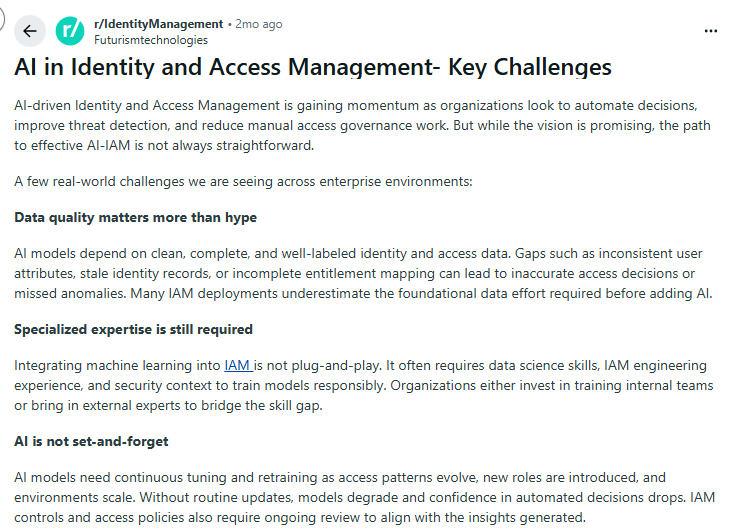
AI is starting to play a bigger role in IAM by spotting risky access patterns before they become problems. Instead of static rules, AI looks at behavior, like unusual login times, locations, or privilege usage, and adjusts access automatically. Sounds great, right?
Reddit discussions show a consistent reality check, though: AI is only as good as the data behind it. If identity data is messy or outdated, AI can make the wrong calls. That’s why clean data and strong governance are non-negotiable before trusting AI with access decisions.
As RPA bots and service accounts multiply, they’re quickly becoming a bigger risk than human users. Security teams often point out that bots tend to be over-privileged and rarely reviewed, which makes them easy targets.
The takeaway is simple: bots need the same IAM controls as people, identity lifecycle management, least-privilege access, credential rotation, and monitoring, otherwise they turn into silent attack vectors.
IAM automation is also aligning closely with Zero-Trust security models. Instead of trusting users once at login, systems continuously verify identity, device health, and behavior. Automated IAM makes this practical by constantly reassessing access in real time. The result? Even if credentials are compromised, attackers can’t move freely inside the network.
With businesses running across hybrid and multi-cloud environments, traditional IAM tools struggle to keep up. Cloud-native IAM automation is becoming the default because it scales faster, integrates better with SaaS platforms, and supports remote work without added friction. Cloud-first IAM isn’t just easier to manage; it’s often the only way to maintain consistent security across modern infrastructure.
In short, IAM automation is evolving from simple rule-based access into intelligent, continuous, and cloud-ready security, but only when it’s backed by strong governance and smart implementation.
Frequently Asked Questions
No, IAM automation scales from SMBs to global enterprises. Even smaller teams benefit from automated onboarding, access reviews, and compliance reporting.
Yes, automation creates detailed logs and standardized workflows that simplify audits and regulatory reporting.
Start with user provisioning/deprovisioning, access reviews, and password resets, high-value tasks with measurable ROI.
Not entirely. It augments IT teams by removing tedious tasks, allowing them to focus on strategy and security improvements.
It must be reviewed regularly, ideally quarterly, as business roles, apps, and compliance requirements evolve.
Yes, IAM automation is a core pillar of Zero Trust security. Instead of granting access once and assuming it’s safe, automated IAM continuously validates user identity, role, device, and behavior.
In remote and hybrid environments, IAM automation ensures secure access regardless of location. When employees log in from home or while traveling, automated IAM applies security policies like multi-factor authentication, role-based access, and device checks in real time.
IAM automation significantly reduces the risk of insider threats by limiting excessive access and enforcing least-privilege policies.
Conclusion
IAM automation has shifted from a luxury to a cybersecurity necessity. It strengthens access governance, accelerates critical workflows, improves compliance, and reduces risk and cost, all while empowering IT teams to focus on strategic outcomes. As digital ecosystems grow automated IAM becomes essential for maintaining secure, agile, and resilient operations.
If your organization still manages identity lifecycles manually, it’s time to embrace automation. By choosing the right tools, defining clear goals, and implementing structured workflows, you can reduce risk, improve compliance, and deliver a superior user experience across the entire business.

Arsalan Rashid

January 5, 2026

2 months ago