Let’s be honest, most of us didn’t start with bad password habits. At first, it was just one or two logins. Then came work tools, streaming services, banking apps, shopping sites, social media, and cloud accounts. Suddenly, remembering passwords became impossible.
So people did what felt practical, they chose a notes app, an Excel or Google Sheet, a text file on the desktop or browser-saved passwords.
It feels organized. Until it isn’t. In 2025 alone, researchers uncovered 19 billion leaked passwords, most of them reused or weak, exactly the kind people store in spreadsheets or notes. That’s why this conversation matters now more than ever.
Why Passwords Are Still the Most Important Security Layer
Despite biometrics and passkeys, passwords remain the backbone of digital security. They protect access to:
- Email accounts (your digital identity)
- Banking and payment apps
- Work dashboards and VPNs
- Cloud storage
- Social media
- Health records
Once an attacker gets your password, everything else starts falling like dominoes. According to Kaspersky, over 50% of compromised passwords in 2025 had already appeared in earlier leaks, meaning attackers rely heavily on password reuse
This is exactly why passwords matter so much, and why how you store them is just as critical.
Recent Password Breach News You Shouldn’t Ignore (2025–2026)
If password breaches sound abstract, let’s ground this in reality. In one of the largest compilations ever discovered, researchers found 16 billion stolen credentials actively circulating and being used in attacks. These weren’t “old” passwords sitting idle. They were being actively tested against major platforms.
A massive breach exposed 184 million login records, including passwords tied to Apple IDs, Google accounts, and Facebook profiles If you reuse passwords, or store them insecurely, this is how attackers chain breaches together.
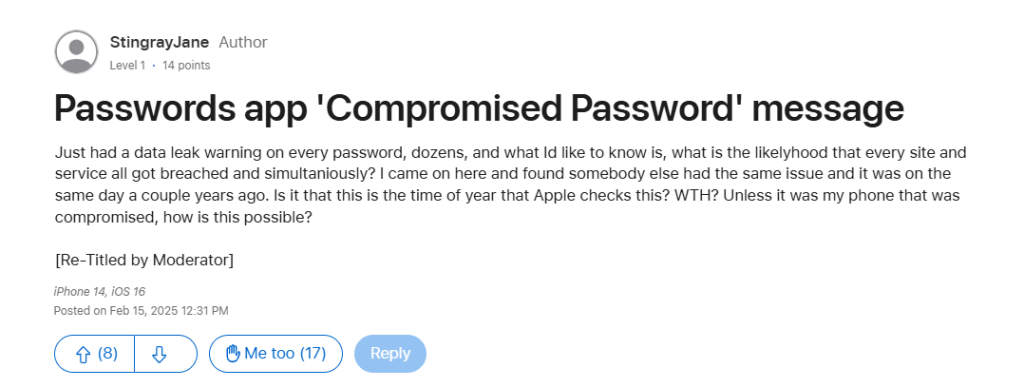
Another compilation, known as RockYou2024, contained nearly 10 billion unique passwords, most of which were reused across multiple services. This confirms a harsh truth: attackers don’t need to “hack” you personally, they just need one leaked password.
Real People, Real Consequences — Password Breach Experiences
Beyond headlines, everyday users share painful lessons after breaches. A user shared on a cybersecurity forum how their laptop was stolen. Their Google Drive auto-synced, including a password spreadsheet. Within hours:
- Email access was lost
- Social media was hijacked
- Password resets were intercepted
Spreadsheets don’t encrypt your passwords. If someone gets the file, the game is over. After the LastPass 2022 breach, attackers cracked weak master passwords years later, leading to real financial thefts.
The lesson wasn’t to use password managers, it was to use them correctly with strong master passwords and MFA.
Why Spreadsheets and Notes Are a Security Risk
Let’s break down why spreadsheets and notes fail at modern password security.
- No Encryption by Default
Most notes apps and spreadsheets:
- Store passwords in plain text
- Rely on device security alone
- Offer no zero-knowledge encryption
If malware, a thief, or a compromised cloud account gets access, your passwords are exposed instantly.
- They Encourage Password Reuse
When you manually manage passwords, you subconsciously reuse them, or create predictable variations. Attackers thrive on this behavior.
- No Alerts When Your Passwords Are Compromised
A spreadsheet won’t tell you:
- If your password appeared in a breach
- If it’s weak or reused
- If it’s time to rotate credentials
You only find out after something goes wrong.
Why a Password Manager Is Better Than Spreadsheets or Notes
Password managers are built for the threats we experience today.
- Strong, Unique Passwords for Every Account
A password manager generates long, random passwords that humans would never choose, and never reuse. This alone neutralizes:
- Credential-stuffing attacks
- Brute-force attacks
- Data leak chaining
- Strong Encryption
Unlike notes or spreadsheets, password managers encrypt your vault using industry-standard algorithms. Even if someone steals the vault, it’s useless without the master key.
- Auto-Fill Without Exposure
Password managers autofill credentials securely without copying them to the clipboard or exposing them to keyloggers.
- Breach Monitoring and Alerts
Many password managers alert you when:
- A saved password appears in a breach
- A password is reused
- A login is weak or outdated
Spreadsheets can’t do that.
Can Password Managers Be a Single Point of Failure?
This concern comes up a lot, and honestly, it’s a reasonable question. The idea of storing all your passwords in one place can feel risky at first. After all, if someone breaks into that vault, doesn’t everything fall apart? In theory, yes, but in practice, modern password managers are built specifically to prevent that exact scenario.
While a password manager vault is protected by a single master password, that password can be made extremely strong, far beyond what most people use for everyday logins. On top of that, most reputable password managers support multi-factor authentication (MFA), adding another critical layer that attackers would have to bypass.
Even more importantly, your data is protected by end-to-end encryption, meaning the service provider itself can’t see or access your passwords. So even if their servers were ever compromised, attackers wouldn’t be able to read your vault.
Now compare that to a spreadsheet or notes app. Those files usually sit unencrypted on your device or cloud account, protected by nothing more than your device login, or sometimes nothing at all. If someone gains access, they don’t need to crack encryption or bypass MFA. Your passwords are simply… there.
Are password managers perfect? No security tool ever is. But compared to manual storage methods like spreadsheets, notes, or reused passwords, they are much safer, smarter, and far more resilient against modern attacks.
Choosing the Right Password Manager For Your Privacy
When you’re comparing password managers, it’s worth looking beyond just the price tag. PureVPN is built with privacy-first principles and gives you a simple way to manage passwords without sacrificing control or transparency.
Here’s what you get:
- zero-knowledge encryption
- seamless cross-device sync
- breach monitoring
- secure autofill
- VPN backup
Wrap Up
Using spreadsheets or notes for passwords might feel convenient, but is dangerously outdated.
With billions of passwords leaked, automated attacks running nonstop, and credential reuse fueling breaches, a password manager is a necessity.
Frequently Asked Questions
No. Google Sheets does not encrypt individual entries. If your account is compromised, attackers get everything instantly.
Dedicated password managers offer stronger encryption, breach alerts, and better isolation than browsers.
Yes. MFA helps, but weak or reused passwords still expose you to phishing and account takeovers.
No. Premium options usually offer stronger monitoring, support, and advanced security features.
With proper encryption and a strong master password, attackers cannot read your vault data.