2FA was never designed to replace strong password hygiene!
Two-factor authentication (2FA) is often treated like the ultimate security upgrade, and it is the one, no doubt. Adding a second verification step can stop a huge percentage of automated attacks and reduce the chances of someone breaking into your accounts.
Cybercriminals today use credential stuffing, AI-driven phishing kits, MFA fatigue attacks, and session hijacking to bypass poorly secured accounts. If your passwords are weak, reused, or exposed in a breach, 2FA alone may not be enough to keep attackers out.
That’s why passwords managed securely + 2FA enabled are important. In this guide, we’ll break down why password managers are important for your privacy.
2FA Protects Access, Password Managers Protect Your Identity
For modern account security, relying on a single privacy tactic is no longer sufficient. Two-factor authentication (2FA) strengthens login protection, but it does not address the underlying risks created by weak or reused passwords.
Security research widely cited by Microsoft shows that multi-factor authentication can block up to 99.9% of automated account attacks.
However, credential reuse and poor password hygiene remain among the most common causes of account compromise. This is why cybersecurity best practices recommend using a password manager alongside 2FA; the former ensures strong, unique credentials, while the latter adds a critical verification layer at login.
What 2FA Actually Does?
2FA requires two separate forms of verification before access is granted:
- Something you know (your password)
- Something you have (your phone, authenticator app, or hardware key)
This extra step makes it harder for attackers to log in, even if they know your password. Enabling 2FA reduces account takeover risk. Large platforms that rolled out multi-factor authentication have reported major drops in unauthorized logins and automated credential attacks. 2FA is essential, but not the single line of defense.
Where 2FA Falls Short
Weak passwords still create exposure. Two-factor authentication does not fix poor password habits. If you reuse passwords across sites or rely on short, predictable combinations, attackers can still gain a dangerous foothold.
Multiple studies have found that a large share of users reuse passwords across accounts. When one site is breached, attackers immediately try those same credentials elsewhere, a technique known as credential stuffing.
2FA helps, but it doesn’t eliminate the risk window created by reused passwords.
Some 2FA Methods Can Be Phished
Not all second factors provide equal protection. Security analysts have repeatedly demonstrated that:
- SMS codes can be intercepted through SIM-swap attacks
- One-time passwords (OTPs) can be captured by real-time phishing proxies
- Push notifications can be abused in MFA fatigue attacks
In targeted campaigns, attackers increasingly use phishing kits that capture both the password and the second factor in real time.
Implementation gaps exist in the real world. Academic research reviewing hundreds of websites has identified common weaknesses in how some services implement two-factor authentication.
Typical issues include:
- Remember, this device bypasses
- Inconsistent MFA enforcement
- Weak session management
In other words, your protection depends partly on how well each service implements 2FA, which is outside your control.
Human Behavior Remains the Weakest Link
Even strong security tools can be undermined by user behavior. In practice, people often:
- approve suspicious push prompts
- reuse backup codes
- disable 2FA for convenience
- ignore unusual login alerts
Security systems must be designed with human error in mind, and that’s where password managers provide critical support.
What Password Managers Solve That 2FA Doesn’t
Password reuse remains one of the most dangerous habits online. A password manager automatically generates long, random, unique passwords for every account you create.
This means that if one service suffers a data breach, attackers cannot use those credentials to access your other accounts. This single change reduces your attack surface.
They Create Truly Strong, Unguessable Passwords
Humans are notoriously bad at creating randomness. Most people unintentionally use patterns, substitutions, or familiar words when building passwords.
Password managers remove the guesswork by generating high-entropy passwords that are extremely difficult to crack, even with modern GPU-powered attacks.
They Help Prevent Phishing Mistakes
One of the most underrated benefits of a good password manager is domain-aware autofill.
Most reputable managers will only autofill credentials on the exact website domain they’re saved for.
If you land on a convincing phishing page, the manager typically refuses to fill in your login.
That hesitation can be the difference between staying safe and handing your credentials to attackers.
They Reduce Risky Human Behavior
Automation is key to better protection. When users must manually create and remember dozens of passwords, mistakes are inevitable. Password managers automate best practices by default:
- unique passwords for every account
- secure storage
- quick but safe autofill
- breach alerts in many tools
This reduces the chances of human error causing a security incident.
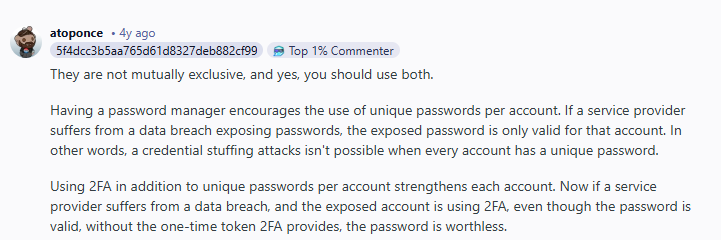
Security conversations across online communities reveal an important pattern: experienced users rarely treat password managers and 2FA as substitutes. Use both is the common advice
In multiple cybersecurity discussions, the dominant recommendation is clear, layered protection works best. Many users point out that 2FA protects the login event, while password managers protect the overall credential ecosystem, which reflects the broader security industry consensus.
Myths About Password Managers
People worry that a password manager becomes a master vault that, if breached, exposes everything. It’s a valid concern, but modern password managers are specifically designed to mitigate this risk through:
- zero-knowledge architecture
- strong local encryption
- optional multi-factor protection on the vault itself
- secure key derivation methods
When properly configured with a strong master password and 2FA, the risk is greatly reduced.
Some people still prefer manual password storage methods due to trust concerns. However, it is noted that human-managed passwords are far more likely to be weak or reused, creating greater overall risk than a properly secured password manager.
Why Using Password Managers and 2FA Together Is the Industry Standard
Modern cybersecurity guidance is clear, no single control is enough on its own. Security professionals consistently recommend combining strong password hygiene with multi-factor authentication (MFA) to reduce real-world risk.
Frameworks from the National Institute of Standards and Technology explicitly advise organizations to:
- enable MFA wherever possible
- use password managers to generate and store strong, unique passwords
- limit reliance on passwords alone
In fact, NIST guidance notes that passwords by themselves are no longer sufficient protection and encourages both MFA adoption and the use of password managers as complementary controls.
Why experts push for both:
- Password managers eliminate password reuse and weak credentials
- Strong unique passwords resist credential-stuffing and brute-force attacks
- MFA blocks unauthorized logins even if a password leaks
- Combined controls create defense-in-depth against modern attack chains
Attackers routinely target single-layer defenses, so overlapping protections reduce breach risk.
Best Practices for Combining 2FA and a Password Manager
Using two-factor authentication (2FA) and a password manager together delivers the strongest everyday protection. Here’s what you need to do:
Enable 2FA on Your Most Critical Accounts
Start by turning on 2FA wherever it’s available, with priority given to high-impact accounts:
- Email accounts
- Banking and financial services
- Cloud storage platforms
- Your password manager vault
- Social media profiles
Your email and password manager deserve special attention. If either is compromised, attackers can often reset passwords and pivot into your other accounts.
Choose the Strongest 2FA Method Available
Not all multi-factor authentication methods offer the same level of protection. When possible, prioritize in this order:
- Hardware security keys
- Authenticator apps
- Push-based MFA
- SMS codes
SMS should be considered a fallback option only, since it is more vulnerable to SIM-swap and interception attacks.
3. Create a Strong Master Password
Your master password protects your entire password vault, so it must be exceptionally strong. Follow these guidelines:
- Use at least 16 characters
- Make it completely unique
- Never reuse it anywhere else
- Prefer a long, memorable passphrase
This is the only password you’ll need to remember, so make it count.
4. Enable Breach Monitoring and Act Quickly
Many modern password managers include breach monitoring that alerts you if your credentials appear in known data leaks. Treat these alerts as urgent:
- Change the affected password immediately
- Review account activity
- Enable or strengthen 2FA if not already active
Fast response can prevent a leaked credential from turning into a full account takeover.
Wrap Up
Two-factor authentication is one of the best security upgrades you can enable, but it was never meant to stand alone. Modern cyber threats exploit weak passwords, credential reuse, phishing mistakes, and human error. A password manager directly addresses these risks by generating strong unique credentials, preventing reuse, and adding phishing resistance.
The safest approach today isn’t choosing between tools. It’s layering them. Use 2FA to protect logins and use PureVPN password manager to protect your privacy.
Frequently Asked Questions
No. While 2FA improves security, it does not fix weak or reused passwords. Combining 2FA with a password manager is what you need for your privacy.
In some cases, yes, with SMS interception, real-time phishing proxies, or MFA fatigue attacks. Strong passwords and phishing-resistant login habits add important extra protection.
Modern password managers use zero-knowledge encryption and strong local protection. When secured with a strong master password and 2FA, they are generally far safer than manually managing passwords.
Absolutely. Your password manager vault and primary email account should always have 2FA enabled.
If you use unique passwords stored in a manager, only that single account is at risk. Without a manager, reused passwords can expose dozens of accounts at once.