
Backdoor attacks are one of the most dangerous and stealthy forms of cyber threats. A backdoor is a hidden method of accessing a computer system, application, or network that bypasses normal authentication and security controls. Unlike typical cyberattacks that try to break in openly, backdoor attacks quietly create a “secret entrance” that allows attackers to return whenever they want, often without being detected.
Backdoors can be intentionally planted by attackers after an initial compromise, or they can exist due to poor system design, insecure configurations, or leftover developer access points that were never removed. Once a backdoor exists, attackers can maintain long-term control, steal sensitive data, or launch further attacks at any time.
What Makes Backdoor Attacks Different from Other Cyber Threats
Most malware is designed to achieve quick results, such as stealing credentials, encrypting files, or spreading rapidly. Backdoor attacks, however, focus on persistence. The goal isn’t immediate damage but ongoing access.
With a backdoor in place, attackers can monitor systems silently, extract data over time, install additional malware, or move laterally across networks. This makes backdoor attacks especially common in advanced persistent threats (APTs), corporate espionage, and long-term cyber campaigns.
How Backdoor Attacks Work
Although techniques vary, most backdoor attacks follow a similar lifecycle.
First, attackers gain initial access to a system. This often happens through phishing emails, malicious downloads, stolen credentials, unpatched software vulnerabilities, or misconfigured servers.
Once inside, the attacker installs a backdoor. This could be malware like a remote access tool, a hidden script on a server, a malicious browser extension, or even a secret user account with elevated privileges.
Next comes persistence. Backdoors are designed to survive reboots, updates, and basic cleanup efforts. Attackers may configure startup scripts, scheduled tasks, registry entries, or cloud permissions to ensure continued access.
After that, the backdoor communicates with the attacker’s command-and-control system. Through this channel, attackers can send commands, retrieve stolen data, or deploy additional tools.
Finally, attackers use the backdoor for follow-up actions such as data theft, credential harvesting, lateral movement, or launching ransomware at a later stage.
Common Types of Backdoor Attacks
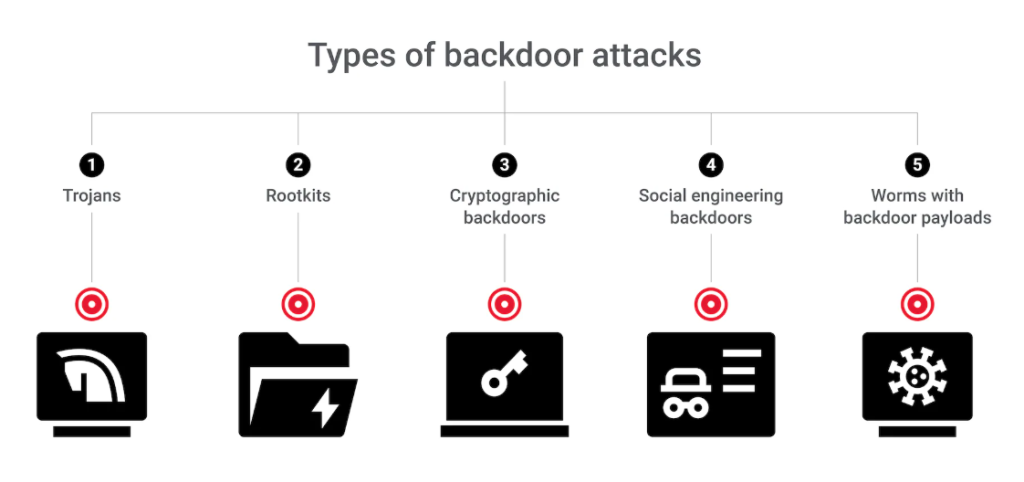
Backdoor attacks can appear in many forms depending on the system being targeted.
Remote Access Trojans (RATs) are one of the most common types. These malicious programs give attackers remote control over an infected device, allowing them to view files, log keystrokes, activate webcams, or run commands.
Web shells and application backdoors are frequently used against servers. These are small scripts hidden inside web applications that let attackers execute commands through a browser.
Credential-based backdoors involve hardcoded passwords, hidden admin accounts, or undocumented access keys that bypass standard login mechanisms. These are especially dangerous because they don’t look like malware.
Supply-chain backdoors occur when attackers compromise software updates, libraries, or development pipelines, inserting malicious code that reaches users through trusted software.
Rootkits and firmware backdoors operate at a deeper system level, hiding themselves by modifying core operating system components or device firmware. These are difficult to detect and remove.
Cloud backdoors appear in cloud environments as malicious access keys, over-permissioned identities, compromised CI/CD tokens, or hidden configuration changes.
Warning Signs of a Backdoor Attack
Backdoor attacks are designed to stay hidden, but there are signs that may indicate a compromise:
- Unexpected login attempts or newly created admin accounts
- Unknown processes running at startup
- Suspicious scheduled tasks or services
- Unusual outbound network traffic to unknown locations
- Disabled security tools or missing logs
- Unexplained performance issues or system behavior
Because backdoors mimic normal system activity, detecting them often requires monitoring patterns rather than relying on a single alert.
How to Protect Yourself from Backdoor Attacks
Preventing backdoor attacks requires a layered security approach rather than a single solution.
Keeping systems updated and patched is critical, as many backdoors are installed after exploiting known vulnerabilities. Reducing exposed services and disabling unused features also lowers risk.
Strong authentication plays a major role. Using multi-factor authentication makes stolen credentials far less useful to attackers.
Applying the principle of least privilege limits what attackers can do if they gain access. Only trusted users should be able to install software, create accounts, or generate access keys.
Endpoint protection and application control tools can help detect unusual behavior and block unknown programs from running.
Network segmentation and outbound traffic monitoring help prevent backdoors from communicating with attacker-controlled servers.
Securing the software supply chain is increasingly important. Organizations should monitor dependencies, verify updates, and audit changes in critical software components.
Finally, continuous logging, monitoring, and threat hunting allow security teams to spot unusual behavior before serious damage occurs.
FAQs
A backdoor attack is when someone secretly creates or uses a hidden way to access a system without normal login checks.
No. Some are created for maintenance or debugging, but they become dangerous if left unsecured or discovered by attackers.
Remote access tools and web shells are among the most common because they’re easy to install and hard to detect.
Sometimes, but many backdoors avoid signature-based detection. Behavioral monitoring and endpoint detection tools are more effective.
Signs include unusual logins, unknown startup programs, suspicious network traffic, or disabled security controls.
Disconnect affected systems, change all credentials, remove persistence mechanisms, patch vulnerabilities, and conduct a full security review.