
Black Friday deals can be hard to resist, especially when a countdown timer is ticking and the price looks too good to pass up. But rushing to checkout without checking the seller can leave you vulnerable to shopping scams.
According to the UK’s National Cyber Security Centre, approximately £11.8 million was lost to online shopping fraud between November 1, 2024, and January 31, 2025, during the festive shopping season.
A few simple checks can help you spot suspicious deals before handing over your money or personal information. Follow this Black Friday shopping safety checklist to shop more confidently and avoid common mistakes.
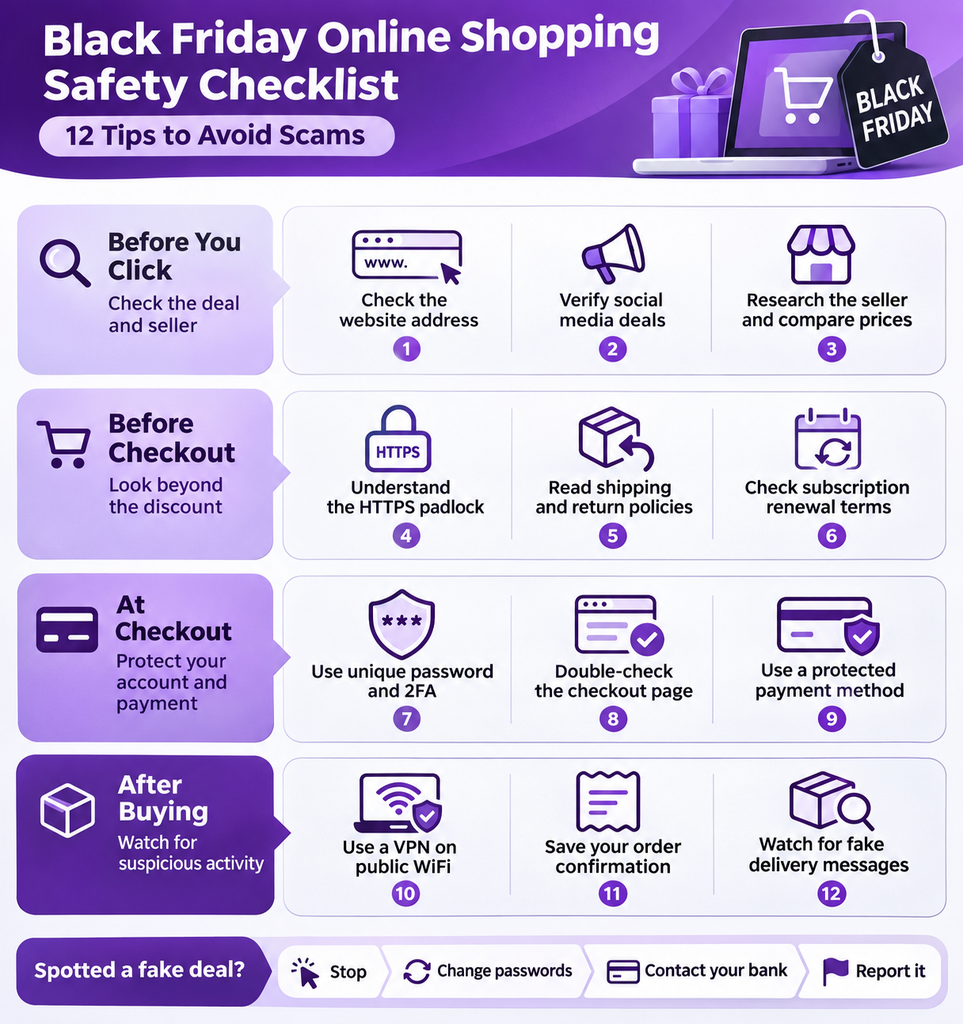
Black Friday Online Shopping Safety Checklist
Before buying anything during Black Friday, take a few minutes to check the deal, the retailer, and the payment process. Here are 12 precautions worth following.
Before You Click: Check the Deal and Seller
Check the Website Address Carefully
Fake shopping websites often imitate legitimate retailers with familiar logos, product images, and slightly altered website addresses. For example, shop.example and shop-deals.example are two different domains, even if the websites look identical.
Check the address bar for misspellings, extra words, and unfamiliar domains before entering any information. If something looks suspicious, search for the retailer’s official website independently rather than following the link you received.
Verify Deals Advertised on Social Media and Search Engines
A sponsored advertisement is no guarantee that the retailer or discount is legitimate. Scammers can advertise fake stores through social media feeds and search results, sometimes impersonating established brands.
According to the US Federal Trade Commission, more than 40% of people who reported losing money to social media scams in 2025 said the scam began when they ordered something advertised to them.
Before clicking Buy Now, visit the retailer’s official website and confirm that the promotion is available there.
Research the Seller and Compare Prices
Buying from an unfamiliar retailer? Search its name alongside terms like “reviews,” “complaints,” or “scam.” Check feedback from independent websites, look for recent customer experiences, and verify that the seller provides usable contact information.
Be cautious of stores displaying only glowing reviews or unusually high ratings. Fake reviews can make an unreliable seller appear trustworthy.
Compare the advertised price across established retailers, too. An unusually steep discount warrants a closer look, especially when the seller has little verifiable history.
Before Checkout: Look Beyond the Discount
Understand What the HTTPS Padlock Means
A padlock icon, where displayed by your browser, or https:// at the beginning of a website address indicates that the connection is encrypted. However, encryption does not prove that the store itself is legitimate.
Scammers can use HTTPS on fraudulent websites, too. Check the actual domain and seller’s credibility instead of relying on the padlock as proof of trustworthiness.
Related Read: HTTPS vs VPN
Read the Shipping, Return, and Refund Policies
A Black Friday discount can look less attractive once you factor in delivery fees and any charges you would face if you needed to return the item.
Before placing an order, check the estimated delivery date, refund eligibility, return window, and who pays for returns. Some retailers apply different return conditions to Black Friday or clearance purchases.
If the seller provides no clear return policy or makes it difficult to find, reconsider the purchase.
Check Subscription Renewal Prices and Billing Terms
Black Friday discounts on software, streaming services, and memberships often apply only to the initial subscription period.
Check the regular renewal price, billing frequency, automatic renewal conditions, and cancellation policy before subscribing. A discounted annual plan, for example, could renew at the standard rate the following year.
Verify these details directly on the seller’s official website and save a copy of the terms you accepted.
At Checkout: Protect Your Account and Payment Details
Use Unique Passwords and Enable Two-Factor Authentication
Reusing the same password across shopping accounts puts more than one account at risk if those credentials become exposed.
Create a unique password for each account and consider using a password manager to generate and store it. Enable two-factor authentication wherever available, particularly on accounts containing saved payment information.
Never share authentication codes with someone contacting you unexpectedly, even if they claim to represent the retailer.
Double-Check the Checkout Page
Before entering your payment details, check whether the checkout page belongs to the retailer or a payment service you recognize.
Unexpected redirects, unfamiliar domains, and requests for unnecessary personal information deserve closer attention. Be particularly suspicious if someone asks you to provide a one-time verification code through email, chat, or text.
If you rarely shop with a retailer, consider using guest checkout instead of creating another account.
Use a Payment Method With Buyer Protection
Credit cards often provide stronger dispute options when an order never arrives, a product differs from its description, or an unauthorized charge appears. However, buyer protections vary by country, card issuer, and payment provider.
Be wary of unfamiliar sellers insisting on gift cards, cryptocurrency, or direct bank transfers. Recovering money sent through these methods can be difficult.
Check the payment options and applicable protections before completing your purchase.
Use a VPN When Shopping on Public WiFi
Shopping while connected to public WiFi at a café, airport, or shopping mall? PureVPN encrypts traffic between your device and the VPN server, helping protect your connection from local network snooping.
Most legitimate shopping websites already use HTTPS to encrypt information exchanged with your browser. A VPN provides an additional layer of network privacy.
Related Read: How VPNs Protect Public WiFi Sessions
After Buying: Watch for Suspicious Activity
Save Your Order Confirmation and Receipt
Keep a copy of your order confirmation, payment receipt, delivery estimate, and the terms advertised when you purchased the product.
If the seller changes the delivery date, sends the wrong item, or refuses a refund, these records can help you explain the issue to customer support or your payment provider.
For expensive purchases, consider saving a screenshot of the original product listing and advertised price.
Beware of Fake Delivery Messages and Unexpected Charges
Scammers send fraudulent delivery notifications claiming that an address needs updating, a package is delayed, or an additional shipping fee is due.
Avoid clicking unexpected delivery links or entering payment details through messages you cannot verify. Instead, check your order through the retailer’s official website or the courier’s verified tracking service.
Review your bank or card statements after shopping and report unfamiliar charges to your payment provider promptly.
Spotted a Fake Black Friday Deal? Here Is What to Do
If you come across a suspicious Black Friday deal, stop interacting with the website. Your next steps depend on what happened:
- Clicked a suspicious link? Close the page immediately without entering any personal information. If you ended up downloading something, make sure to run a security scan on your device.
- Entered your login credentials? Change the affected password immediately and update any other accounts where you reused it. Enable two-factor authentication if available.
- Shared payment details or sent money? Contact your bank or payment provider immediately to discuss blocking your card, monitoring suspicious transactions, or disputing the payment.
- Found a fraudulent retailer? Save the website address, screenshots, and relevant messages. Report the suspected scam to the platform and your local consumer protection or cybercrime authority.
Think Twice Before You Buy
A big Black Friday discount can be tempting, but a little caution can save you from an expensive mistake. Take the time to verify unfamiliar sellers, read the purchase terms, and check how you are being asked to pay.
If something feels off or the details do not add up, walk away. Missing a good deal is far better than losing money to a scam.

Arsalan Rashid

November 10, 2026

2 days ago