Software-as-a-Service (SaaS) platforms power modern businesses. From collaboration tools, CRM systems, finance software, and cloud storage, employees rely on dozens, sometimes hundreds, of online services every day.
But with this convenience comes a serious security risk: credential reuse!
Employees often reuse the same password across multiple SaaS applications. While this behavior is understandable, remembering dozens of complex passwords is difficult, it creates a dangerous vulnerability.
For businesses that rely heavily on SaaS ecosystems, preventing credential reuse is a critical security requirement. In this guide, we’ll explore why SaaS credential reuse is a major business risk and the role of advanced password vaults in modern security.
Understanding the Risk of SaaS Credential Reuse
Before discussing solutions, it’s important to understand why credential reuse is so dangerous.
The Modern SaaS Explosion
The average organization now uses over 100 SaaS applications, according to multiple industry reports. Larger enterprises may use several hundred. Common examples include:
- Project management tools
- CRM platforms
- Accounting software
- HR systems
- Email services
- Cloud storage platforms
- Developer tools
Each of these services requires authentication. Without centralized password management, employees typically fall back on unsafe habits.
Why Employees Reuse Passwords
Credential reuse usually happens for various reasons:
- Password Fatigue
Employees must remember dozens of passwords. Without a secure system, they often simplify their approach.
- Convenience
Using the same password across multiple tools is faster and easier.
- Lack of Security Training
Many employees underestimate the risks of password reuse.
- Poor Password Policies
Organizations without strong password policies often unknowingly encourage unsafe practices.
Unfortunately, attackers know this behavior is common.
How Attackers Exploit Reused SaaS Credentials
Credential reuse increases the effectiveness of several common attack methods.
1. Credential Stuffing
Credential stuffing involves using stolen usernames and passwords from previous breaches to attempt logins across other services. Since many users reuse passwords, attackers often gain access quickly.
For Example
- A third-party website suffers a data breach.
- Employee credentials are exposed.
- Attackers test those credentials across SaaS tools.
- Multiple systems become compromised.
Credential stuffing attacks are largely automated and can test thousands of login attempts in minutes.
2. Phishing Attacks
Phishing campaigns trick employees into entering their login credentials on fake websites.
If the stolen password is reused elsewhere, attackers gain access to multiple accounts.
For example, if an employee reuses their email password for CRM access, one phishing attack can compromise both systems.
3. Dark Web Credential Markets
Stolen credentials frequently appear on underground marketplaces. Attackers purchase these credential lists and test them against business SaaS platforms.
If employees reuse passwords, attackers gain immediate access without needing to hack anything directly.
The Business Impact of SaaS Credential Reuse
The consequences of compromised credentials extend far beyond a single account.
- Unauthorized Access to Sensitive Data
Attackers may gain access to:
- Customer databases
- Financial records
- Internal documents
- Intellectual property
- Employee information
This can lead to data breaches and regulatory violations.
- Financial Losses
Compromised SaaS accounts can enable:
- Fraudulent transactions
- Invoice manipulation
- Payment redirection scams
These attacks often result in direct financial losses.
- Operational Disruption
If attackers take control of SaaS tools, they can disrupt workflows by:
- Deleting files
- Locking accounts
- Altering configurations
- Sending malicious communications
Recovery can take days or even weeks.
- Reputational Damage
Data breaches erode customer trust. Businesses may face:
- Customer churn
- Legal action
- Regulatory fines
- Brand damage
Preventing credential misuse is far less costly than responding to a breach.
Why Traditional Password Policies Are Not Enough
Many organizations attempt to reduce credential reuse through strict password policies. While helpful, policies alone rarely solve the problem.
Password Complexity Requirements
Policies often require:
- Minimum length
- Uppercase and lowercase letters
- Numbers and symbols
While this improves password strength, it does not prevent reuse.
Mandatory Password Changes
Some companies enforce regular password rotations. However, this can unintentionally encourage employees to create predictable variations.
Example:
Password1 → Password2 → Password3
Attackers can easily guess these patterns.
Security Awareness Training
Employee education helps but cannot fully eliminate human behavior. People naturally prioritize convenience.
To truly prevent credential reuse, businesses need technical enforcement mechanisms.
How Advanced Password Vaults Prevent Credential Reuse
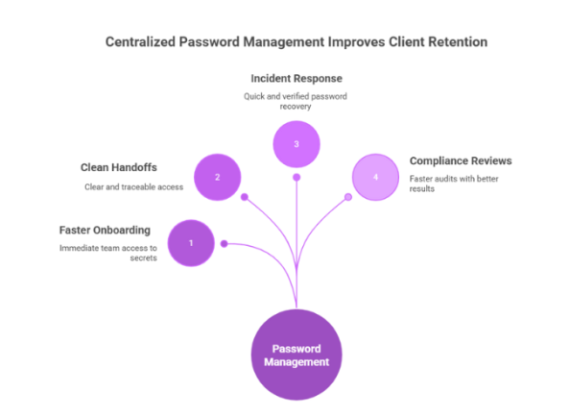
A password vault is a secure system that stores and manages credentials using strong encryption. Modern password vaults provide far more than simple password storage. They play a critical role in enterprise identity security.
Secure Password Generation
Advanced password vaults generate strong, unique passwords for every account. These passwords include:
- 16–32 characters
- Random letters and numbers
- Special characters
Because users don’t need to memorize them, every SaaS account can have a completely different password. This immediately eliminates credential reuse.
Encrypted Credential Storage
All credentials are stored in encrypted vaults protected by strong cryptographic standards.
Even if attackers access the vault database, they cannot decrypt the passwords without authentication.
Automatic Autofill
Password vaults automatically fill login credentials for approved websites. This improves both security and usability:
- Employees no longer need to remember passwords
- Login errors are reduced
- Phishing risks decrease
Since autofill typically works only on legitimate domains, it also prevents users from entering credentials into fake phishing sites.
Centralized Credential Management
For IT teams, password vaults provide centralized visibility. Administrators can:
- Monitor password usage
- Enforce password policies
- Detect credential reuse
- Revoke access quickly
This greatly simplifies SaaS security management.
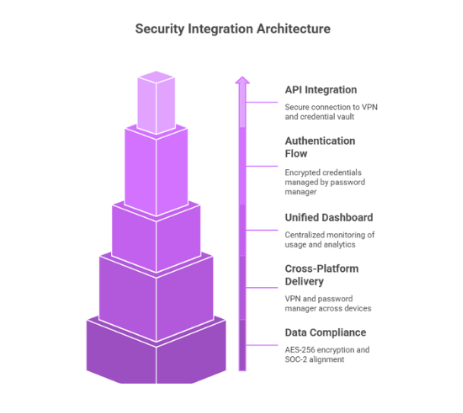
Additional Security Features in Advanced Password Vaults
Modern password vaults include several advanced capabilities designed for business environments.
- Access Control and Role-Based Permissions
Organizations can restrict credential access based on employee roles. For example:
- Finance team members access accounting tools
- Developers access code repositories
- HR staff access employee management systems
This ensures employees only access what they need.
- Secure Credential Sharing
Sometimes teams need shared access to accounts. Password vaults allow secure sharing without revealing the actual password. This eliminates risky practices like:
- Sending passwords via email
- Sharing credentials in chat tools
- Writing passwords in documents
- Breach Monitoring
Some password vaults continuously monitor for leaked credentials. If a password appears in a known data breach, the system alerts users and prompts immediate updates. This proactive approach helps prevent credential-based attacks.
- Audit Logs and Activity Monitoring
Advanced vaults maintain logs of credential activity, including:
- Login attempts
- Access requests
- Password changes
- Credential sharing events
These logs help security teams investigate suspicious behavior.
Best Practices for Preventing SaaS Credential Reuse
Password vaults are most effective when combined with strong security practices.
- Enforce Unique Passwords Across All SaaS Tools
Every SaaS account should have a unique password. Password vaults make this possible without burdening employees.
- Implement Multi-Factor Authentication (MFA)
MFA adds an additional layer of protection beyond passwords. Common methods include:
- Authenticator apps
- Security keys
- Biometric authentication
Even if a password is compromised, MFA helps block unauthorized access.
- Monitor SaaS Application Usage
Organizations should track which SaaS tools employees use. Shadow IT, unauthorized SaaS usage, can introduce hidden credential risks. Visibility helps ensure all accounts follow security policies.
- Regularly Audit Credentials
Periodic credential audits can identify:
- Weak passwords
- Shared credentials
- Inactive accounts
- Potential security gaps
Password vault reporting tools make this process easier.
- Educate Employees About Credential Security
Security awareness training should cover:
- The risks of password reuse
- Recognizing phishing attacks
- Proper password management practices
Educated employees are a crucial defense layer.
Strengthening SaaS Security with a Modern Password Manager
For businesses managing dozens or hundreds of SaaS tools, manual password management simply does not scale.
A dedicated password manager provides the infrastructure needed to maintain strong authentication practices across the organization. PureVPN’s Password Manager combines encrypted password vaults, strong password generation, and secure credential storage to help teams eliminate password reuse while simplifying daily access to SaaS applications.
By removing the need to remember complex passwords and enabling secure credential management, organizations can reduce the likelihood of credential-based attacks without disrupting employee productivity.
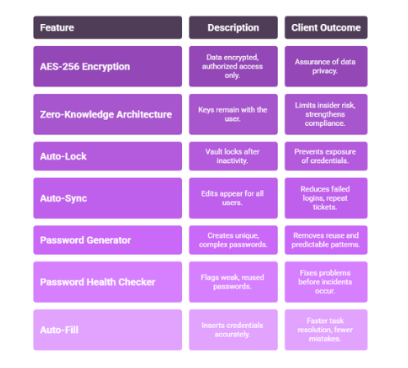
When implemented alongside MFA and proper security policies, password managers become a foundational component of modern SaaS security strategies.
Wrap Up
SaaS platforms have transformed how businesses operate, enabling teams to collaborate, automate workflows, and access critical systems from anywhere. However, the rapid expansion of SaaS applications has also increased the risk of credential reuse, one of the most common causes of account compromise.
When employees reuse passwords across multiple services, a single breach or phishing attack can cascade into a widespread security incident. Preventing this risk requires more than just password policies.
Advanced password vaults solve this challenge by generating strong passwords, securely storing credentials, and giving organizations centralized control over access management.
Frequently Asked Questions
If attackers obtain a reused password, they can access multiple SaaS platforms, leading to data breaches, financial loss, and operational disruptions.
Password vaults generate and store unique passwords for every account. Since users don’t need to memorize them, each SaaS application can have a completely different password.
Yes. Modern password managers use strong encryption and secure authentication methods to protect stored credentials while providing centralized control for IT teams.
Absolutely. Multi-factor authentication adds an extra layer of protection when used with password managers.
Yes, a password manager with breach monitoring features alerts users if their credentials appear in known data breaches.