
SafeInCloud is appreciated for its encrypted vault, cloud sync via Dropbox, Google Drive, or WebDAV, browser autofill, and cross-platform apps. But as you use it more, you might notice missing independent audits, fewer advanced identity-protection tools, or limits within its free and budget tiers.
If you’re finding SafeInCloud doesn’t meet your needs for privacy, feature depth, or enterprise/team usage, you’re not alone. In this guide, we will discuss some SafeInCloud alternatives that deliver stronger security, better usability, and tools you’ll actually use.
Why Do People Switch to SafeInCloud Alternatives?
There are a few common pain points with SafeInCloud that drive people away:
- It’s proprietary, so there’s no open-source transparency or regularly published security audits.
- Some users want more advanced security tools: breach alerts, identity monitoring, passkey support, or privacy extras like VPN integration.
- The syncing via cloud services or WebDAV works, but users sometimes experience issues with browser extensions, filling forms, or day-to-day mobile responsiveness.
Top 5 SafeInCloud Alternatives At a Glance
Prices listed below are accurate at the time of writing and may vary based on region, plan type, or promotional offers.
| Alternative | Best For | Highlights | Starting Price |
| PureVPN Password Manager | Users who want all-round privacy + extras | Zero-knowledge encryption, bundled identity & privacy tools, excellent cross-device sync, clean UI | ~$2.19 / mo |
| Bitwarden | Open-source lovers & budget-minded users | Free unlimited devices, zero-knowledge model, audited code, robust feature set | ~$1 / mo |
| 1Password | Families, travelers, polished UI, advanced sharing | Passkey support, Travel Mode, strong vault health tools, excellent UX across platforms | ~$2.39 / mo |
| LastPass | People who want long-standing provider, rich features & sharing | Autofill, dark-web monitoring, emergency access, form fill, cross-platform maturity | ~$1.50 / mo |
| Enpass | Privacy purists & users who prefer local control | Local encryption & storage, optional cloud sync, one-time payment option, supports many platforms | ~$1.99 / mo |
1. PureVPN Password Manager
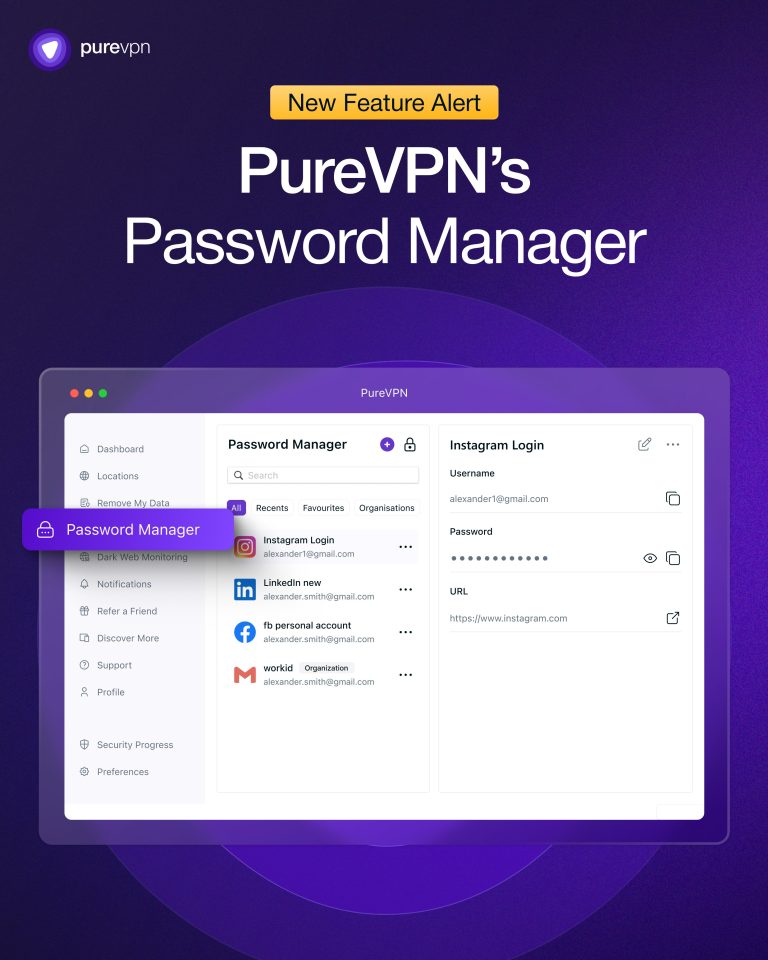
PureVPN Password Manager offers a compelling alternative to SafeInCloud by combining strong privacy with extra tools beyond just storing passwords. You get zero-knowledge encryption so that only you can unlock your vault, and extras such as dark web monitoring and data broker removal.
The user interface is clean and consistent across different platforms. Importing passwords from SafeInCloud is relatively smooth, and autofill tends to work more reliably in some situations where other managers struggle. If you want both strong encryption and a privacy ecosystem, PureVPN Password Manager is a top pick.
Pros:
- Zero-knowledge encryption plus bundled privacy tools
- Excellent cross-platform support with reliable autofill and sync
- Cleaner, less cluttered UI
- Good value for features offered
Cons:
- Newer than the others, so some third-party integrations may be missing
- Some users may find certain features are still developing
2. Bitwarden

Bitwarden is often the first recommendation for anyone wanting an open-source, transparent, and budget-friendly alternative to SafeInCloud. It uses zero-knowledge encryption with your vault encrypted locally before anything is uploaded. It supports unlimited devices, browser extensions, mobile apps, and has strong import/export tools.
In addition, Bitwarden gives you features like password strength reports, breach notifications, 2FA / passkeys (in supported environments), and good credential sharing tools. The free and low-cost tiers are very usable, especially if you don’t need fancy extras or enterprise-level admin dashboards.
Pros:
- Very strong free tier + open-source code base
- Excellent sync across multiple platforms and browsers
- Good security hygiene tools (password health, breach alerts, etc.)
- Transparent third-party audits and high community trust
Cons:
- UI is more professional than flashy
- Some advanced features are locked behind premium/business plans
3. 1Password

1Password is a powerfully polished alternative for users who care about design, usability, and advanced features. It adds things like Travel Mode (hide certain vaults when crossing borders), passkey support, segregated vaults for family or teams, and strong admin tools. The apps are beautifully designed, intuitive, and often praised for how smooth autofill and form-filling work.
While there is no forever-free individual plan, 1Password makes up for that with features like secure document storage, credit card and address autofill, and excellent support. If you share with family or need polished tools for business or travel, this is one of the strongest SafeInCloud alternatives.
Pros:
- Polished UI and excellent UX across platforms
- Strong security model: zero-knowledge, passkeys, and audits
- Great password sharing features
- Useful extras like secure documents storage and travel-focused controls
Cons:
- More expensive than basic managers
- Free plan limitations mean you’ll likely pay for full experience
4. LastPass
LastPass has been in the password manager game for a long time, which means mature features, wide browser and mobile support, and many useful time-saving tools. You get autofill, secure notes, dark web monitoring, and password sharing. It’s very likely to cover most of what SafeInCloud offers, plus some extras.
That said, LastPass has had a mixed history when it comes to security perception, but recent versions have improved, adding passkey support, stronger encryption, and continuous updates. If you want a provider with a long track record (or want more features) and don’t mind paying for a premium plan, LastPass can be a solid alternative.
Pros:
- Rich feature set and mature product
- Broad platform support and great browser extensions
- Useful premium and family features like emergency access and form filling
Cons:
- Some concerns / past security incidents may worry privacy-first users
- Free plan has limitations; many desirable features sit behind premium tiers
5. Enpass
Enpass is ideal for users who prefer control over where and how their data is stored, especially for those who dislike keeping data on third-party servers. It encrypts vaults locally (using SQLCipher), and lets you sync through your own cloud choice or keep everything local.
It offers cross-platform support, decent browser extensions, autofill, and even a one-time payment option (for some versions/plans), which is rare among many subscription-first password managers. If offline control or minimal dependency on servers matters to you, Enpass is an excellent SafeInCloud alternative.
Pros:
- Strong local encryption and optional cloud + offline storage choices
- One-time payment option in some cases + flexible sync options
- Works well across devices, good autofill / form-fill support
Cons:
- Fewer advanced extras (like dark web monitoring) compared to some rivals
- Interface and user experience are solid but not as polished as premium competitors
How to Switch from SafeInCloud to Another Manager
Whether you’re upgrading for better privacy, more features, or smoother syncing, the process takes just a few steps. Here’s how:
- Export your vault/data from SafeInCloud.
- Download and install your new password manager.
- Import the exported file into the manager.
- Enable additional security features.
- Once verified, securely delete the exported file.
Frequently Asked Questions
While SafeInCloud encrypts data locally, it lacks independent audits and advanced security extras like dark web monitoring or breach alerts. Plus, its design feels more dated and minimal compared to newer password managers.
If you want extra features like dark web monitoring, VPN integration, or better password sharing features, and you prefer open-source or audited tools, you should consider switching to any of the SafeInCloud alternatives listed above.
You must look for features which are missing in SafeInCloud, such as zero-knowledge, end-to-end encryption, cross-platform sync, browser autofill, secure sharing, and independent audits when upgrading to a new manager.
Final Thoughts
SafeInCloud is solid and serves plenty of users, but as your needs grow, you might want more transparency, advanced features, or extra privacy protections. Several alternatives, such as the ones highlighted above, offer a stronger long-term experience and overall better security package.
Secure Your Passwords, Find the Best Alternatives:

PureVPN

December 16, 2025

3 months ago