
A sneaker proxy routes bot traffic through a real residential IP so checkout requests look like an ordinary shopper, not automation. Most drop sites cap purchases at one pair per IP, which is why PureVPN’s Residential Proxy per tab gives every bot task its own rotating US or UK IP.
If you’re serious about copping limited-edition sneakers, you already know that speed and stealth are everything. Sneaker bots can help you automate the buying process, but without the right proxies, you’re likely to get blocked or throttled. That’s where residential proxies come in, they’re the secret weapon that gives you a competitive edge during hyped releases.
What Are Residential Proxies for Sneaker Bots?
Residential proxies route your internet traffic through real devices with legitimate IP addresses assigned by Internet Service Providers (ISPs). This makes your bot activity appear as if it’s coming from a regular user, helping you avoid detection and bans from sneaker sites.
Unlike datacenter proxies, which can be easily identified and blocked, residential proxies offer higher anonymity and are less likely to be flagged. This is crucial when dealing with sneaker retailers that have sophisticated anti-bot measures.
How PureVPN’s Proxy-Per-Tab Runs Multiple Sneaker Tasks From One Browser
PureVPN’s residential proxy-per-tab Chrome extension assigns a separate IP address to each open browser tab, so every sneaker task runs on its own identity instead of sharing one connection across the whole browser.
You can open five tabs for five different SNKRS or Supreme checkouts, and each one connects through its own residential IP — no separate proxy manager, antidetect browser, or virtual machine required.
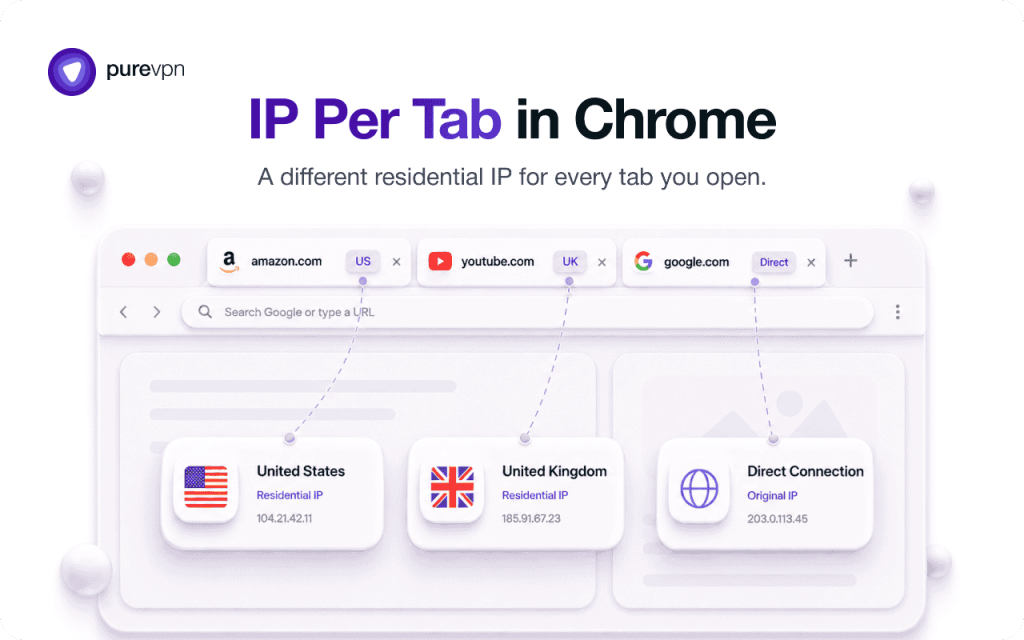
Most drop sites cap purchases at one pair per IP address, which normally means a shared connection wastes every task after the first. Proxy-per-tab removes that bottleneck: each tab looks like its own shopper to the site, and a ban on one tab doesn’t touch the others.
If you’re running multiple sneaker tasks from a single machine, PureVPN’s proxy-per-tab extension keeps them from sharing one IP, because each tab routes through its own independent connection inside the extension itself. That’s the difference between five checkout attempts and one IP burned five times.
Why Residential Proxies Are Essential for Sneaker Bots
Residential proxies route your internet traffic through real devices with legitimate IP addresses, making your bot activity appear as genuine user behavior. Sneaker retailers like Nike SNKRS, Foot Locker, and Supreme have implemented advanced bot protection systems. Residential proxies help you: Here’s how they enhance your sneaker botting strategy:
- High Stability: Residential proxies usually have stable network connections and high-speed bandwidth, ensuring efficiency during the buying process.
- High Anonymity: Residential proxies offer a highly anonymous network environment, making it difficult for sneaker websites to detect and block bots.
- Real Simulation: They simulate real user environments, including IP addresses, browser types, and operating systems, making bot operations closer to real user behavior.
- Avoid IP bans: By rotating through a pool of real IP addresses, you reduce the risk of being blocked.
- Bypass geo-restrictions: Access region-specific releases by appearing to connect from different locations.
- Maintain high success rates: Increase your chances of securing limited-edition sneakers during high-traffic drops.
Tips for Using Residential Proxies with Sneaker Bots
- Rotate Proxies Regularly: Avoid detection by changing IPs frequently.
- Use Multiple Proxies: Assign different proxies to each bot to reduce the chance of being flagged.
- Monitor Latency: Test proxies before drops to ensure they are fast enough.
- Avoid Proxy Blacklists: Choose providers that frequently update their IP pools to avoid blacklisted IPs.
- Choose the Right Locations: Select proxies from regions where the sneaker release is happening to avoid geo-blocks.
- Monitor Performance: Keep an eye on success rates and adjust your proxy settings as needed.
- Stay Updated: Sneaker sites frequently update their anti-bot measures; stay informed to adapt your strategies accordingly.
Related Read: Benefits of Residential Proxies
Why Get PureVPN’s Residential Network Add-on?
PureVPN’s Residential Network add-on assigns your bot traffic a genuine, ISP-issued residential IP from its US or UK pool, so checkout requests read as an ordinary shopper instead of automation. The pool rotates automatically, and it connects directly inside the PureVPN app with no manual proxy configuration — no separate dashboard, no IP whitelisting steps.
If a sneaker site bans on IP reputation, PureVPN prevents that ban by routing your traffic through a residential IP the site has no prior record of flagging. Bandwidth runs from 12GB to 50GB a month depending on plan, which covers a full drop calendar’s worth of checkout attempts without adding a separate proxy provider to the stack.
If you need a high-quality residential proxy for sneaker bots, PureVPN’s Residential Network add-on has got you covered:
- Genuine US or UK Residential IPs: Rotating IPs from real ISPs make your online traffic appear local and authentic. This way, you can avoid getting flagged by survey sites and enjoy smooth access.
- Best-in-Class Encryption: AES 256-bit encryption, the gold standard, is used to protect your connection from prying eyes, which adds an extra layer of security while you participate in surveys.
- Audited No-Log Policy: None of your online activities are tracked or stored, period. This means you can make money from surveys without having to worry about your personal data being logged.
- Ultra-Fast Connections: With speeds of up to 50 Gbps, surveys load quickly and run smoothly. This eliminates frustrating delays or disconnections, especially when you take longer surveys.
- 24/7 Customer Support: Around-the-clock support is available to help users with setup or troubleshoot issues. You will always have assistance when you need it for a seamless experience.
How to Set Up a Residential Proxy for Sneaker Bots
Just follow these simple steps to get started:
- Sign Up for PureVPN: First, visit the PureVPN website and sign up for an account. Make sure to include the Residential Network add-on to your plan.
- Download and Install PureVPN: After purchasing your subscription, download and install the PureVPN app on your device (Windows, Mac, iOS, Android, and more).
- Log into Your PureVPN Account: Open the app and log in using your credentials. This will give you access to all the features of PureVPN, including Residential Network.
- Connect to a Residential IP: In the PureVPN app, go to the server list. Select the Residential Network option to connect to a US or UK residential IP.
- Take Surveys: Your connection will now be routed through a US or UK residential IP address, allowing you to access surveys as if you are a regular user.
Frequently Asked Questions
Yes, residential proxies themselves are legal, but using them with sneaker bots may violate the terms of service of some websites. Always use them responsibly and understand the platform rules.
It depends on the number of tasks or accounts you’re running. Generally, you should have at least one unique IP per task to avoid bans.
Rotating proxies are ideal for avoiding bans during mass requests. Static proxies may be useful for account logins or sites with session tracking.
They offer better anonymity, rotate IPs to avoid detection, and can mimic real users, making them ideal for bypassing anti-bot protections on sneaker websites.

PureVPN

August 11, 2026

2 months ago


