Ever tried using a VPN only to find it suddenly won’t connect or gets blocked on your network? That usually happens because some networks can recognize and block standard VPN traffic. A stealth VPN is designed to solve this problem. It hides the fact that you are using a VPN by making your encrypted traffic look more like HTTPS traffic.
It can be useful on strict Wi-Fi networks at workplaces or schools as well as in countries with heavy internet restrictions. But how does it actually work, and is it really different from a normal VPN? Let’s break it down in simple terms.
What Is a Stealth VPN?
A stealth VPN is a VPN feature designed to disguise your VPN use. It is often referred to as VPN obfuscation, while some providers use their own name for it, such as Camouflage Mode. A regular VPN encrypts your traffic, so outside observers cannot read what you are doing online.
However, some networks may still recognize VPN traffic by looking at protocol patterns, packet behavior, or connection signatures linked to common VPN protocols. By using a stealth VPN, you can hide those markers, making it harder for deep packet inspection tools or firewalls to identify it as VPN traffic.
How Does a Stealth VPN Work?
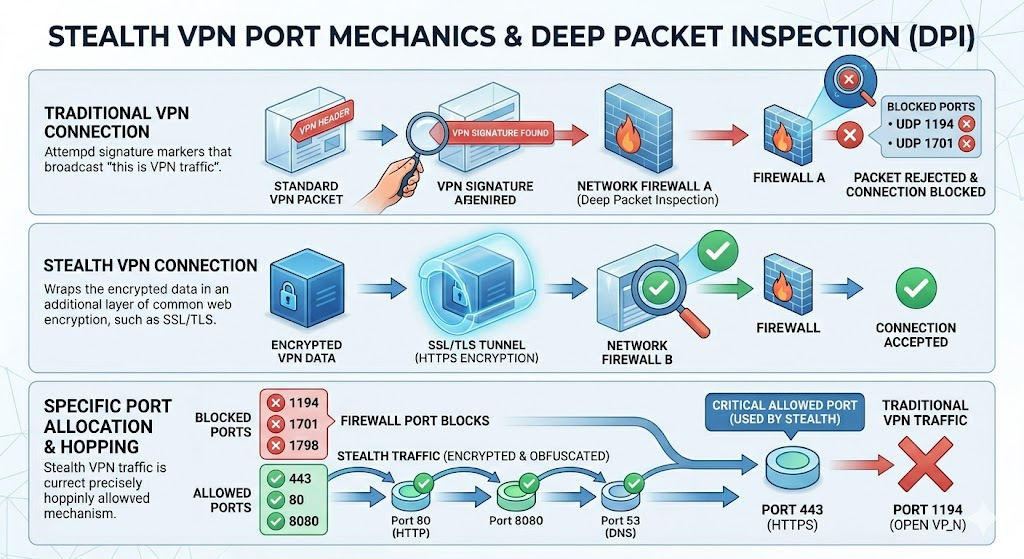
To understand how a stealth VPN works, it helps to look at how VPN traffic appears on a network. When you use a regular VPN, the connection may still show patterns that firewalls or Deep Packet Inspection (DPI) tools can recognize as VPN traffic.
A stealth VPN reduces those visible clues by changing how the VPN connection looks to the network. It can do this in a few ways:
- Masking VPN signatures: It hides or changes the patterns that make VPN traffic easier to identify, such as protocol fingerprints, handshake behavior, or other recognizable connection markers.
- Wrapping traffic in another layer: Some stealth methods wrap VPN traffic in an additional TLS-like layer, making it look closer to normal HTTPS browsing.
- Using common web ports: Stealth VPN traffic may use Port 443 (the same port used by HTTPS websites), making blocking the VPN harder because blocking that port could also disrupt normal secure web browsing.
By the time your traffic passes through a firewall, it looks less like standard VPN traffic and more like regular encrypted web activity.
Related Read: What Are VPN Ports? All You Need to Know
Why Would You Need a Stealth VPN?
You may need one when a regular VPN connection keeps getting blocked in situations like these:
- Your VPN is Blocked on a Restricted Network
Many corporate offices, universities, and managed networks use firewalls that can detect and block standard VPN traffic. If your regular VPN fails to connect, a stealth VPN can help by making the connection harder to identify as VPN traffic.
- Public Wi-Fi Blocks or Limits VPN Connections
Public Wi-Fi networks at airports, hotels, and cafes may restrict VPN connections or certain types of encrypted traffic to manage network use. An obfuscated connection lets you get around those restrictions more reliably.
- Your Internet Access is Affected by Censorship or Filtering
In regions with strict internet filtering, access to foreign websites, social media apps, or independent news outlets may be restricted. Standard VPN connections may also be detected and blocked. A stealth VPN can be a useful option to access the open internet in these regions.
- Standard VPN Protocols are Being Detected
Some networks can detect traffic patterns linked to common VPN protocols such as OpenVPN or WireGuard. When a regular VPN connection is instantly identified and blocked, switching to a stealth or obfuscated mode can make the connection harder to detect.
Stealth VPN vs. Regular VPN – What’s the Difference?
A regular VPN protects your traffic, while a stealth VPN also hides the signs that you are using a VPN. Here’s how they differ:
| Regular VPN Connection | Stealth VPN (Obfuscation) |
| Encrypts your internet traffic | Encrypts traffic and adds obfuscation |
| VPN traffic may still be recognizable | VPN traffic is made to look more like regular HTTPS traffic |
| Can be detected by some DPI tools and firewalls | Harder for DPI tools and firewalls to identify |
| Usually faster with less overhead | May be slightly slower because of extra masking |
| Best for everyday privacy, public Wi-Fi, streaming, and downloads | Best when VPN traffic is blocked, restricted, or filtered |
How to Use Stealth VPN with PureVPN
Not all VPN providers support obfuscation. PureVPN lets you use obfuscation by switching to OpenVPN inside the app. Just follow these steps to use it:
- Launch PureVPN on your device and log in.
- Go to Settings and look for the protocol options.
- Turn off Automatic Protocol Selection and choose either OpenVPN TCP or OpenVPN UDP.
- Open the server list, choose your location, and your VPN traffic will be obfuscated upon connection.
Final Thoughts
Standard VPNs work well for everyday privacy, but some networks can still detect and block regular VPN traffic. A stealth VPN helps in those situations by making the connection harder to identify as VPN traffic. It is not something every user needs all the time, but it can be useful on restrictive networks, public Wi-Fi, or in places where standard VPN connections fail.
Frequently Asked Questions
Using a VPN with stealth or obfuscation features is legal in many countries. However, VPN rules vary by location, and some countries restrict or regulate VPN use more heavily. If you are traveling, it is best to check local laws before using any VPN feature.
Yes, a stealth VPN can cause a small speed drop because it adds extra obfuscation to the VPN connection. The exact impact depends on your server location, protocol, network quality, and device.
Yes, stealth VPN and VPN obfuscation refer to the same idea of hiding or disguising VPN traffic. Some providers use their own names, such as Camouflage Mode. The goal is similar, but the exact method can vary by provider.
No, your ISP cannot see the actual websites, messages, videos, or apps you use through the VPN. It may only see that encrypted data is moving from your device. Stealth mode helps make that encrypted connection look less like a normal VPN connection.
Yes, streaming platforms like Netflix can sometimes detect VPN usage, even when obfuscation is enabled. Stealth VPN features are mainly designed to make VPN traffic harder for networks and firewalls to identify. They do not guarantee access to every streaming platform.
No, not all VPNs include stealth mode, obfuscation, or similar features. These tools are more common in premium VPN services because they require extra protocol support and infrastructure. Free VPNs often have fewer advanced connection options.
The main purpose of a stealth VPN is to make VPN traffic look less like standard VPN traffic. It helps when regular VPN connections are blocked, filtered, or detected by firewalls and DPI systems. It is mainly useful on restrictive networks where normal VPN traffic may fail.