
Browser profiles and per-tab proxies solve two different problems inside the same browser.
A browser profile separates your cookies, saved sessions, and identity signals from other profiles on the same machine, but it does not change the IP address the website sees.
A per-tab proxy assigns a different IP address to each browser tab at the same time, but it does not separate the cookie or session data between those tabs.
Most professionals working across multiple geographies pick one tool and discover it only solves half their problem. Understanding what each tool actually does at the technical layer is what prevents that mistake.
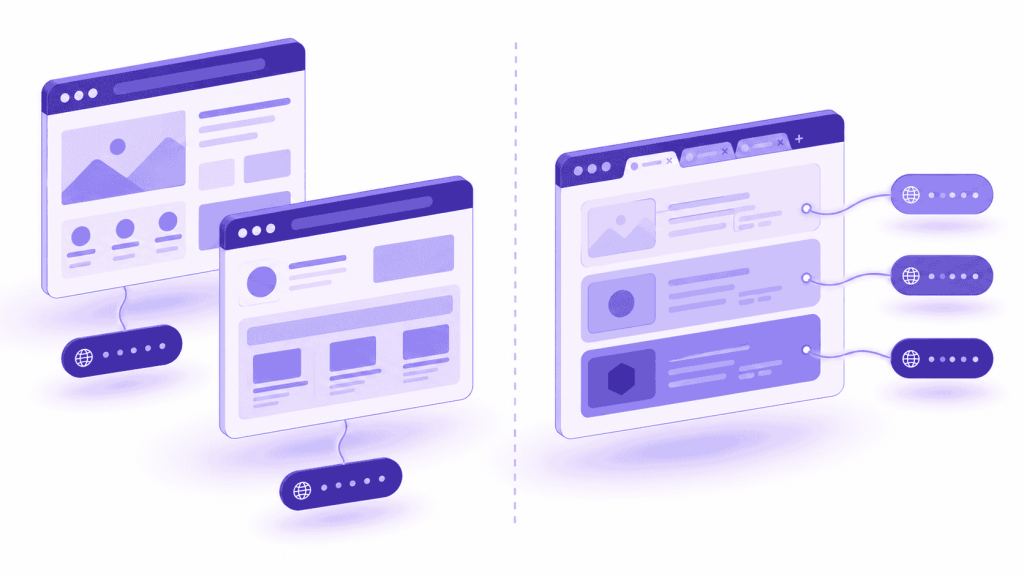
What a Browser Profile Isolates: What It Covers and What It Does Not
A browser profile creates a separate session container inside your browser. Each profile gets its own cookies, local storage, browsing history, saved passwords, and installed extensions. When you open a tab inside Profile A and another tab inside Profile B, neither tab can read the other’s session data. The two profiles behave like two completely separate users on the same machine.
What a browser profile does not do is change your IP address. Both profiles send traffic from the same network location. A website tracking visitors by IP address still sees one machine behind both sessions, regardless of how many profiles exist on that device.
According to EFF’s Cover Your Tracks research (2025), 83.6% of browsers carry a fingerprint unique enough to identify them across sessions. Browser profiles were built specifically to address that fingerprint-level tracking problem. The IP address is a separate signal, and profiles leave it completely unchanged.
What a browser profile isolates:
- Cookies and session tokens, kept separate per profile
- Local storage and browser cache, kept separate per profile
- Saved passwords and autofill data, kept separate per profile
- Installed extensions and their configuration, kept separate per profile
- Browsing history, kept separate per profile
What a browser profile does not change:
- The IP address your traffic originates from
- The network location visible to every website you visit
- The device-level hardware signals that identify your physical machine
What Changes When You Add a Proxy to a Browser Profile
Pairing a proxy with a browser profile adds IP isolation on top of the session isolation the profile already provides. Profile A routes through a UK residential IP. Profile B routes through a US residential IP. The two sessions are fully separated at both the session layer and the network layer.
The overhead this creates is the problem. Every geographic location you want to work from simultaneously requires its own profile, its own proxy assignment, and its own browser window.
Moving between locations means switching windows, not switching tabs. For workflows where a professional needs to compare content across multiple locations at the same time, switching cost compounds quickly.
What Per-Tab Proxy Isolation Does: Capabilities and Limits
A per-tab proxy assigns a different IP address to each browser tab while keeping all those tabs inside the same Chrome session. Tab 1 routes through a UK residential IP. Tab 2 routes through a US residential IP. Both tabs sit in the same window at the same time, and switching between them requires no profile management and no window switching.
What a per-tab proxy does not do is create a separate cookie store between tabs or modify the browser fingerprint. All tabs under a per-tab proxy share the same session layer. A cookie set in Tab 1 is visible to Tab 2. Both tabs present the same device fingerprint to every website they visit.
A study analyzing over two million browser fingerprints found that 33.6% were unique enough to identify a specific browser without any additional tracking signals (NodeMaven, 2025).
For workflows where separate accounts must stay completely isolated from each other at the identity level, that shared fingerprint creates a linkability risk that per-tab proxy routing does not address. Per-tab proxy was built for the geographic IP layer, not the identity isolation layer.
When Shared Session State Does Not Create a Problem
For a broad range of professional workflows, the absence of cookie isolation or fingerprint separation between tabs is completely irrelevant. The person working across those tabs is the same user. The accounts being accessed are the same. The goal is to see how a page, ad, or search result renders differently depending on the geographic location the request comes from, not to operate separate identities in parallel.
Per-tab proxy fully covers these workflows:
- A QA engineer verifying that a pricing page shows the correct currency and tax rate for UK and US visitors at the same time, using the same test account in both tabs
- An SEO professional checking whether a target keyword produces different organic results in Google UK versus Google US, with both tabs open and refreshable simultaneously
- An ad verification analyst confirming that a campaign is delivering in a target market by loading the destination URL from a residential IP registered in that region
- An e-commerce researcher comparing how a product listing appears on a marketplace from two different regional IPs, checking for pricing or availability differences between markets
In every case above, the same person is doing the work across all tabs. Session separation between tabs would add no functional benefit and would require a full profile management workflow to achieve.
Browser Profiles vs. Per-Tab Proxy: A Direct Comparison
Browser profiles and per-tab proxies differ in what they isolate, how much setup they require, and which workflows they serve. The differences become especially clear when both tools are placed side by side across the dimensions that matter most in professional multi-session work.
| Feature | Browser Profile with Proxy | Per-Tab Proxy (IP Per Tab) |
| IP isolation | Yes, one IP per profile | Yes, one IP per tab |
| Session and cookie isolation | Yes, fully separated per profile | No, all tabs share one session |
| Browser fingerprint isolation | Yes, with antidetect tools | No |
| Setup required per geographic location | Create profile, assign proxy, open new window | Select IP from dropdown in extension |
| Works inside your existing Chrome window | No, requires a separate window per profile | Yes, all tabs stay in one window |
| Monthly software cost | $9 to $150 or more per month plus proxy bandwidth | Free extension, pay-as-you-go bandwidth only |
| Best suited for | Separate account identities, fingerprint-sensitive workflows | Geo verification, SERP comparison, ad confirmation, QA geo-testing |
The cost difference between the two approaches reflects what each tool is built to do. Antidetect browser tools with profile management start at around $9 per month on annual billing for basic tiers, with enterprise-grade plans running considerably higher, and residential proxy bandwidth is priced separately on top of the software cost.
IP Per Tab by PureVPN is a free Chrome extension where the only cost is the residential proxy bandwidth consumed, billed on a pay-as-you-go basis.
Which Tool Fits Your Workflow: A Decision Framework
The right tool depends on two questions about your workflow. First, do the sessions you are running need to stay completely isolated from each other at the account and identity level? Second, do you need to view multiple geographic locations simultaneously, or are you moving between them one at a time?
Use a browser profile tool when:
- You are accessing the same platform under different account credentials and those accounts must not share any cookie or session data
- Session data shared between tabs would create a conflict or a detection risk at the platform level
- Each session needs to present a distinct device fingerprint to the platform it is connecting to
Use a per-tab proxy when:
- You need to see how a single page, ad placement, or search result renders from different geographic locations at the same time
- You are comparing geo-specific pricing, product listings, or content side by side in one browser window
- Setting up a new geographic view needs to take seconds, not minutes
- You work inside Chrome and do not want to manage a second browser application running alongside it
Use both together when:
- You maintain separate account sessions across different browser profiles, and within one of those sessions you also need to verify how geo-specific content renders for that account’s region
How IP Per Tab by PureVPN Handles the Geographic IP Layer
IP Per Tab by PureVPN is a Chrome extension that assigns a different residential IP address to each browser tab from a dropdown inside the extension popup. There is no proxy credential entry required.
There is no IP address, port number, username, or password to configure manually. The extension applies each tab’s assigned IP in under three seconds, and the assignment persists across browser restarts through Chrome’s local storage.
IP Per Tab does not modify the browser fingerprint. It does not create a separate cookie store per tab. For workflows where those two capabilities matter, specifically for workflows where accounts must be genuinely isolated at the identity level, a browser profile tool with a separately configured proxy is the correct choice.
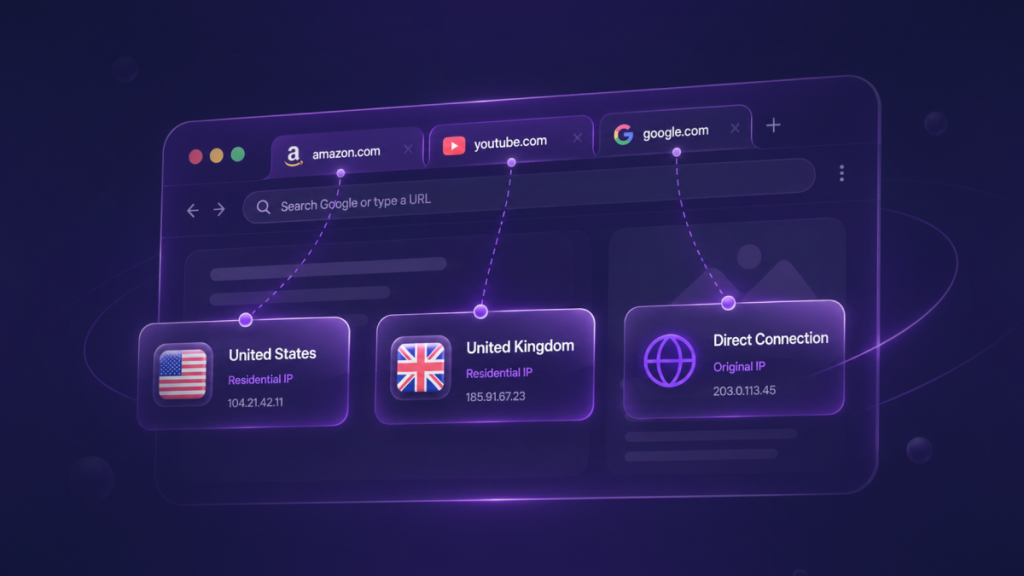
IP Per Tab addresses the geographic IP routing layer specifically, and it does that job without any of the profile creation overhead that makes browser profile tools slow to use for ad-hoc geo-verification work.
PureVPN’s residential proxy infrastructure powers the IP assignments inside IP Per Tab, which means the addresses websites receive are registered as genuine residential IPs rather than data center addresses.
Platforms that serve different content to residential versus data center traffic, including most major search engines, ad networks, and e-commerce marketplaces, return results that reflect what real local users in that region actually see.
For geo-verification workflows, IP Per Tab by PureVPN removes the profile management layer entirely.
Frequently Asked Questions
No. A per-tab proxy changes the IP address each tab uses but does not isolate cookies, local storage, or session data between tabs. For workflows where separate account sessions must not share any state, a browser profile with its own proxy assignment is the correct tool. A per-tab proxy handles geographic IP routing, not account-level session separation.
No. A Chrome browser profile creates a separate session container that isolates cookies, history, and storage, but it does not route traffic through a different IP address. IP isolation requires a proxy or VPN assigned to that profile separately. A profile with no proxy configured still sends traffic from your real IP address.
A per-tab proxy assigns a different IP to each tab inside a standard browser, routing traffic through different geographic locations at the same time. An antidetect browser creates fully separate browser instances, each with its own device fingerprint, cookie store, proxy assignment, and session data.
No. A VPN routes all browser traffic through a single encrypted tunnel from one location, applying the same IP to every tab and every application running on the device. IP Per Tab assigns a different residential IP to each individual browser tab simultaneously, without a VPN tunnel and without device-level routing.
Session isolation matters when the same platform is accessed under different account credentials in separate tabs and those accounts must not share cookies or session data.
A per-tab proxy extension uses Chrome’s proxy API to apply a different proxy configuration when the user focuses each tab. The extension reads the stored proxy assignment for the active tab and updates the browser’s active proxy to match, typically within 300 milliseconds of the tab focus event.

Arsalan Rashid

September 3, 2026

1 month ago


