
Streaming platforms have become harder to access with a VPN. Many now monitor VPN traffic, block shared IP addresses, and show errors when they detect that a viewer is trying to access content from another region.
The reason usually comes down to licensing. Streaming services do not always own the same rights in every country, so they limit certain movies, shows, and live events by location. That is why a VPN that worked last month may suddenly stop working on Netflix, Hulu, BBC iPlayer, Disney Plus, or another platform.
Fortunately, you do not need complicated tools to fix this. Find out how you can overcome VPN detection on streaming sites and resume watching your favorite movies and TV shows without interruptions.
Why Streaming Sites Block VPNs
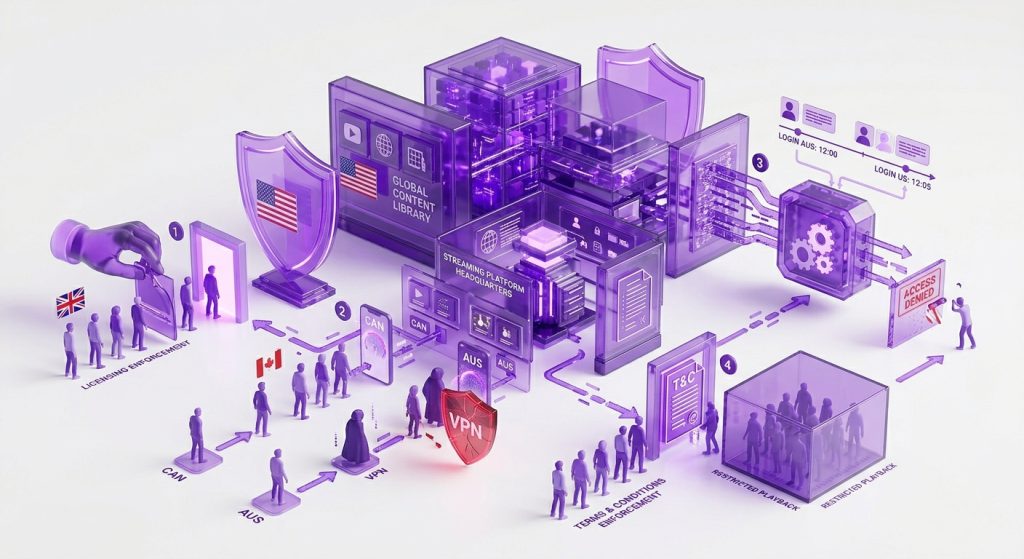
Streaming platforms have become stricter with VPN traffic for several reasons, including:
Enforcing Regional Licensing Agreements
Streaming services do not always own the same content rights in every country. A show available on Netflix US may not appear on Netflix UK, Canada, or Australia because each region has its own catalog.
A VPN can change the apparent location of a viewer by routing traffic through another country. Streaming platforms try to detect that traffic because they have to follow licensing deals with studios, sports leagues, and content distributors.
Managing Access to Country-Specific Libraries
Streaming platforms often have different libraries in different countries because content rights, local rules, and audience demand can vary by market. Content, pricing, language options, subtitles, and release dates can all change by region.
That is why streaming sites monitor IP addresses, DNS activity, device location signals, and repeated VPN server use. If too many viewers appear to be using the same server, the platform may flag that IP address and block playback.
Preventing Account Abuse and Suspicious Access
VPN detection is also part of many streaming platforms’ anti-abuse systems. A login from one country, followed by another login from a different country a few minutes later, can look suspicious.
Streaming services may treat frequent location changes as a sign of account sharing, credential theft, automated login attempts, or other risky behavior. In some cases, they block the stream even if the account owner is legitimate.
Complying With Platform Terms and Distribution Rules
Many streaming services mention VPN or proxy use in their terms of service. Some platforms may restrict playback when they cannot confirm a viewer’s real location, especially if the connection appears to come from a shared or suspicious IP address.
VPN blocks are not always just about content libraries. They also help platforms enforce their own rules, meet distribution obligations, and avoid serving content in regions where they do not have permission to show it.
How Do Streaming Services Detect VPNs
Streaming sites use multiple checks to detect VPN traffic, such as:
Blocking Known VPN Server IPs
This is one of the most common VPN detection methods. Streaming platforms keep track of IP addresses linked to VPN servers and may block playback when traffic comes from them.
Shared VPN servers are easier to flag because many users can appear under the same IP address. If hundreds of viewers seem to be streaming from one server, the platform may treat that IP as a VPN endpoint and block it.
Restricting Traffic From VPN Ports
Some VPN protocols use ports and traffic patterns that are easier to recognize. Older protocols like PPTP and L2TP are easier to identify, while some OpenVPN configurations may also stand out on stricter networks.
Streaming services do not need to read the encrypted traffic itself. In some cases, they only need to detect patterns that suggest the connection is coming through a VPN tunnel.
Identifying IP and GPS Mismatches
Streaming apps can compare more than one location signal, especially on mobile devices. If those signals do not match, the app may flag the session or block playback.
For example, your VPN may show a German IP address, while your phone’s GPS, device region, or account settings point to another country. To a streaming app, that mismatch can look suspicious.
Using Deep Packet Inspection
Deep Packet Inspection, or DPI, checks the structure and behavior of internet traffic. It does not decrypt your VPN traffic, but it can sometimes identify that a VPN is being used.
DPI may look at packet size, timing, protocol behavior, and encrypted traffic patterns. Some networks use it to restrict VPN traffic before it reaches the streaming platform, which is why changing protocols can sometimes help.
Ways to Overcome VPN Detection on Streaming Sites
Streaming sites keep updating their detection systems to limit access from unsupported regions. Still, you can reduce VPN errors by taking the following measures:
Switch to a Different VPN Server
Switching to another VPN server is usually the first fix to try. If one server has already been flagged by a streaming platform, another server in the same country may still work.
You can also try a less crowded server, a recently added server, or a server recommended for streaming. A fresh server gives you a better chance of avoiding an IP address the platform has already flagged.
Change Your VPN Protocol
Some VPN protocols are easier to detect because of their ports, traffic patterns, or older configurations. PPTP and L2TP are outdated options, while WireGuard is usually better for speed and everyday streaming.
If a streaming site keeps detecting your VPN, try switching protocols inside the VPN app. OpenVPN TCP can sometimes work better on stricter networks, while obfuscated OpenVPN is useful when the network is actively trying to identify VPN traffic (more on this later).
Turn Off GPS or Location Services
Your device location can sometimes conflict with your VPN location, particularly on mobile apps. So, if your VPN shows a US IP address, but your phone’s GPS may still indicate that you are in France, you are likely to get blocked.
Turning off GPS or location permissions for the streaming app can reduce this mismatch. You can also check your device region, browser location permissions, and app settings if the platform keeps showing location errors.
Clear Browser Cache and Cookies
Your browser can store location-based data from previous sessions. Even after you connect to a VPN, old cookies, cached files, and saved site permissions may still point to your actual region.
Clearing cookies, cache, HTML5 geolocation permissions, and previous session data can help reset those signals. You can also try a private browsing window, but clearing old browser data is usually the better first step.
Enable Obfuscation
Obfuscation makes VPN traffic look closer to regular HTTPS traffic. They do not remove encryption. Instead, they hide the obvious signs that a VPN tunnel is being used.
This can help on networks that use VPN filtering or Deep Packet Inspection to identify encrypted tunnels. Many VPN providers call this feature stealth mode, obfuscation mode, or obfuscated servers.
Use a Dedicated IP Address
A dedicated IP address is assigned to one user instead of being shared by many people at the same time. That can make the connection look less crowded than a regular shared VPN server.
A dedicated IP may reduce suspicious traffic patterns because hundreds of viewers are not using the same IP address at once. However, it is not a guaranteed fix for every streaming site, since platforms can still check location signals, account region, payment region, and other details.
Frequently Asked Questions
Many major streaming services can detect and block VPN traffic, including Netflix, Disney Plus, Hulu, BBC iPlayer, Amazon Prime Video, Peacock, Max, and DAZN. The level of detection varies by platform, region, server, and device.
Most streaming sites do not permanently ban users just for using a VPN. They usually show a VPN or proxy error and stop playback until the connection changes. To avoid repeated errors, switch to another VPN server, clear cookies, and reopen the streaming site. Repeatedly retrying the same blocked IP address can make the issue worse.
Each streaming site uses its own detection system. Some focus on known data center IP addresses, while others check GPS signals, DNS activity, account region, or repeated traffic from the same VPN server. That is why one VPN server may work on one platform but fail on another.
A dedicated IP can reduce some VPN detection issues, but it does not guarantee access to every streaming site. It is used by one user instead of many users at once, so it may avoid the shared-IP pattern that some platforms flag.
Common signs include a “proxy detected” error, playback stopping suddenly, content disappearing from the library, repeated CAPTCHA checks, or a message asking you to turn off VPN or privacy tools.

Arsalan Rashid

June 18, 2026

3 months ago


