Many Metronet residential customers are placed behind Carrier-Grade NAT (CGNAT) by default, which blocks inbound port forwarding and prevents public IPv4 reachability. For home users who want hosting, remote access, or reliable peer-to-peer connections, the main workarounds are purchasing a static IP from Metronet, using IPv6 (if available), or relying on tunneling services (VPNs, Tailscale, Cloudflare Tunnel).
There simply aren’t enough IPv4 addresses to give every household a unique one. CGNAT is how ISPs stretch what’s left, but it creates real limitations for advanced users. Metronet is one such provider that commonly uses CGNAT for residential accounts. Understanding what CGNAT does, why Metronet uses it, and what you can do about it will save you hours of frustration.
What Is CGNAT and Why Metronet Uses It?
CGNAT (Carrier-Grade Network Address Translation) places an extra NAT layer inside the ISP’s network. Instead of your home router holding a public IPv4 address, your router gets an RFC 6598 / CGN private address and the ISP translates many customers’ traffic through a smaller pool of shared public IPv4s.
This works fine for most browsing and streaming, but it breaks services that need inbound connections, such as hosting a game server, using remote desktop, VoIP/P2P apps that require NAT traversal, or port forwarding.
Metronet explicitly states that, due to IPv4 scarcity, it uses CGNAT for DHCP-assigned addresses. To provide a public routable IPv4 when needed, it offers static IPs, usually as business plans or paid add-ons. Community reports and forum threads from customers corroborate that CGNAT is the default for many residential accounts.
How CGNAT Affects Everyday Users?
For most people, CGNAT is invisible: Netflix, YouTube, and cloud backups all work without issue. Problems appear only when you need to accept inbound connections:
- Home NAS or game servers become unreachable from the wider internet without a public IP.
- Remote access tools (unless using relays or a cloud broker) can’t reach your machine directly.
- Peer-to-peer gaming or voice apps can suffer higher latency or connection failures when proper NAT traversal fails.
- Advanced setups (pfSense, UTM boxes, advanced port forwarding) can’t complete typical port mapping.
Can You Get Around Metronet’s CGNAT?
Yes, but there are trade-offs. Here are the typical options customers use, with pros and cons.
| Option | What it does | Pros | Cons |
| Buy Metronet static/public IPv4 | ISP assigns a unique public IPv4 to your connection (usually paid) | Restores full inbound reachability and port forwarding; simplest for hosting | Extra monthly cost; may require business-plan provisioning. |
| Ask support (complain) | Some users report Metronet grants a free static IP temporarily after asking | Low-cost way to get a public IP for a time | Not guaranteed; may be temporary or require repeated requests |
| IPv6 (native) | Use a public IPv6 address for direct reachability | Future-proof, no NAT, abundant addressing | Metronet’s IPv6 rollout is limited in many markets; not all services/peers support IPv6. |
| VPN / Tunneling (Cloudflare/Tailscale/VPN) | Tunnel your machine to a publicly reachable endpoint | Works without ISP changes; often free/cheap | Adds latency, depends on a third party, and may require extra setup. |
| Host in the cloud | Move services to VPS/cloud providers with public IPs | Robust, scalable, no ISP dependency | Ongoing cloud costs and migration effort. |
Ways to Get Around Metronet CGNAT
Log into your router/ONT and check the WAN IPv4. If it’s in the 100.64.0.0/10 range, you are behind CGNAT. Here are some ways you can get around it:
- Request a Static IP: Ask whether your connection is behind CGNAT and what the static/public IPv4 options are (cost, provisioning time). Metronet’s support pages and business FAQ walk through ordering static IPs.
- Consider IPv6: Ask whether Metronet offers IPv6 in your market. If available and supported by your devices and apps, IPv6 can eliminate the problem entirely. Community reports suggest Metronet’s IPv6 availability varies by market.
- Use a Tunneling Service: Tools like Cloudflare Tunnel or Tailscale create a secure outbound connection from your device to a public endpoint, which lets you expose services (web apps, SSH, RDP) without needing a public IP from Metronet.
- Host in the Cloud: For critical services, consider moving hosting to a VPS or cloud provider with a public IPv4. This avoids CGNAT entirely but adds ongoing costs and migration effort.
- Get a VPN: Some VPN providers offer port forwarding or dedicated IPs that can restore inbound connectivity lost under CGNAT. This works well for gaming and peer-to-peer apps, though it might introduce some extra latency.
How to Use PureVPN to Get Around Metronet CGNAT
Metronet’s CGNAT blocks inbound connections, but PureVPN with Port Forwarding can give you a public-facing endpoint. Here’s how to set it up:
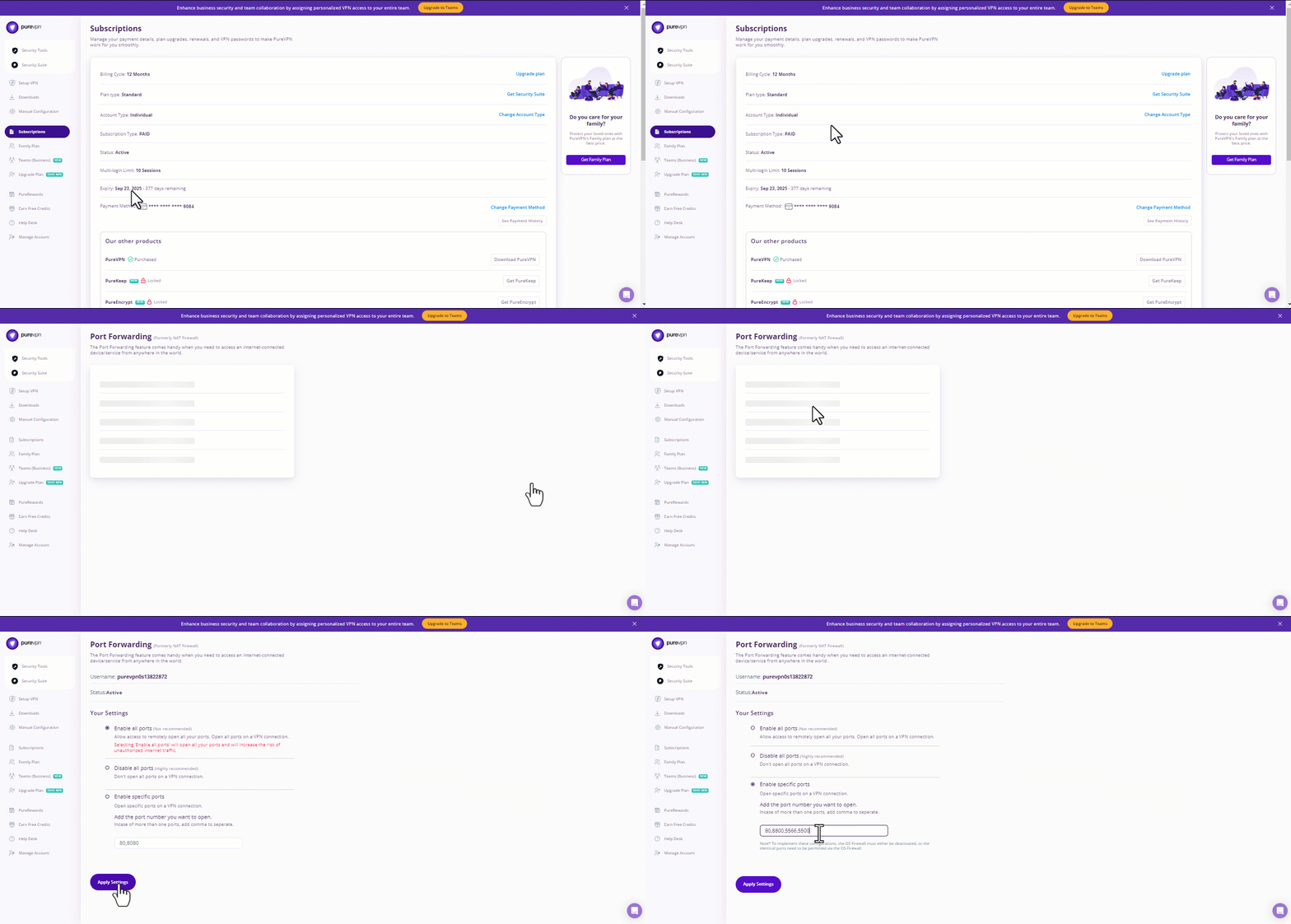
- Subscribe to PureVPN: Add the Port Forwarding add-on when signing up. This creates a routable IP path for your apps and services.
- Install and log in: Download the PureVPN app for your device, install it, and log in with your account.
- Enable Port Forwarding: In the PureVPN Member Area, go to Subscriptions and click Configure under Port Forwarding.
- Choose your ports: Select Enable specific ports and enter the ports you need to open (for gaming, hosting, or remote access).
- Connect through PureVPN: Use a port forwarding–enabled server, and your services will now be reachable despite Metronet’s CGNAT.
Note: For the closest experience to a static public IPv4, you can get PureVPN’s Dedicated IP + Port Forwarding add-on. Unlike shared VPN servers, this gives you one fixed IP address that only you use, plus control over which ports remain open
Final Take
If you’re a typical consumer who only browses, streams, and uses social apps, Metronet’s CGNAT will likely go unnoticed. If you run servers, host games, or need stable inbound connections, CGNAT is a real operational limitation but not an insurmountable one. Metronet provides a path to public IPv4 via static IPs for customers who need it. For others, VPNs with port forwarding, tunneling tools, and cloud-hosting providers offer practical workarounds until IPv6 matures into a complete, universal solution.

PureVPN

September 25, 2025

6 months ago