A VPN can help protect your internet traffic and mask your real IP address, but it still needs the right configuration to work properly. In simple terms, a VPN configuration refers to the settings behind a working VPN connection.
Most VPN apps handle these settings automatically, so you do not always need to adjust them yourself. But if manual changes are ever required, knowing the basics can help you choose the right option. In this guide, we’ll break down what a VPN configuration is, why it’s important, and how you can configure a VPN properly.
What is a VPN Configuration?
In simple words, VPN configuration is a set of settings that allows your device to connect to a remote VPN server. These options tell the VPN which server to use, what protocol to follow, how to handle DNS requests, and other connection details. You can either configure a VPN automatically through an app or enter the details manually when needed
Why Does VPN Configuration Matter?
The right VPN configuration helps your connection stay secure, stable, and leak-free. Learn why it makes a difference:
Helps Your VPN Connect Properly
A correct VPN configuration helps your device connect to the VPN server without errors. If the server address, protocol, credentials, or connection settings are wrong, the VPN may fail to connect, disconnect often, or get stuck while trying to establish a secure connection.
Affects Privacy and Encryption
Your VPN configuration also influences how your connection is protected. Choosing a secure protocol and keeping the right encryption settings in place helps protect your data from being read by outsiders, especially on public Wi-Fi or unsecured networks.
Reduces DNS and IP Leak Risks
Misconfigured DNS or IP settings can expose information your VPN is supposed to protect. For example, a DNS leak may reveal the websites your device is trying to reach, while an IP leak may expose your real IP address. A proper VPN configuration helps reduce these risks.
Impacts Speed and Performance
VPN speed can also depend on configuration choices. The protocol you use, the server location you select, and how DNS requests are handled can all affect performance. The right configuration helps balance privacy, stability, and speed without making the connection harder to use.
Key Parts of a VPN Configuration
Most VPN configurations include a few basic details. Here’s what each one controls:
VPN Protocol
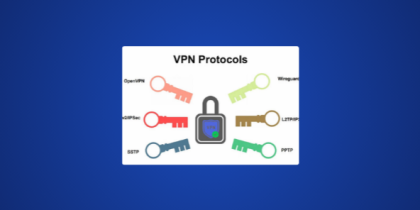
A VPN protocol decides how your device communicates with the VPN server. It can affect speed, stability, encryption, and compatibility across networks and devices. Some well-known options include WireGuard, OpenVPN, and IKEv2/IPsec. Check their pros and cons in our comparison of the best VPN protocols.
Server Address
A server address tells your device where to connect. For manual configurations, this may appear as a hostname, IP address, or domain name in your VPN provider’s “Support Center” or “Manual Setup” pages. If you are using a VPN app, you will find the server address after connecting to a location from the server list.
Authentication Details
Authentication details are used to confirm that you are allowed to connect to the VPN. For most VPN apps, this usually means signing in with your account credentials. Manual or business VPN configurations may require additional details, such as authentication keys, certificates, or multi-factor authentication.
DNS Settings
DNS settings decide how website requests are handled while the VPN is connected. Correct DNS configuration helps make sure those requests go through the VPN instead of your ISP’s DNS servers. Many reliable VPNs use private DNS servers by default, while some services also let users customize DNS settings manually.
VPN configurations can also include other settings, such as encryption preferences, kill switch behavior, and split tunneling rules. These depend on the VPN provider, device, and whether you are using an app or manual configuration.
VPN Configuration Files Explained
A VPN configuration file stores the settings needed to create a VPN connection. Instead of entering every server detail, certificate, or protocol option manually, you can import the file into a compatible VPN client.
VPN configuration files are often used for manual VPN setups, business or corporate VPN connections, and installing VPN on routers. Common VPN configuration file types include:
- .ovpn files for OpenVPN
- .conf files for WireGuard
- Mobile VPN configuration profiles
- XML-based VPN configurations
For example, if you want to connect to PureVPN through the OpenVPN client, you can download the relevant OpenVPN configuration files and import them instead of entering each detail manually.
App-Based VPN Configuration vs Manual VPN Configuration
The table below highlights how app-based and manual VPN configuration compare:
| Feature | App-Based VPN Configuration | Manual VPN Configuration |
| How it works | The VPN app handles most settings automatically | You enter server, protocol, DNS, and authentication details yourself |
| Technical knowledge needed | Low | Moderate to advanced |
| Customization | Limited to in-app options | More control over protocols, servers, ports, and certificates |
| Error risk | Lower because the app applies most settings | Higher because incorrect details can stop the VPN from connecting |
| Commonly used for | Phones, laptops, and desktops | Routers, OpenVPN/WireGuard clients, and business VPNs |
| Best for | Everyday users who want quick protection | Users who need custom connection details |
When Do You Need to Configure a VPN Manually?
Manual configuration is useful when the VPN app is not the best option, such as when you need to:
- Configure a VPN on a router using OpenVPN or WireGuard files.
- Use a device without VPN app support, such as a smart TV, gaming console, or some router models.
- Choose advanced settings like protocols, ports, DNS servers, or routing rules.
- Work around app issues when the VPN app does not connect properly on a specific device.
How to Configure a VPN on an iPhone
The easiest way to configure a VPN on iPhone is through a VPN app:
- Download an iOS VPN app from the App Store.
- Sign in with your account credentials.
- Allow VPN permissions when prompted.
- Choose your desired location and connect.
How to Configure a VPN on Android
Likewise, using a VPN app is the quickest way to configure a VPN on Android:
- Download an Android VPN app from the Play Store.
- Sign in with your account credentials.
- Open the list of available servers.
- Choose your preferred location and connect.
Common VPN Configuration Problems
VPN configuration issues usually come down to incorrect details, unsupported options, or connection conflicts. Here are the common ones to watch for:
- Invalid VPN configuration: This usually appears when the server address, VPN type, or required fields are entered incorrectly.
- Connection failure: The VPN may fail to connect if the server is unavailable, your internet connection is unstable, or the credentials are wrong.
- Authentication error: This happens when the username, password, certificate, or login details do not match what the VPN provider requires.
- Unsupported protocol: Some devices do not support every VPN protocol, so choosing the wrong one can stop the connection from working.
- DNS or IP leaks: These can happen when DNS, IPv6, or leak protection settings are not handled correctly.
- Slow connection: Speed can drop if you choose a distant server, use a slower protocol, or connect through a crowded network.
Final Thoughts
VPN configuration is what keeps a VPN connection working the way it should. For most users, the app handles that automatically, from server selection to protocol and DNS handling. Manual configuration only matters when you need more control, want to use a router, or connect through a separate VPN client.
Frequently Asked Questions
VPN configuration gives your device the details it needs to connect to a VPN server. These details can include the server address, VPN protocol, DNS settings, and authentication information. In most VPN apps, this happens automatically once you sign in, choose a location, and connect.
The easiest way to configure a VPN connection is to use a VPN app. Install the app, sign in, choose a server location, and connect. If you are configuring a VPN manually, you will need details from your VPN provider, such as the server address, VPN type, username, password, or configuration file.
For most users, app-based configuration is best because the VPN provider handles the server, protocol, DNS, and security settings automatically. Manual configuration is better for routers, business VPNs, custom clients, or users who need more control.
Yes, you can configure your own VPN if your device or VPN client supports manual configuration. You will need the correct server details, protocol, login credentials, and sometimes a configuration file or certificate.