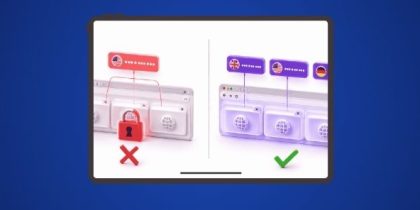
Searching for a FoxyProxy alternative because you’ve hit the four-proxy limit on tab assignment, or because entering proxy credentials manually for every server is taking too long?
FoxyProxy already lets you assign a different proxy to individual tabs, but that mode caps out at four proxy servers across four tabs, and every proxy has to be sourced separately and entered by hand.
IP Per Tab is more than a proxy switcher, and is built around a different model: it assigns a residential IP to any open tab with no fixed tab limit, and the proxies come included with the plan instead of being sourced separately.
Here’s a full feature-by-feature breakdown of both tools, so you can decide which one fits how you actually work.
PureVPN’s IP Per Tab vs FoxyProxy
| Feature | FoxyProxy | IP Per Tab by PureVPN |
|---|---|---|
| Per-tab proxy assignment | Up to 4 proxy servers across 4 tabs | No fixed tab limit |
| Domain-based auto-assignment | URL pattern matching changes the active browser-wide connection | Domain Rule Engine assigns only the matching tab |
| Proxy source | Bring your own, or buy separately from any vendor | Residential IPs included in the connected PureVPN plan |
| Setup per proxy | Manual: server, port, protocol, username, password | Sign in, assign from a dropdown |
| WebRTC leak protection | Included | Included |
| Cost | Free extension, proxies priced separately | Free extension, plans from $19.92/month |
| Support | Open-source, community-maintained | 24/7 support tied to a PureVPN account |
Proxy Scope: How Many Tabs Can Each Tool Run on Different Proxies?
FoxyProxy’s per-tab mode assigns individual proxies to tabs, but FoxyProxy limits this feature to 4 proxy servers across 4 different tabs at once. A 5th tab needing its own proxy has no slot available in that mode.
IP Per Tab reads the proxy assignment from the tab itself rather than from a fixed slot system, so there’s no hard cap on how many open tabs can each carry a different residential IP.
Domain Rules: How Does Each Tool Automate Proxy Switching?
FoxyProxy’s URL pattern matching activates a single active proxy connection browser-wide when a visited address matches a defined pattern. This mode runs separately from the 4-tab assignment feature, and a matched pattern changes the one active connection rather than a specific tab.
IP Per Tab’s Domain Rule Engine assigns a proxy directly to the tab that triggers a match. IP Per Tab evaluates rules on every navigation event, and only the tab that navigated to the matching domain gets the new assignment. Other open tabs keep whatever proxy or direct connection they already had.
Proxy Sourcing: Do You Need to Buy Your Own Proxies?
FoxyProxy is a pure management layer. Its own listing states no paid account is necessary, and users bring their own proxies or buy them from any vendor. FoxyProxy doesn’t supply IPs itself.
IP Per Tab draws its residential IPs directly from the plan tied to the user’s PureVPN account. IP Per Tab populates available proxies automatically after sign-in, with 12 GB, 25 GB, and 50 GB monthly tiers starting at $19.92/month.
Setup: How Long Does It Take to Get Running?
FoxyProxy setup, per proxy: Add a new proxy Enter proxy type (HTTP, HTTPS, SOCKS4, SOCKS5) Enter server address and port Enter username and password, if the proxy requires authentication Repeat for each additional proxy, up to 4 for tab assignment
IP Per Tab setup: Sign in with a PureVPN account Assign a proxy to any open tab from the dropdown
Leak Protection: Does Either Tool Prevent IP Exposure?
Both tools include a WebRTC on/off toggle to limit exposure of the real IP address through WebRTC. Neither claim is exclusive here.
Support: Who Do You Contact When Something Breaks?
FoxyProxy is open-source and community-maintained, backed by extensive built-in help documentation rather than a dedicated support line.
IP Per Tab is backed by a PureVPN account, with 24/7 customer support attached to that account.
Which Tool Fits Your Use Case?
| Your Situation | Best Fit | Why |
|---|---|---|
| Running more than 4 tabs on distinct IPs at once | IP Per Tab | No fixed limit on how many tabs can carry a different proxy |
| Already own a proxy pool from another vendor | FoxyProxy | Built to manage proxies you’ve already sourced, with no plan required |
| Want proxies included without a separate purchase | IP Per Tab | Residential IPs are included with the connected PureVPN plan |
| Setting up proxies manually is a bottleneck | IP Per Tab | No server, port, or credential entry required |
| Need DNS leak protection built in | IP Per Tab | DNS leak protection toggle included alongside WebRTC protection |
Frequently Asked Questions
FoxyProxy’s per-tab mode supports up to 4 proxy servers across 4 different tabs at one time. It does not extend to unlimited tabs.
No. FoxyProxy is a management tool. Users bring their own proxies or purchase them separately from any vendor.
IP Per Tab draws residential IPs directly from the user’s existing PureVPN plan. No separate proxy provider is needed.
Both assign a proxy automatically by matching a domain or URL. FoxyProxy’s pattern matching changes the one active browser-wide connection. Whereas, IP Per Tab’s Domain Rule Engine changes only the specific tab that navigated to the matching domain.
Yes. The extension is free to add to Chrome. Residential IP usage draws from the bandwidth included in the connected PureVPN plan.

Arsalan Rashid

August 17, 2026

2 months ago