
If you need different IP addresses on different browser tabs at the same time, you do not need a VPN per tab. VPNs apply one IP to the entire browser. What you actually need is IP Per Tab by PureVPN, a Chrome extension that assigns a separate IP to each tab independently, with any configuration required.
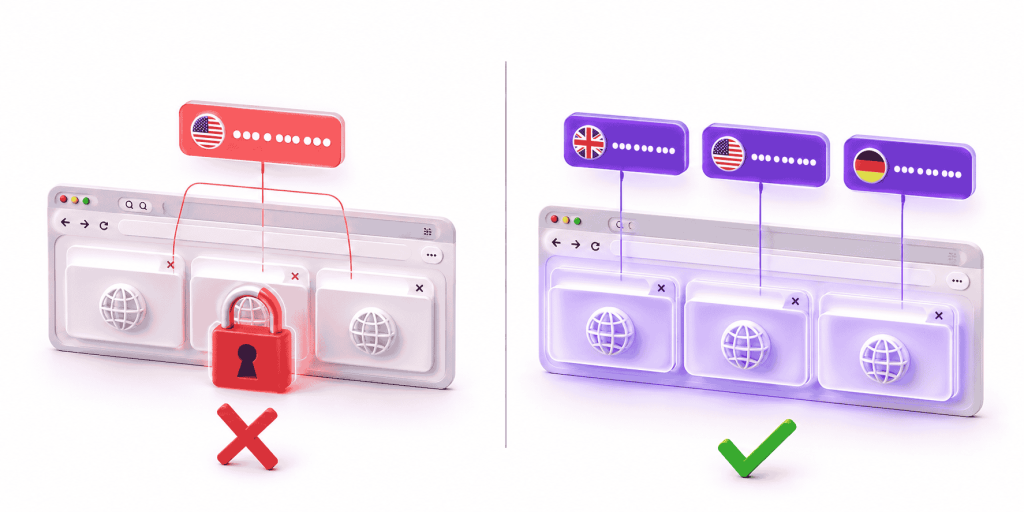
VPN per tab is not a feature that exists in Chrome. A VPN applies one encrypted tunnel to the entire browser, and every open tab shares the same exit IP the moment you connect. Switching country changes the IP for all tabs at once, with no way to isolate one tab from another.
If you are searching for VPN per tab, what you actually need is per-tab residential proxy routing. IP Per Tab by PureVPN assigns a different residential IP to each Chrome tab independently, with no external VPN required and no manual configuration.
What Does “VPN Per Tab” Actually Mean?
Two different problems sit behind the term “VPN per tab,” and both have the same root cause.
The first is directional: users want specific tabs or sites routed through a chosen country while everything else stays direct. Most VPNs do the opposite — route everything through the tunnel and let you exempt specific apps. Per-tab control in the other direction does not exist in any Chrome VPN extension.
The second is simultaneous: users want Tab 1 on a UK IP and Tab 2 on a US IP at the same time. A VPN holds one exit IP for the entire browser at any given moment. Running two different country IPs across two tabs simultaneously is architecturally impossible with a VPN.
Why VPN Per Tab Is Not Possible in Chrome
A VPN creates one encrypted tunnel at the device or browser level. Chrome applies that tunnel to every open tab through a single proxy configuration. There is no mechanism in Chrome’s networking layer to apply a different tunnel to Tab 2 while Tab 1 uses another.
Chrome VPN extensions have exactly the same constraint. Every VPN extension in the Chrome Web Store uses the chrome.proxy API. That API accepts one configuration for the entire browser profile. When the extension updates that configuration, every open tab immediately routes through the new setting.
| What you want | What a VPN does | VPN per tab possible? |
|---|---|---|
| Tab 1 on UK IP, Tab 2 on US IP simultaneously | One tunnel, one exit IP for all tabs | No |
| Route one tab through a different country, keep others unchanged | Country switch applies to entire browser | No |
| Keep one tab direct while another uses a proxy country | Split tunnel works per app, not per tab | No in Chrome |
| Set a rule so a specific site always loads from a specific country | Not a VPN feature | No |
Does Split Tunneling Solve VPN Per Tab?
Split tunneling is the closest feature VPNs offer to per-tab control, and it does not solve the problem.
Split tunneling works at the application level. It routes Chrome as one app through the VPN while another app uses a direct connection. Chrome is one process, and split tunneling cannot distinguish between individual tabs inside it.
VPN Per Tab vs IP Per Tab by PureVPN
IP Per Tab by PureVPN is the tool built for the workflow that VPN per tab searches are actually describing. It routes individual Chrome tabs through separate residential IPs simultaneously, using PAC file logic that maps each tab ID to its own proxy endpoint.
The comparison between the two approaches is direct:
| Property | VPN per tab (any provider) | IP Per Tab by PureVPN |
|---|---|---|
| Routing level | Entire browser, no tab-level control | Individual tab |
| Simultaneous different IPs across tabs | No | Yes |
| Change one tab’s IP without affecting others | No | Yes |
| Domain rules (auto-assign IP per site) | No | Yes |
| IPs included | No — bring your own | Yes — residential IPs from PureVPN pool |
| Manual proxy configuration | No | No |
| Encrypts all device traffic | Yes | No — proxy routing only |
| Setup required | VPN app or extension | Chrome extension only |
VPN per tab and IP Per Tab by PureVPN solve different problems. A VPN encrypts everything and gives the entire browser one location. IP Per Tab by PureVPN gives each tab its own residential IP, simultaneously, with no encryption overhead and no browser-wide IP change on every switch.
Related Read: What Is Per-Tab IP Routing?
How IP Per Tab by PureVPN Works
IP Per Tab by PureVPN assigns residential IPs from PureVPN’s proxy pool to individual Chrome tabs through the extension popup. Select a country for a tab, and that tab routes through a residential IP in that country immediately. Every other tab is unaffected.
The residential IPs are included in the plan. No external VPN app is needed, no proxy credentials to enter, and no PAC scripts to write manually. The extension handles the routing logic internally.
Bandwidth plans are available at 12 GB, 25 GB, and 50 GB. The extension itself is free to install.
The Feature VPN Per Tab Never Had: Domain Rules
VPN per tab, even if it existed, would still require manual switching every session. Domain rules in IP Per Tab by PureVPN remove that friction entirely.
Set a rule for a domain once. Every time any tab navigates to that domain, IP Per Tab by PureVPN automatically assigns the chosen residential IP. The rule persists in chrome.storage.local and survives browser restarts. No action is required after the initial setup.
A practical example: set amazon.co.uk to always route through a UK residential IP. From that point, every tab that opens amazon.co.uk gets the UK IP automatically. Set amazon.com to always route through a US residential IP. Both can be open simultaneously, each on their assigned IP, with no manual switching.
Related Read: What Is Session Isolation in Chrome
When a VPN Is Still the Right Tool
IP Per Tab by PureVPN is not a replacement for a VPN. The two tools serve genuinely different purposes.
| You need | Right tool |
|---|---|
| Encrypt all traffic on public Wi-Fi | VPN |
| Access a geo-restricted streaming service on your full browser | VPN |
| Hide your real IP across all browsing activity | VPN |
| VPN per tab: different IP on each tab simultaneously | IP Per Tab by PureVPN |
| A site that always loads through a specific country automatically | IP Per Tab by PureVPN |
| Check search results from two countries side by side | IP Per Tab by PureVPN |
| Verify ads from multiple geos without switching | IP Per Tab by PureVPN |
| Residential IP for accurate geo-targeted results | IP Per Tab by PureVPN |
If encryption for all traffic is the requirement, a VPN is the correct tool. If tab-level IP control is the requirement, IP Per Tab by PureVPN is the correct tool.
Related Read: Browser Profiles vs Per-Tab Proxy
Frequently Asked Questions
No. Chrome VPN extensions apply one proxy configuration across the entire browser through the chrome.proxy API. Switching VPN country changes the IP for every open tab simultaneously. VPN per tab, meaning different IPs on different tabs at the same time, is not possible with any Chrome VPN extension.
Chrome’s proxy API accepts one configuration for the entire browser profile. When a VPN extension updates that configuration, every tab routes through the new setting immediately.
A VPN applies one encrypted tunnel to the entire browser. IP Per Tab assigns a separate residential IP to each Chrome tab independently using PAC file routing. With IP Per Tab, Tab 1 and Tab 2 run different country IPs simultaneously. With a VPN, every tab always shares the same exit IP.
No. Split tunneling works at the application level, routing specific apps through the VPN while others use a direct connection. Chrome is one application, so split tunneling applies to the entire browser. It cannot route individual tabs inside Chrome through different connections.
Yes, with IP Per Tab by PureVPN’s domain rules. Set a domain once and the extension automatically assigns the chosen residential IP every time any tab navigates to that domain. The rule persists across browser restarts with no manual switching required on each session.
No. IP Per Tab by PureVPN includes residential IPs from PureVPN’s proxy pool directly. No external VPN app or subscription is needed. Install the extension, select a bandwidth plan, and assign IPs to tabs from the popup.

Arsalan Rashid

September 2, 2026

2 months ago