You connect to your VPN expecting privacy, security, and a smoother internet experience.
Instead, everything slows down.
Videos start buffering.
Pages take longer to load.
Downloads crawl.
It is frustrating, but it is also common. The good news is that slow VPN speed is usually fixable.
In most cases, the problem is not that “VPNs are slow.” It is usually one of three things: the server you chose, the protocol you are using, or the speed of your original internet connection.
Let’s break it down.
Why Does a VPN Slow Down Your Internet?
A VPN protects your connection by sending your internet traffic through an encrypted tunnel. That extra step helps keep your browsing private and secure, but it can also affect speed if the connection is not optimized.
Here are the most common reasons your VPN feels slow.
1. You’re Connected to a Server That’s Too Far Away
Distance matters.
The farther your VPN server is from your actual location, the longer your data has to travel. That added distance can increase latency, which makes browsing, streaming, gaming, and downloads feel slower.
For example:
- Connecting from Germany to Australia will usually feel slower
- Connecting from Germany to a nearby European server will usually feel faster
How to fix it
Choose the closest available server unless you specifically need a different location.
A shorter distance usually means lower latency and better performance.
2. You’re Not Using the Fastest VPN Protocol
VPN protocols control how your data is encrypted and transferred.
Some protocols are designed for speed. Others focus more on compatibility with older devices or networks.
For most users, WireGuard is one of the fastest modern VPN protocols available. It is lightweight, efficient, and built for strong everyday performance.
How to fix it
Open your VPN app settings and switch your protocol to WireGuard if it is available.
Then reconnect and test your speed again.
3. Your Base Internet Speed Is Already Limited
A VPN cannot create speed that your internet connection does not already have.
If your Wi-Fi, mobile data, or public network is already slow, your VPN connection will reflect that.
This is common on:
- Public Wi-Fi
- Hotel Wi-Fi
- Airport Wi-Fi
- Weak home Wi-Fi
- Shared office networks
- Mobile data with poor signal
How to fix it
Disconnect your VPN and run a speed test. Then reconnect your VPN and run the test again.
This helps you understand whether the issue is your VPN setup or your original connection.
How to Fix Slow VPN Speed? (Step by Step Guide)
1. Switch to WireGuard
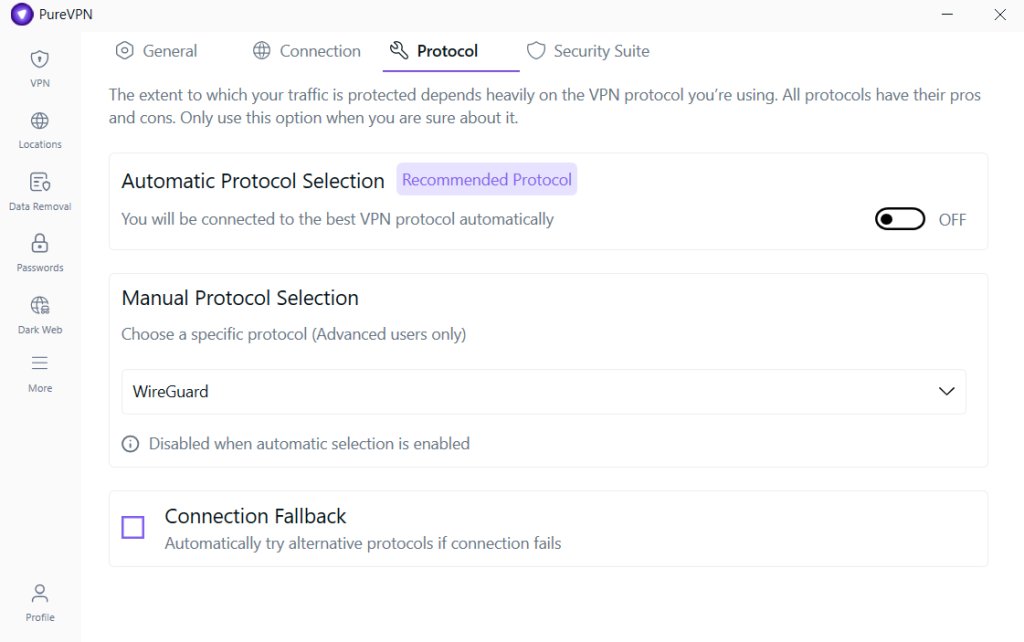
This is the quickest fix for many users.
WireGuard is designed to be fast, stable, and efficient. If your VPN app supports it, switching to WireGuard can improve browsing, streaming, downloads, and general connection stability.
What to do
Go to your VPN settings and select:
Protocol → WireGuard
Then reconnect to your VPN and check your speed again.
2. Connect to a Nearby Server
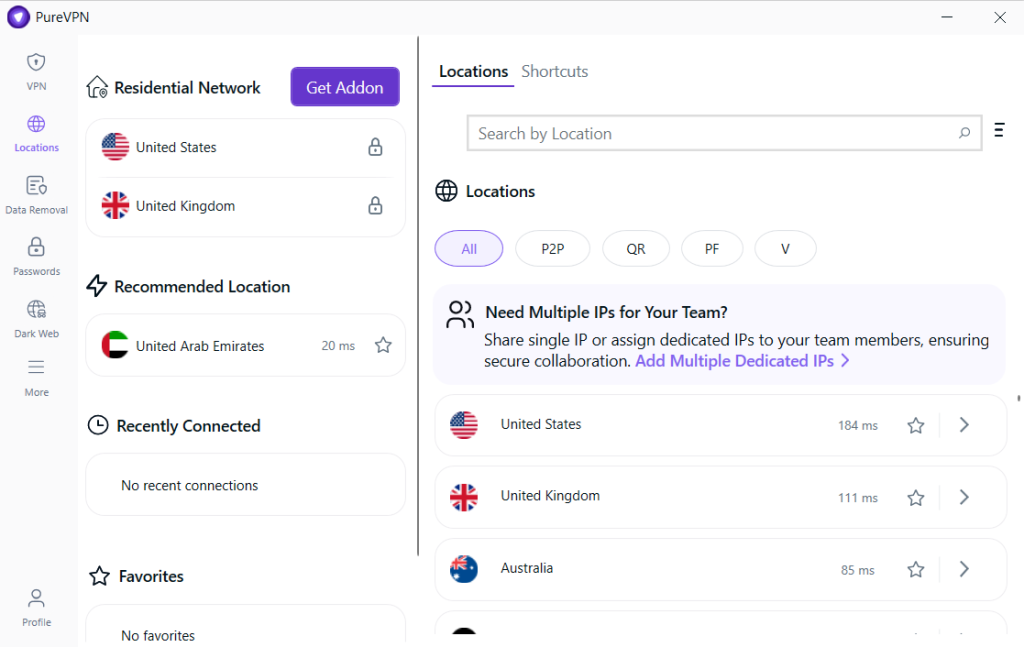
If you do not need a specific country, choose the server closest to your actual location.
For example:
- If you are in Germany, try Germany, France, or the Netherlands
- If you are in the US, choose the nearest available city
- If you are in South Asia, try nearby regional servers where available
The closer the server, the shorter the route your data takes.
3. Use City-Level Server Selection
Sometimes choosing a country is not enough.
If your VPN gives you city-level options, use them.
Instead of choosing:
United States
Choose a specific city such as:
New York, Los Angeles, Dallas, Chicago, or Miami
City-level selection gives you more control and can help you find a faster route.
4. Try Another Server in the Same Region
One slow server does not mean the entire VPN is slow.
A server can be temporarily crowded or affected by routing issues. Switching to another server in the same country or region can improve speed instantly.
What to do
Try two or three nearby servers and compare performance.
5. Use Optimized Shortcuts for Streaming
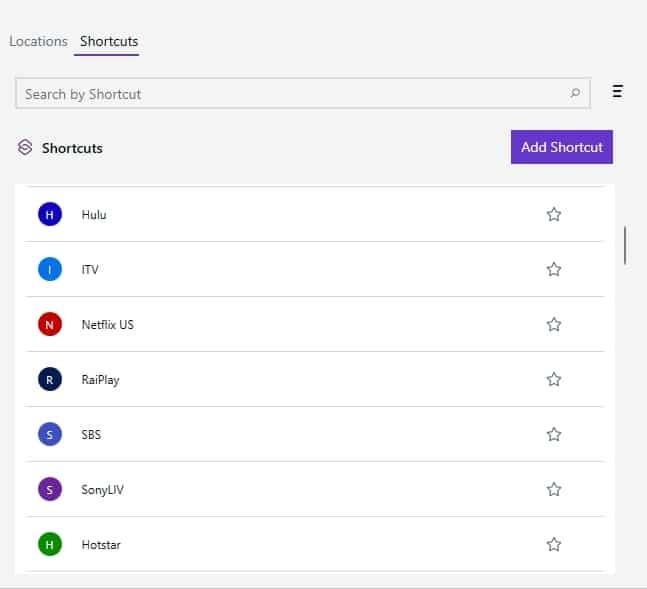
If your VPN app offers optimized shortcuts for streaming activity, use them.
These shortcuts are designed to reduce manual trial and error by connecting you through better-performing routes for video playback.
They can help with:
- Buffering
- Slow loading
- Quality drops
- Repeated interruptions
Always make sure your VPN use follows applicable laws and the terms of any third-party services you use.
6. Test Your Internet Without the VPN
Before blaming the VPN, test your normal connection.
Here is the simple process:
- Disconnect your VPN
- Run a speed test
- Reconnect your VPN
- Run the speed test again
- Compare the results
If your speed is already low before connecting to the VPN, the issue may be your Wi-Fi, router, ISP, device, or local network.
Advanced Fixes If Your VPN Is Still Slow
Use a Wired Connection
Wi-Fi is convenient, but it is not always stable.
Walls, distance from the router, interference, and crowded networks can all affect speed.
For more consistent performance, use Ethernet when possible, especially for:
- Work calls
- Large downloads
- Gaming
- HD streaming
- Long browsing sessions
Network Limitation
A VPN is essential for security on public Wi-Fi, but it cannot improve the underlying network quality. If the network is crowded or unstable, users may still experience slow speeds even with a VPN.
Quick Troubleshooting Checklist
| Problem | Likely Cause | Quick Fix |
| Pages load slowly | Distant server | Choose a nearby server |
| Streaming buffers | Server congestion | Try another server or optimized shortcut |
| Downloads are slow | Older protocol | Switch to WireGuard |
| VPN is slow everywhere | Base internet issue | Test speed without VPN |
| Speed keeps changing | Wi-Fi instability | Use Ethernet or move closer to router |
| One country is slow | Server load or routing | Try another city/server |
Pro Tip: Most VPN Speed Problems Are Setup Problems
Slow VPN speed is often caused by:
- Wrong server location
- Older protocol
- Weak Wi-Fi
- Server congestion
- Slow base internet
- Poor routing
Start with the basics: WireGuard + nearby server + stable internet.
That setup solves most VPN speed issues.
Final Thoughts
A VPN should protect your privacy without making your internet painful to use.
If your VPN feels slow, do not immediately assume the product is broken. First, check your setup.
- Switch to WireGuard.
- Choose a nearby server.
- Use city-level selection.
- Try another server in the same region.
- Test your speed without the VPN.
With the right configuration, your VPN can feel fast, stable, and reliable for everyday browsing, streaming, downloads, and secure internet use.
If you are constantly changing settings just to get acceptable speeds, use a VPN that makes performance easier with modern protocols, optimized servers, smart server selection, and privacy-first protection in one app.
Frequently Asked Questions (FAQs)
Your VPN may feel slow because of server congestion, weak Wi-Fi, a distant server, or a temporary routing issue. Try switching servers, changing to WireGuard, and testing your base internet speed.
Speed drops can happen due to server congestion during peak hours. Switching to another server or using a different city location can help improve performance.
Yes. Older devices or devices with limited processing power may struggle with encryption, which can reduce VPN speed. Using a modern device or a lighter protocol like WireGuard helps.
WireGuard is one of the fastest modern VPN protocols for most users. It is lightweight, efficient, and designed for strong performance.
Yes, if speed is your priority. Nearby servers usually offer lower latency and better performance.
Public Wi-Fi is often crowded and unstable. A VPN can protect your connection, but it cannot fix a weak or overloaded network.
Yes. If one server is crowded or poorly routed, switching to another server in the same region can improve speed.