IP assignment and IP switching are closely related, but they describe different actions. IP assignment gives a device, connection, or session an IP address to use. IP switching happens when the address currently in use is replaced with another one. A switch can also result in a new IP being assigned, so the two processes can overlap.
Sometimes you only need a different IP. Other times, different connections or sessions need to use different IPs at the same time. In this guide to IP assignment vs IP switching, we break down what they do, when each approach makes sense, and how PureVPN can help you work with multiple IPs at once.
What Is IP Assignment?
IP assignment is the process of allocating an IP address to a device, connection, or session. On a local network, DHCP often handles this automatically by leasing an available address to a device. Assignment also happens beyond your local network.
ISPs assign public IP addresses to internet connections, while a VPN gives your internet traffic a different public-facing IP when you connect. The assigned IP does not always have to stay the same. It can be dynamic and change over time, or remain fixed.
What Is IP Switching?
IP switching means changing from the IP address currently in use to another one. It can be manual, where you choose when to change the IP, or automatic through a system that rotates IP addresses. In either case, the current IP is replaced by another one.
With a VPN, switching can happen when you connect to a different server. Reconnecting can also give you a different IP, depending on how the service assigns addresses. Other tools like proxies can also change the active IP address your traffic uses.
When IP Assignment and IP Switching Are Used
IP assignment and IP switching are not always separate choices. Switching from one IP to another often means a new IP is assigned as part of the change.
IP Assignment Is Used When:
- A device, connection, or session needs an IP address allocated to it: This commonly happens when a device joins a network or a connection is established.
- You need the same IP to stay associated with a device or connection: A static or reserved assignment can keep the address consistent instead of allowing it to change.
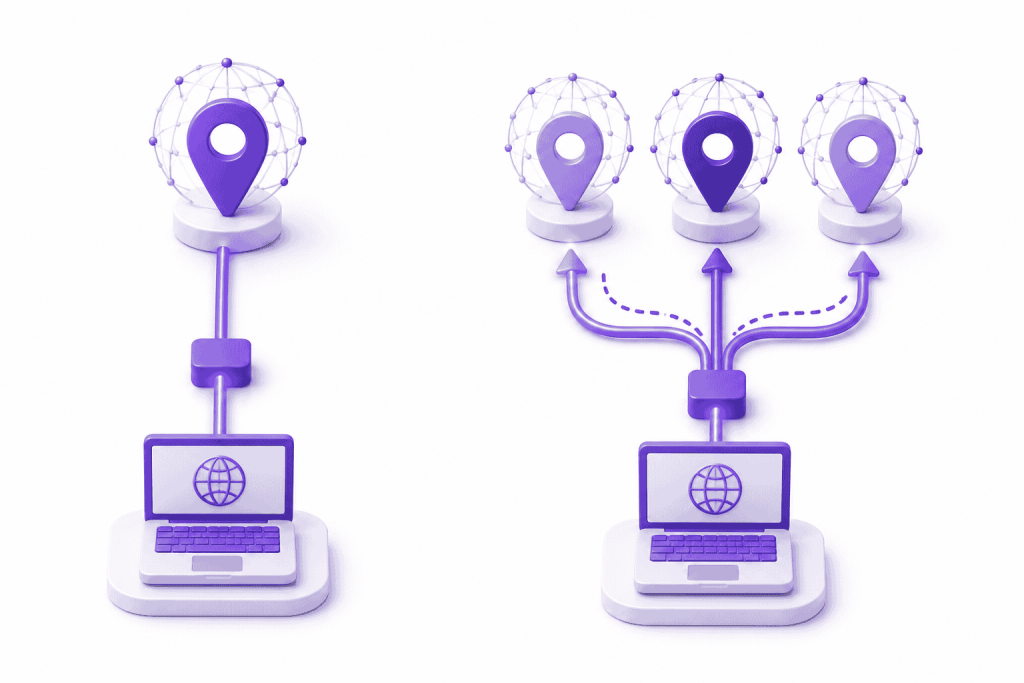
- Different connections or sessions need different IPs: Where supported, each one can use its own IP instead of changing a single address back and forth.
IP Switching Is Used When
- You already have an IP but need a different one: Switching replaces the address currently in use with another one.
- You want to change VPN servers or locations: Moving to another server commonly changes the public-facing IP used by the connection.
- You only need one different IP at a time: Switching works well when you can change the active IP whenever the task or location changes.
Can You Use Multiple IP Addresses at the Same Time?
Multiple public-facing IPs can be used at the same time if different traffic is sent through separate routes. In a browser, two common ways to do this are:
Proxy Tools
A proxy tool sends traffic configured to use it through another server, so websites see the proxy server’s public-facing IP. Different proxy settings can be used for separate apps or browser contexts where the software supports it. With the right configuration, one set of traffic can use one IP while another follows a different route.
IP Per-Tab Extension
An IP per-tab extension by PureVPN lets different tabs follow different routes within the same browser window. One tab can use one public-facing IP while another uses a different one. PureVPN’s IP Per Tab extension works this way, letting individual Chrome tabs use different residential proxy IPs, while tabs without an assigned proxy connect directly.
Related Read: Meet IP Per Tab – A Different IP for Every Chrome Tab
When Using Multiple IPs at Once Is Useful
Multiple IPs are useful when you need to check more than one location without changing the active IP each time.
Regional Website Testing
A website can behave differently by location, including redirects, availability, or regional page versions. Keeping those versions open at the same time lets you compare them directly instead of checking one region, switching IPs, and repeating the process.
Localization Checks
When content changes by market, separate IPs let you review language, local copy, and country-specific pages side by side. You can move between regions without changing the active IP each time.
Development and QA
When a site uses location-based redirects, content, or availability rules, developers and QA teams can compare several regional versions at once. Keeping them open at the same time makes it easier to compare behavior across markets.
E-Commerce and CRO
Online stores can vary currencies, products, promotions, shipping options, or checkout details by region. Separate IPs let you compare those differences across markets without switching the whole browsing route each time.
Ad Campaign Verification
Regional ad campaigns can point users to different landing pages, offers, or localized content. Keeping each market open on its own IP makes it easier to check what is being served in each location and spot any differences between markets.
Assign Different IPs to Browser Tabs With PureVPN
PureVPN’s IP Per Tab extension lets you assign a residential proxy IP to an individual Chrome tab instead of changing the route for the whole browser. You can choose a country available in your residential proxy plan for each tab, while tabs without an assigned proxy can stay on direct traffic.
Once the tabs are set, different regional tasks can stay open side by side. A website test can run through one location while a localization, e-commerce, or ad check uses another, without switching the browser back and forth between them.
The extension also gives you a few ways to cut down on repeated changes:
- Choose a location for each tab: Assign the country you need to a tab without manually entering proxy IPs, ports, usernames, or passwords.
- Set domain rules: A domain can automatically load through the IP route you have chosen whenever you visit it.
- Keep tab assignments after a restart: Saved tab-to-IP assignments and domain rules persist when Chrome is reopened.
- Return a tab to direct traffic: Remove the proxy from an individual tab without changing the assignments on the others.
Frequently Asked Questions
No. IP assignment describes the process of allocating an address, while a static IP is an address that stays the same. An assigned IP can be static or dynamic, depending on how it is configured.
Yes. Switching to a different IP often involves another IP being assigned as part of the change. For example, connecting to a different VPN server can replace the current public-facing IP with another one.
Not exactly. IP switching refers to changing from one IP to another, whether manually or automatically. IP rotation automates repeated IP changes, often based on time, sessions, or requests.
Yes, if the browser tool supports routing traffic separately at the tab level. PureVPN IP Per Tab, for example, lets individual Chrome tabs use different residential proxy IPs while unassigned tabs can connect directly.

Arsalan Rashid

August 24, 2026

2 months ago