One IP can be enough for smaller scraping tasks, but it becomes limiting as workloads grow. Traffic stays concentrated on one address, parallel jobs may share it, and regional checks are restricted to one IP-based location at a time.
Using multiple IPs can spread requests across different routes and keep separate scraping tasks apart. It does not mean the IP should change with every request, either. Some jobs work well with rotation, while others need the same IP to stay in place for a session.
In this guide, we break down why one IP is not always enough for web scraping, when it can still do the job, where using multiple IPs makes more sense, and how rotating and sticky IPs compare against each other.
Why a Single IP Can Limit Scraping
There are a few ways relying on one IP can hold a scraping task back. Here are the main ones:
Repeated Requests Build Up Against the Same IP
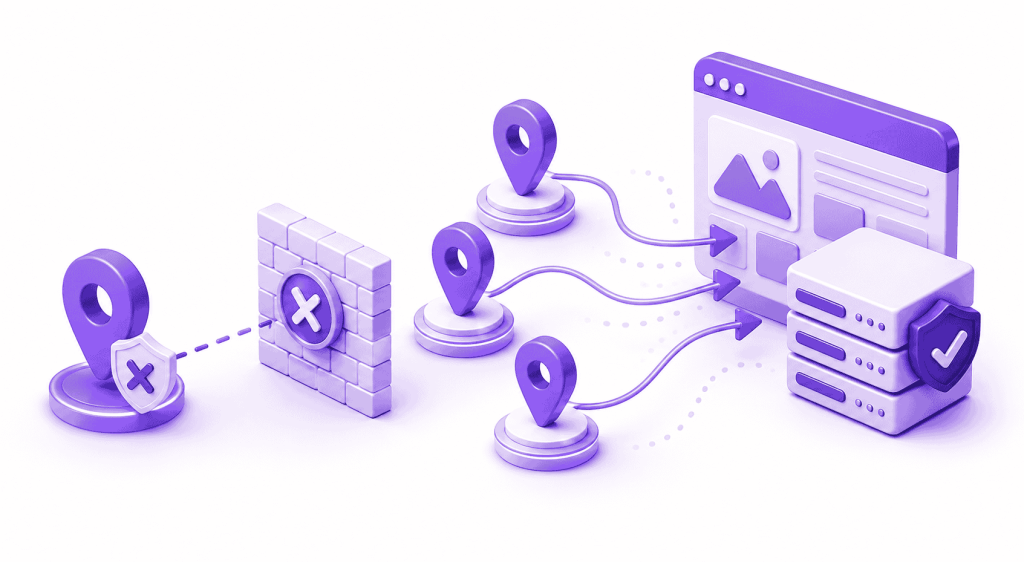
When every request goes through the same network route, the target website sees the same source IP each time. Websites can count requests by IP and apply rate limits or restrictions when their configured rules are triggered.
The limitation is straightforward: as request volume increases, all of that traffic remains tied to one address. With only one IP, there is no way to spread those requests across separate source addresses.
Parallel Scraping Jobs Still Share the Same Source IP
Running several scraping jobs at the same time does not automatically give each one a different public IP. If they all use the same network or proxy route, their requests still come from the same source address.
Even though the jobs are separate, their combined requests still add to the traffic associated with that IP. As more jobs use the same route, that concentration grows, and a rate limit or restriction affecting the address can also disrupt the other jobs relying on it.
One IP Only Gives You One IP-Based Location at a Time
Location can matter when a scraping task involves comparing regional prices, availability, search results, or localized pages. One IP route represents one IP-based location at a time, so checking several markets through separate locations requires different routes.
IP location is only one part of how a website may determine what to show. Cookies, account settings, browser language, and other signals can also affect the experience, so changing the IP alone does not guarantee a particular regional version of a page.
When Is One IP Still Enough for Scraping?
A single IP can still work well for simpler scraping tasks that do not need separate routes for different jobs or locations. For example:
- Small scraping workloads: A single IP might be sufficient when request volume stays low.
- One location only: There is less need for multiple routes when the task only needs one IP-based location.
- No need to separate parallel jobs: If several jobs do not need to appear from different source IPs, one route may still be enough.
- Stateful workflows: Some related requests can benefit from staying on the same IP, since changing the address too often may disrupt session continuity.
How Many IPs Do You Need for Scraping?
No fixed number of IPs works for every scraping task. It comes down to how the workload is structured. The table below highlights the main factors that can affect your requirements:
| Factor | Why It Matters |
| Request volume | Higher volumes may need more IPs so traffic is not concentrated on one address |
| Concurrent jobs | Separate jobs may need separate routes if you do not want all requests coming from the same IP |
| Location coverage | Checking different markets may require IPs from different locations |
| Session consistency | Some workflows work better when related requests keep the same IP, which affects how IPs are assigned or rotated |
| Site request limits | IP-based request limits can affect how much traffic each address should handle |
Rotating IP vs Sticky IP Sessions
When it comes to using multiple IPs, you can either use rotating IPs or keep the same IP for a session. Take a closer look at their differences below:
Rotating IPs
A rotating proxy draws from a pool of IPs and changes the exit address according to its rotation rules. Depending on the service, that can happen with each request, after a set period, or when a new session starts.
Rotation can work well for independent requests that do not rely on what happened before them. It spreads traffic across different IPs without requiring one address to stay tied to the entire job.
Sticky IPs
A sticky session keeps related requests on the same proxy IP instead of changing the address each time. That can be useful for workflows where continuity matters, such as logging in, completing a multi-step form, or moving through another stateful session.
Changing the IP partway through such a flow can cause problems on sites that expect the same client to remain consistent. How long an IP stays assigned depends on the proxy service and its session settings.
Why Multiple IPs Do Not Solve Every Scraping Problem
Using multiple IPs changes where requests come from, but websites can still look at other signals. Request patterns, cookies, session information, browser characteristics, and behaviour across the site can all remain relevant even when the IP changes.
CAPTCHA or browser challenges can also depend on more than the source address, so switching IPs does not automatically remove them. The same applies to crawler rules and site policies, which still apply regardless of which IP sends the request.
Related Read: Why Websites Block Scrapers and How They Detect Them
How Per-Tab IP Routing Helps
Browser-based scraping can involve several source checks, test runs, or regional pages open at once. Chrome normally applies one proxy configuration across the browser, so separate tabs do not get their own proxy routes by default. Per-tab routing can help when those tasks need different IPs at the same time.
PureVPN IP Per Tab lets you assign a residential proxy IP to an individual Chrome tab. Different tabs can use different available locations, while tabs that do not need a proxy can stay on your direct connection. Each assigned tab keeps its own IP session, and domain rules can automatically apply a chosen route when you return to a specific site.
For browser-based work, that means separate checks can stay open side by side without repeatedly changing the proxy for the whole browser. Automated scraping scripts would still need their own proxy or rotation.
Related Read: What Is Per-Tab IP Routing?
Frequently Asked Questions
Not necessarily. More IPs can spread requests across different routes, but scraping speed also depends on factors such as request concurrency, network performance, response times, and how the scraper is configured.
No. A sticky IP usually stays the same for a session or a set period within a rotating proxy pool, while a static IP is intended to remain assigned for much longer. The exact duration depends on the provider and service.
Yes, if different parts of the workload have different requirements. Independent requests can use rotation, while related or stateful requests can stay on the same IP for a session.
No. Some scraping tasks work well with rotation, while others benefit from keeping the same IP across related requests. How often the IP changes should match the way the workload is structured.

Arsalan Rashid

September 2, 2026

2 months ago