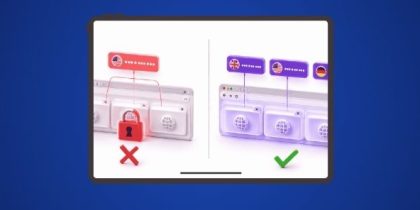
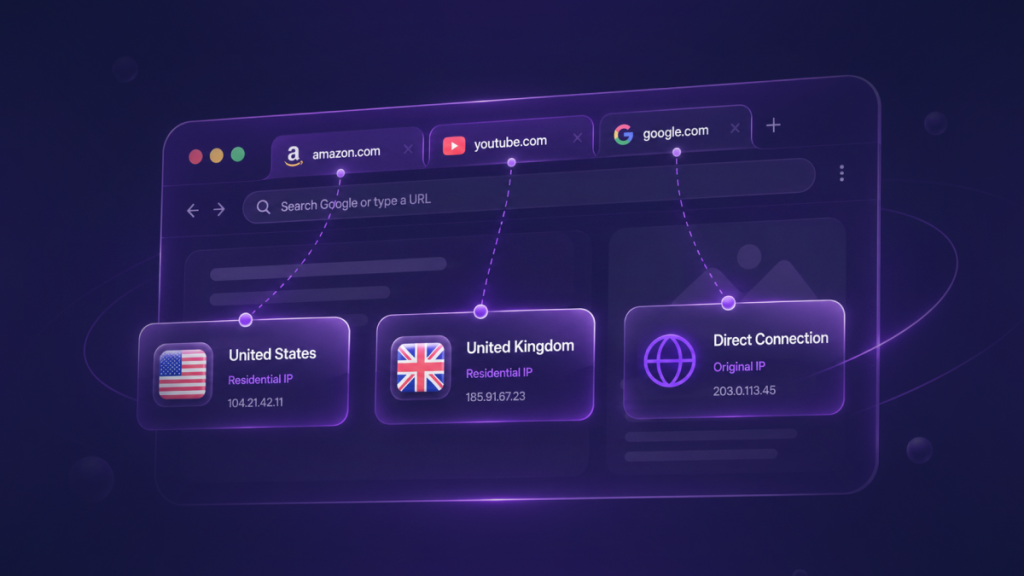
Per-tab IP routing assigns a different IP address to each browser tab individually, so two or more tabs open in the same browser window can connect from different geographic locations at the same time.
A browser running per-tab IP routing can show Google search results for the United Kingdom in Tab 1 and Google search results for the United States in Tab 2, simultaneously, without reconnecting, switching tools, or losing session context.
How Does Per-Tab IP Routing Work Inside Chrome?
Per-tab IP routing works by intercepting Chrome’s tab focus events and switching the browser’s active proxy assignment to match each tab’s stored IP configuration within milliseconds of the user switching tabs.
The underlying mechanism uses Chrome’s chrome.proxy API, which by default applies one proxy setting globally across the entire browser. Per-tab routing adds a coordination layer that swaps that global setting each time the active tab changes.
The sequence of events for each tab switch is as follows:
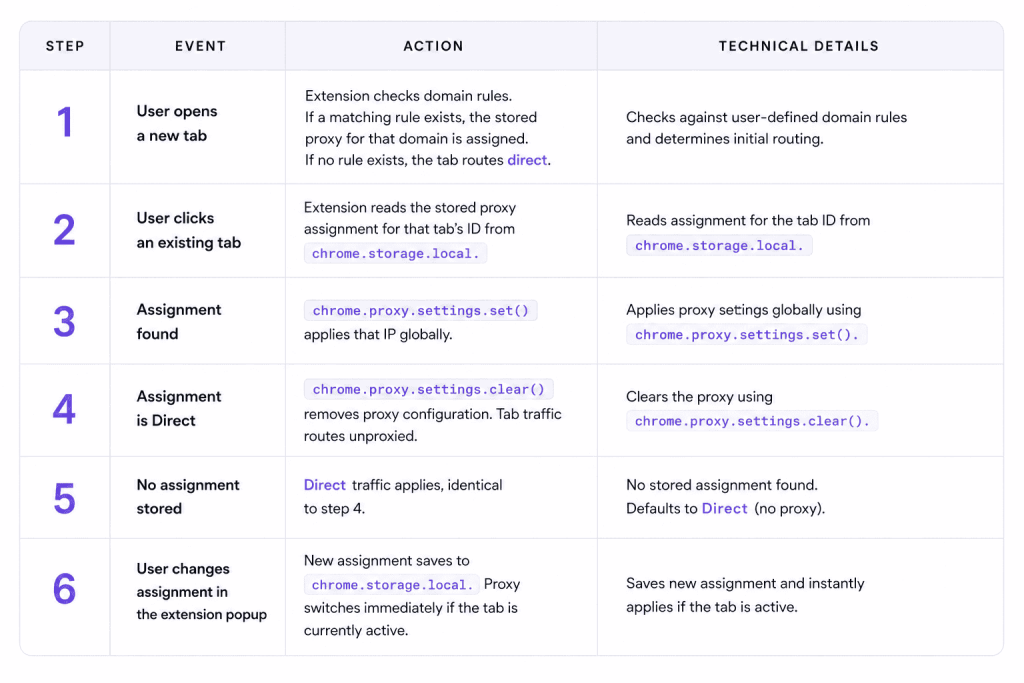
Tab assignments persist across browser restarts via chrome.storage.local, so a tab configured with a UK residential IP retains that configuration after Chrome closes and reopens. Tabs with no assignment route direct by default. For a detailed explanation of how Chrome manages session state across tab switches, see what is session isolation in Chrome.
Per-tab IP routing is built on Chrome’s Manifest V3 service worker architecture, which replaced the persistent background page model used in older extensions. Manifest V3 compliance is a Chrome Web Store requirement for all new extensions as of January 2023.
How Does Per-Tab IP Routing Differ From Browser-Wide Proxy Switching?
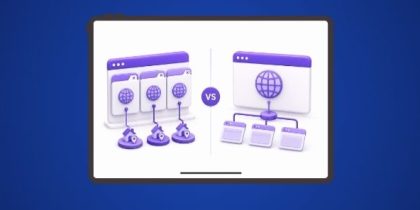
Per-tab IP routing differs from browser-wide proxy switching in one fundamental way: per-tab routing assigns a distinct IP to each tab independently, while browser-wide proxy switching applies one IP setting to the entire browser simultaneously, overwriting every open tab.
| Feature | Per-Tab IP Routing | Browser-Wide Proxy Switching |
| Granularity | One IP per tab, independently assigned | One IP for the entire browser at a time |
| Simultaneous locations | Yes: Tab 1 = UK, Tab 2 = US, both live | No: switching location replaces the previous location for all tabs |
| Session context on switch | Preserved: all open tabs remain active | Lost: every tab reloads against the new proxy |
| Example tools | IP Per Tab by PureVPN | SwitchyOmega, FoxyProxy |
| Proxy configuration required | None: IPs are managed by the extension | Manual: IP address, port, username, and password required per proxy |
| Proxies included | Yes, via PureVPN’s IP per tab plan | No: user must source and configure proxies separately |
The practical consequence of this difference is significant for any professional who needs to compare geo-specific content across two locations at once. Switching a browser-wide proxy kills every open tab’s session context, forces a full page reload, and collapses any in-progress work in all other tabs. Per-tab IP routing preserves all open sessions and changes only which IP is active when the user focuses a specific tab.
- For a full feature comparison, see IP Per Tab vs. SwitchyOmega and IP Per Tab vs. FoxyProxy.
Do I Need a Separate Browser for Geo-Testing, or Is Per-Tab IP Routing Enough?
Per-tab IP routing changes the IP address assigned to a browser tab. Full browser isolation tools, such as Multilogin, GoLogin, and AdsPower, change the entire browser fingerprint, including canvas signatures, WebGL rendering, font enumeration, user agent strings, screen resolution, and hardware identifiers, creating a fully separate and distinct browser identity for each profile.
| Feature | Per-Tab IP Routing | Full Browser Isolation Tools (Multilogin, GoLogin, AdsPower) |
| IP address isolation | Yes: per tab | Yes: per profile |
| Browser fingerprint isolation | No | Yes: full canvas, WebGL, font, UA spoofing |
| Proxies required | Included (PureVPN plan) | Usually separate purchase |
| Browser used | Your existing Chrome browser | Separate proprietary browser |
| Monthly cost | From $0 (extension) + bandwidth price | $30–$120+/month |
| Setup complexity | Low: install, log in, assign tabs | High: browser install, profile management, configuration |
| Suitable for geo-testing | Yes | Yes (overkill for most geo-testing tasks) |
| Suitable for full fingerprint isolation | No | Yes |
For geo-testing, SERP verification, ad placement verification, and regional price checking, IP-level isolation is sufficient. These tasks require the website to serve content as it would to a real user in a specific geographic location. They do not require the website to believe that different tabs represent entirely different devices with distinct hardware profiles.
Full fingerprint isolation is the right tool when the task genuinely requires separate browser identities. For the majority of QA and verification workflows, full browser isolation tools are a more expensive and more complex solution than the task requires.
For a direct decision guide, see do you need a full browser isolation tool? and browser profiles vs. per-tab proxy.
What Do Professionals Use Per-Tab IP Routing For?
Local SERP verification
SEO professionals use per-tab IP routing to see Google search results as they appear to users in specific cities or countries, without relying on rank tracking tools that report averages rather than real observed results.
To see how professionals structure this workflow across multiple tabs, see how to isolate IP addresses across multiple Chrome tabs.
Ad and campaign verification
Ad verification analysts confirm that ads render correctly for users in target markets, that the correct creative is served per region, and that no misrepresentation of delivery is occurring. Checking six markets sequentially used to require six separate proxy sessions, with context lost between each. Per-tab IP routing runs all six in parallel in the same browser window.
Regional pricing and geo-feature testing
QA engineers and e-commerce researchers use per-tab IP routing to verify that geo-conditional content renders correctly per location: regional pricing, local currency display, VAT calculation, content restrictions, and feature gating. Tab 1 shows the US version of a product page with USD pricing. Tab 2 shows the UK version with GBP pricing and VAT applied. Both are live simultaneously.
Residential proxy IPs produce more accurate results than datacenter IPs for this use case, because geo-detection systems at major e-commerce platforms and CDNs are calibrated to identify and filter non-residential traffic.
Developer and QA geo-testing
Developers testing geo-fenced features, CDN routing behavior, or IP-based feature flags need to reproduce the exact experience of a real user in a specific location. A developer testing a regional paywall can open Tab 1 with a US residential IP to confirm that US users see the expected content, and Tab 2 with a UK residential IP to confirm that UK users see the geo-restricted version, without running two separate browser sessions or asking a colleague in another country to test manually.
What Does Per-Tab IP Routing Not Do?
Per-tab IP routing changes one thing: the IP address a browser tab connects from. Everything else about the browser session stays exactly as it was.
The fingerprint stays intact. Per-tab IP routing does not change canvas signatures, WebGL output, installed fonts, or the user agent string. A website that fingerprints visitors beyond IP address will see the same browser identity regardless of which tab is active or which IP is assigned to it.
Per-tab IP routing does not create browser profiles, automate sessions, or interact with page content programmatically. It is routing infrastructure, not automation tooling.
It is also not a VPN. A VPN tunnels all device traffic at the OS level, covering every application running on the machine. Per-tab IP routing affects only the tabs explicitly assigned a proxy inside Chrome. Traffic from other applications, other browsers, and unassigned tabs routes directly, unaffected.
How Do Domain Rules Extend Per-Tab IP Routing?
Domain rules automate per-tab IP assignment so that any tab navigating to a specified domain receives a designated country’s IP without requiring manual assignment each time.
A user can configure a rule so that every tab loading amazon.com automatically connects through a US residential IP, and every tab loading ebay.co.uk automatically connects through a UK residential IP.
Rules are evaluated on every navigation event using chrome.webNavigation.onCommitted.
Each domain rule supports exact domain matching (e.g., amazon.com) and subdomain wildcard matching (e.g., *.amazon.com). Rules can be toggled on or off without deletion, so a temporary exception does not require reconfiguring the rule from scratch.
Domain rules in IP Per Tab by PureVPN persist in chrome.storage.local and survive browser restarts. For a full explanation of the distinction between assigning an IP to a tab and switching an IP between sessions, see IP assignment vs. IP switching.
How Is Per-Tab IP Routing Different From a VPN?
Per-tab IP routing is different from a VPN in scope, architecture, and purpose. A VPN encrypts all traffic from the device at the operating system level, covering every application, every browser tab, and every background process running on the machine under a single tunneled IP.
Per-tab IP routing operates at the browser tab level only, assigning different IPs to individual tabs without affecting device-level traffic, other applications, or other browser tabs that have no proxy assignment.
| Feature | Per-Tab IP Routing | VPN |
| Scope | Individual browser tab | Entire device |
| Traffic affected | Assigned browser tabs only | All apps and connections on the device |
| Simultaneous locations | Yes: different tabs, different IPs | No: one IP for the whole device |
| Encryption | No: proxy routing only | Yes: full tunnel encryption |
A VPN changes the IP address for the entire device. Per-tab IP routing changes the IP address for a specific tab, independently of every other tab in the browser and every other application running on the machine. The two tools serve different purposes and are not direct substitutes for each other.
Frequently Asked Questions
Browser-wide proxy switching applies one proxy setting to the entire browser, replacing the active IP for every open tab simultaneously. Per-tab IP routing assigns a distinct IP to each tab independently, so multiple geographic locations run in parallel in the same window without any tab losing its session or requiring a reload.
Per-tab IP routing is sufficient for geo-testing, SERP verification, ad verification, and regional price checking. Full browser isolation tools change the complete browser fingerprint, which those tasks do not require. Full browser isolation tools are the right choice only when the workflow requires websites to perceive each session as originating from a distinct device with a unique hardware profile.
Yes. IP Per Tab by PureVPN routes each assigned tab through residential proxy IPs sourced from PureVPN’s residential proxy network. Residential IPs appear to websites as connections from real users in a specific geographic location, rather than from datacenter infrastructure that geo-detection systems commonly identify and filter.
Routing browser traffic through residential proxies for geo-testing, research, and verification is legal in most jurisdictions. Users should consult qualified legal counsel for jurisdiction-specific guidance and review the terms of service of any platform they intend to access through proxied connections.
A VPN encrypts all device traffic at the operating system level, assigning one IP address to every connection from the machine. Per-tab IP routing operates at the browser tab level, assigning different IPs to individual browser tabs independently, without affecting device-level traffic, other applications, or browser tabs that carry no proxy assignment.
Yes. IP Per Tab by PureVPN includes a domain rule engine that assigns a designated country’s IP to any tab navigating to a specified domain automatically, without requiring manual assignment each time.
Try Per-Tab IP Routing in Chrome Browser
IP Per Tab by PureVPN is free to install from the Chrome Web Store. Bandwidth is available in plans starting at 12 GB, with larger tiers at 25 GB and 50 GB for higher-volume workflows. Visit IP Per Tab by PureVPN to install the extension and assign your first tab a residential IP in under 60 seconds.

Arsalan Rashid

August 27, 2026

2 months ago