Port forwarding is straightforward on most home internet connections. You choose a port, point it to the device or service you want to reach, and configure it on the router. T-Mobile Home Internet adds another layer to the equation because it uses CGNAT, with public IPv4 addresses shared across multiple customers.
So if you are trying to host a game server, reach a NAS from outside your home, use Remote Desktop, or run anything else that needs an incoming connection, the usual router settings will not get you there. In this guide, we look at why that happens on T-Mobile Home Internet and the best ways to work around it.
Open the Ports You Need Behind T-Mobile CGNAT With PureVPN
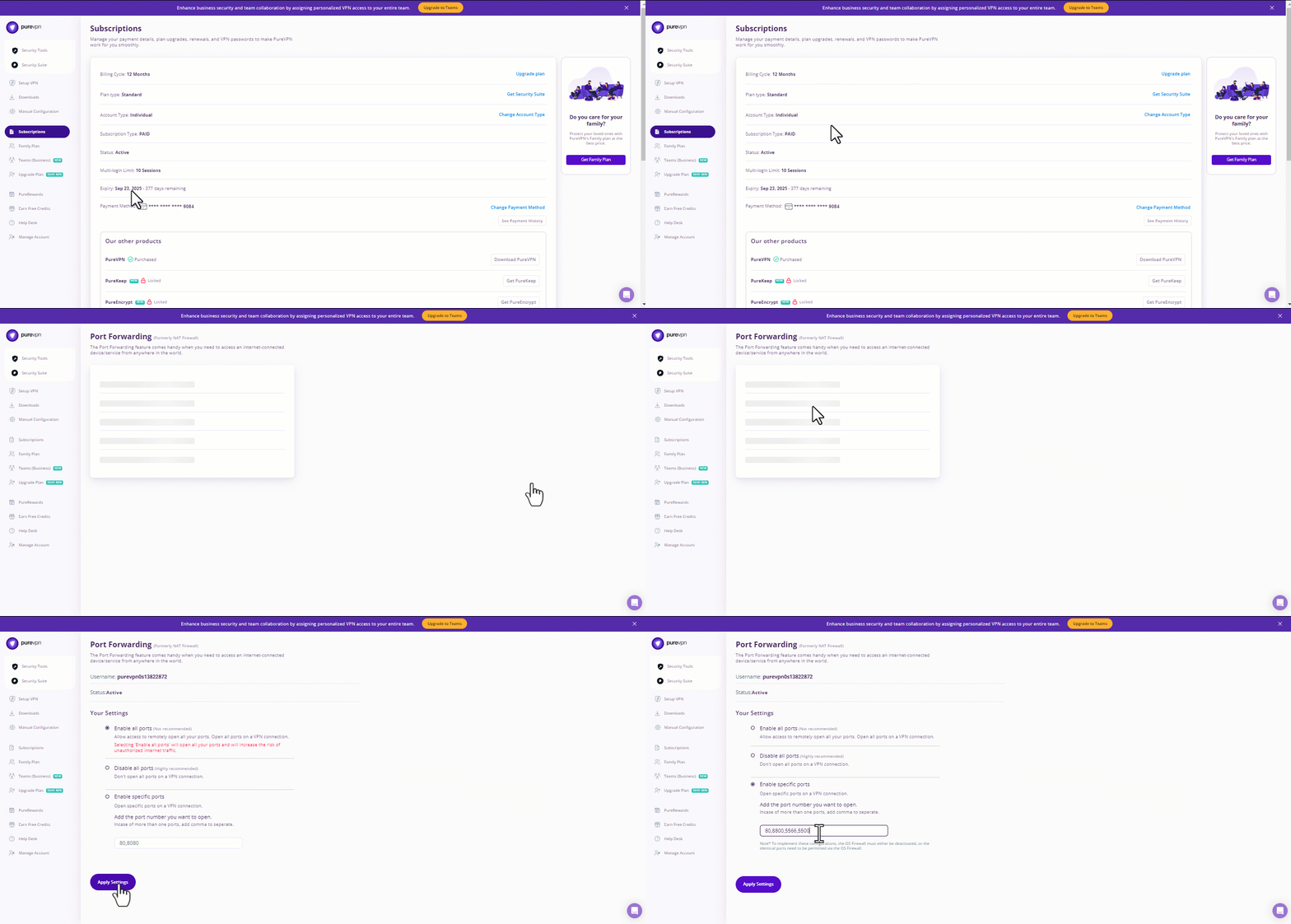
PureVPN handles the port forwarding on the VPN side, giving your service an inbound route without relying on T-Mobile’s shared public IP. Just follow these steps to set it up:
- Sign up for PureVPN and add Port Forwarding to your subscription.
- Download the PureVPN app on your device, install it, and sign in.
- Go to the Member Area, open Subscriptions, and select Configure next to Port Forwarding.
- Choose Enable specific ports, enter the ports you want to forward, and apply the changes.
- Connect to a server that supports Port Forwarding so the settings take effect.
Why Port Forwarding Does Not Work on T-Mobile Home Internet
Port forwarding only works when incoming traffic can reach your public IP and then be passed to the right device on your network. With T-Mobile Home Internet, CGNAT adds a carrier-side NAT layer before traffic reaches your gateway.
That means a port forwarding rule on your router only controls what happens inside your own network. It cannot open the corresponding port at T-Mobile’s CGNAT layer, so unsolicited inbound traffic never reaches the rule you created.
Using a third-party router does not remove this limitation. Yes, it can give you more control over your local network, but it cannot change the carrier-side NAT. Your connection still passes through T-Mobile’s CGNAT before reaching the public internet.
When T-Mobile CGNAT Becomes a Problem
CGNAT usually stays out of the way until something outside your home network needs to connect directly to a device or service inside it. Here are a few common situations where that can become an issue:
Hosting Games and Game Servers
Most online games will still work, but problems can come up with peer-to-peer games, player-hosted sessions, or your own game server. In those cases, other players need a direct way back to your network. Even if the game or server is configured correctly, other players may still be unable to reach it directly because the required inbound connection cannot get through CGNAT.
Accessing Home Devices Remotely
The same issue comes up when you want to reach a NAS, PC, or another device from outside your home. Direct remote access depends on that device being reachable from the internet. Services that use their own cloud relay might still work without any problems. If the connection has to come straight back to your device, though, opening a port on your router will not be enough.
Running Self-Hosted Services
Web apps, media servers, home labs, and other self-hosted services can also run into trouble when you want to make them available outside your local network. If the service expects users to connect directly to a port on your home network, CGNAT can block that path before the traffic reaches your gateway, so you need another way to make the service reachable from the internet.
Ways to Work Around T-Mobile Home Internet CGNAT
There are a few ways to get around T-Mobile CGNAT, but they work differently and offer different levels of control. Take a look at the main options below:
| Method | Cost | What It Does |
| Port Forwarding VPN | Paid | Opens selected ports through the VPN connection |
| Reverse Tunnel Service | Free or paid | Creates an outbound tunnel that makes a local service reachable from the internet |
| VPS with WireGuard or Reverse SSH | Depends on VPS provider | Routes traffic through a publicly reachable server back to your home network |
1. VPN With Port Forwarding
A port forwarding VPN lets you receive incoming traffic through the VPN server instead of relying on T-Mobile’s shared public IP. It can work for game servers, remote access, and self-hosted services that need specific ports open.
PureVPN’s Port Forwarding add-on gives you control over which ports are open on the VPN connection. You can specify the required ports from the Member Area and use them with the service you want to make reachable.
2. Reverse Tunnel Service
A reverse tunnel does not open a port on your T-Mobile connection. Software on your network creates an outbound connection to a tunnel provider, which then carries outside traffic back to the local service you want to reach.
Cloudflare Tunnel is one good example. It can make selected services reachable without a public IP or an open inbound port. Support varies by provider and protocol, so reverse tunnels will not suit every use case.
3. VPS With WireGuard or Reverse SSH
A virtual private server, or VPS, gives you a separate server with a public IP that can receive incoming traffic. You then use WireGuard or a reverse SSH tunnel to connect that server back to your home network.
Incoming traffic reaches the VPS first and is then sent through the tunnel to the service you want to reach. You get more control over the routing, but the responsibility of managing the server and configuration sits with you.
Frequently Asked Questions
No. T-Mobile Home Internet does not offer native port forwarding through its gateway. Because the connection sits behind CGNAT, opening a port locally will not make a service reachable from the public internet.
No. T-Mobile’s Home Internet gateways do not include a setting to change the NAT type. If a game or service needs a direct inbound connection, the limitation has to be handled outside the gateway.
T-Mobile uses CGNAT so multiple customers can share public IPv4 addresses instead of assigning one to every connection. That reduces the number of public IPv4 addresses the network needs, but it also limits direct inbound access.
You can use a VPN with port forwarding, a reverse tunnel service, or a VPS with WireGuard or reverse SSH. The right option depends on what you need to make reachable.

PureVPN

September 28, 2026

1 week ago