
When you are choosing your first VPN, every option can look more complicated than it needs to. Some apps assume you already know what to do after installing them, while others bury the simple stuff under too many choices.
However, most beginners just want to download the app, connect with a click or tap, and browse without worrying about what each setting does. That is why beginner-friendly VPNs should be judged through a different lens.
Server count, encryption, and advanced tools still matter, but only when the app is simple enough for beginners to use. This guide covers what to look for, what to avoid, and why PureVPN is the best choice for first-time users.
Among people who do not use VPNs, 30% said they do not know how to set one up, according to All About Cookies’ 2026 VPN usage survey. PureVPN is built to reduce that setup gap. With 69.6% of new users completing their first secure connection over the last 60 days, the app experience helps make the first steps less confusing.
What Makes a VPN Beginner-Friendly?
A beginner-friendly VPN does not make you feel like you need a cybersecurity background before you can use it. The app feels clear, the connection process feels simple, and the basic settings do not get in the way of everyday use.
Here is what that usually means:
- Easy installation: Download the app, sign in, and start using the VPN without manual configuration or complicated device settings.
- Clear connect button: The main action is obvious, so new users do not have to search through menus just to connect to the VPN.
- Automatic settings: Beginners do not need to choose a protocol or advanced security option before connecting. The VPN works well on default settings.
- Multi-device support: A beginner-friendly VPN supports the devices people actually use, including phones, laptops, browsers, tablets, and more.
- Simple server choice: The server list uses clear country or location options instead of confusing labels that make users second-guess their choice.
- Accessible support: Help is simple to reach when beginners need support with login issues, installation, server choice, or device-specific steps.
- Optional controls: A good beginner VPN keeps everyday use simple, while still giving users more control when they want to adjust settings.
Beginner-Friendly VPN Features That Actually Matter
Not every VPN feature matters for beginners. They should focus on the ones that make the app easier to use and harder to misconfigure, as shown in the table below:
| Feature | Why It Matters for Beginners |
| One-tap connect | Connects the VPN with one click or tap |
| Recommended server | Chooses a suitable server without guesswork |
| 24/7 live chat | Provides quick help when something goes wrong |
| Multi-logins | Covers more devices with one VPN account |
| Easy-to-use apps | Keeps navigation and settings simple |
| Automatic protocol selection | Picks the right protocol for you |
| Auto-connect | Turns the VPN on for WiFi, cellular, or both |
| DNS leak protection | Helps DNS queries stay inside the VPN tunnel |
Why PureVPN Works Well for Beginners
PureVPN is great for beginners as it does not force new users to deal with the technical side of a VPN before they can use it. The app keeps the starting point simple. Select the recommended server, and the VPN connects automatically with suitable settings.
Internal data from PureVPN also points to a short learning curve. Over the last 60 days, users took 14 minutes on average from purchase to their first successful connection. During the same period, 69.6% of new users completed their first secure VPN connection.
PureVPN gives users the basics upfront without making every setting feel like a decision. Once they are comfortable, they can explore server locations, connection settings, and other privacy features, along with Dark Web Monitoring, Remove My Data, and Password Manager.
The product has a longer track record than many VPN services. It has been around since 2007 and has a 4.3/5 Trustpilot rating from 17,700+ reviews, slightly above the 4.2/5 average across well-known providers on Trustpilot.
When beginners need help, PureVPN’s 24/7 live chat gives them a place to ask instead of figuring everything out alone. Support can help with installation, login issues, server choice, or device-specific steps in real time.
How to Start Using PureVPN as a Beginner
Getting started with PureVPN only takes a few minutes:
- Choose a PureVPN plan: Pick the plan that fits how you want to use the VPN.
- Download the PureVPN app: Install the app on your phone, laptop, browser, tablet, or streaming device.
- Sign in to your account: Open the app and log in with your PureVPN account details.
- Select the recommended server: Choose the recommended server, and PureVPN will connect automatically with suitable settings.
- Keep default settings at first: Beginners do not need to change protocols or connection settings right away. You can explore those options later if needed.
Common Mistakes Beginners Make When Choosing a VPN
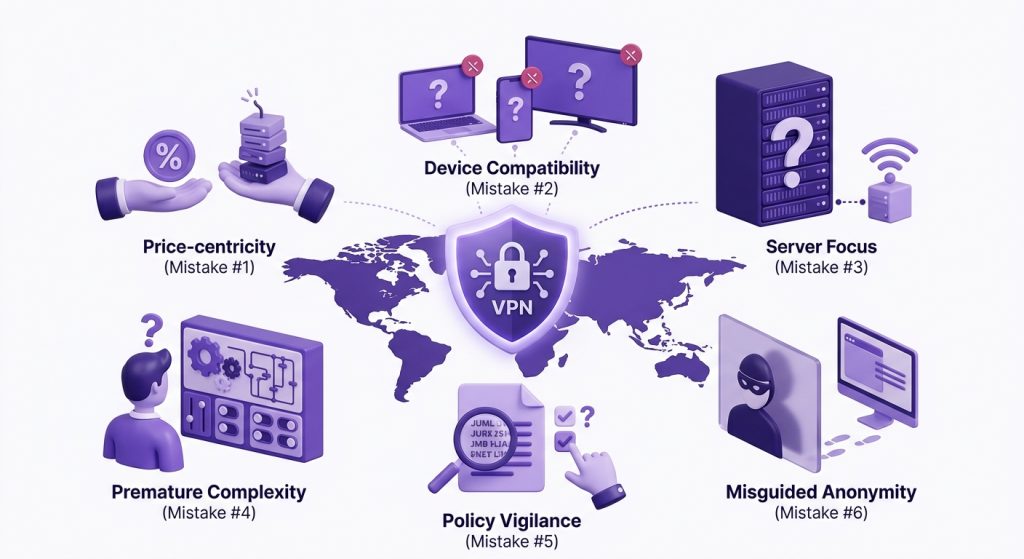
Choosing a VPN for the first time can get confusing because many providers focus on the same claims. To keep things simple, avoid these common mistakes before you decide:
Mistake #1: Selecting Only by Price
A low price can look attractive, especially if you are trying a VPN for the first time. The problem is that very cheap or free VPNs may come with slower servers, limited locations, weaker support, data caps, or unclear privacy practices. Price matters, but it should not be the only reason you choose a VPN.
Mistake #2: Ignoring Device Support
A VPN is only useful if it works on the devices you actually use. Before choosing one, check whether it supports your phone, laptop, browser, tablet, streaming device, or router if needed. Beginners often focus on the main app first, then realize later that their VPN does not work well across the rest of their devices.
Mistake #3: Overvaluing Server Count
A large server network can be useful, but more servers do not automatically make a VPN easier to use. Beginners should also look at app design, recommended server options, connection stability, support quality, and privacy basics. A VPN with thousands of servers can still feel frustrating if the app makes it hard to choose the right one.
Mistake #4: Using Advanced Settings Too Early
Most beginners do not need to change protocols or connection settings right away. Default settings are usually enough for everyday browsing, public WiFi, and general privacy. Advanced controls like split tunneling are useful later, but changing them too early can create connection issues that make the VPN feel harder than it really is.
Mistake #5: Skipping the Privacy Policy
Beginners often look at things like price and server count, but the privacy policy matters too. A VPN should be clear about what it does and does not collect. No-logs claims are stronger when backed by independent audits, so if the policy feels vague or full of broad promises, you are better off slowing down before signing up.
Mistake #6: Assuming It Makes You 100% Anonymous
A VPN can improve privacy by encrypting your internet traffic and masking your IP address, but it does not make you completely anonymous. TechRadar found that “three in 10 readers believe VPNs make you completely anonymous,” even though this is not true. Beginners should use a VPN for stronger privacy, not complete anonymity.
Your email could be compromised.
Scan it on the dark web for free – no signup required.
Frequently Asked Questions
No, most modern VPNs are easy to use once the app is installed. Beginners can usually sign and connect without changing protocols or advanced settings.
Beginners should be careful with free VPNs. Many free services come with data limits, slower speeds, fewer server choices, weaker support, or unclear privacy practices. A paid VPN is usually the safer option.
PureVPN is the best VPN for beginners because it keeps the first steps simple. You can install the app, click or tap the recommended server, and it connects automatically with suitable settings. It also offers automatic protocol selection, auto-connect, up to 10 multi-logins, DNS leak protection, and 24/7 live chat.
When you use a VPN, it hides your IP address and encrypts your internet traffic. As a result, beginners can enjoy more privacy when browsing and better security on public WiFi networks, among other things.
Yes. PureVPN is safe for beginners because it uses encrypted VPN connections and a no-logs policy backed by independent audits. Beginners can start with the default settings without having to configure security features manually.
PureVPN offers a 7-day free trial on Android and iOS for users who sign up through the mobile app. It also offers a 7-day trial for $0.99 through its website and a 31-day money-back guarantee on all plans.

Arsalan Rashid

June 8, 2026

4 months ago