
FoxyProxy has managed proxy configurations in Chrome and Firefox since 2006, and for many users it still does the job. But FoxyProxy’s per-tab assignment mode caps out at 4 proxy servers across 4 tabs. When a workflow demands 6 tabs, 10 tabs, or more, each running a distinct IP, FoxyProxy’s architecture hits a ceiling that is not configurable.
A second friction point: FoxyProxy is a management layer only. Every proxy has to be sourced separately from another vendor, entered manually as a server address, port, protocol, username, and password. For users who want residential IPs without the sourcing and credential overhead, FoxyProxy requires a multi-vendor setup before any tab gets an IP.
This blog covers the best FoxyProxy alternatives for Chrome in 2026, with a focus on what each tool actually changes for users who have run into either of those limits.
IP Per Tab by PureVPN Is The Best FoxyProxy Alternative for Unlimited Per-Tab Routing
IP Per Tab by PureVPN is the only Chrome extension that assigns a new IP to each opened tab simultaneously, with no fixed limit on how many tabs can carry a distinct IP, and with the proxy pool included in the plan rather than sourced separately.
A user opens a dropdown on any tab, selects a residential IP, and that tab routes through that IP until the assignment changes. Other open tabs keep their own assignments or remain on direct traffic. The session isolation mechanism means no tab’s proxy state affects any other tab’s state.
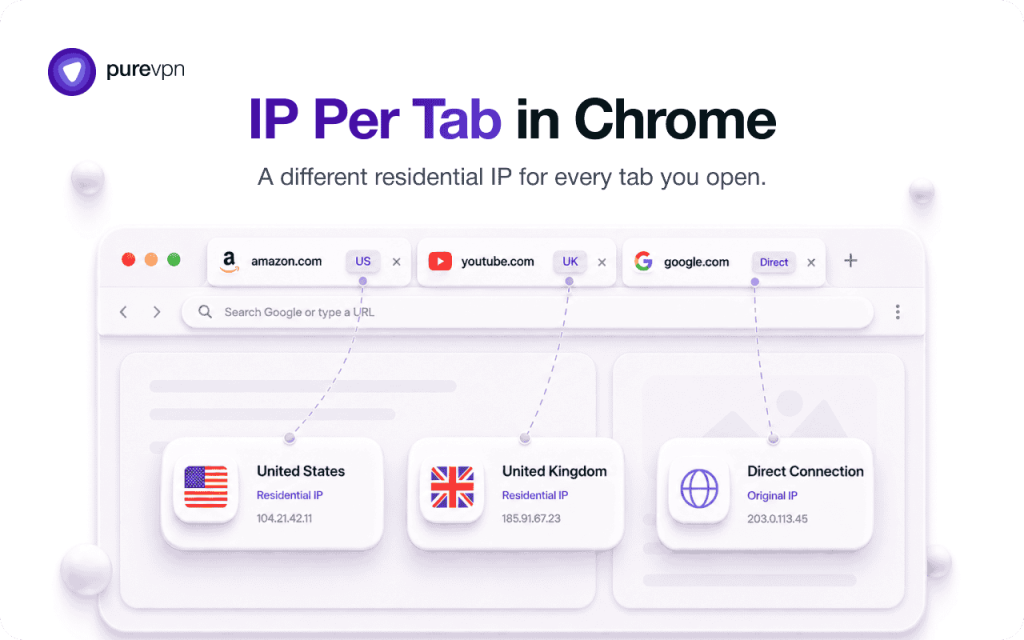
The Domain Rule Engine extends this to automation: rules auto-assign a specific residential IP whenever any tab navigates to a matching domain, applying only to the tab that triggered it. More on how this works across multiple Chrome tabs simultaneously.
IP Per Tab by PureVPN is free to install from the Chrome Web Store. Residential IP usage draws from a connected PureVPN plan: 12 GB at $19.92/month, 25 GB at $39.75/month, or 50 GB at $79.50/month.
Other FoxyProxy Alternatives to Explore
The Chrome proxy extension category is narrow. Most tools in this space manage browser-wide connections, not per-tab assignments. The distinction matters for anyone whose search started with “FoxyProxy alternative” but whose actual need is a different IP on each tab at the same time.
IP Per Tab by PureVPN
IP Per Tab by PureVPN is one of the best and free alternative of FoxyProxy, it is a Chrome extension built specifically for per-tab IP assignment. Unlike browser-wide proxy managers, it lets users assign a different residential IP to each tab simultaneously — no tab cap, no separate proxy provider needed, and no anti-detect browser required.
ZeroOmega (SwitchyOmega)
ZeroOmega (SwitchyOmega) is the another FoxyProxy alternative: a free, actively maintained Manifest V3 fork that applies one proxy profile browser-wide, with no per-tab IP assignment and no proxies included.
SmartProxy
SmartProxy extension is an open-source Chrome and Firefox proxy manager that activates a proxy for a specific site automatically using pattern-based rules. SmartProxy routes traffic at the site level across the whole browser, not at the tab level independently. No proxies are included: users supply their own credentials.
Anti-detect browsers
Anti-detect browsers (Multilogin, GoLogin, AdsPower, Incogniton, Octo Browser) are a separate product category, not Chrome extensions. They cost $30 to $120 per month, require leaving Chrome entirely, and add full browser fingerprint management on top of IP isolation.
Users who need per-tab IPs for geo testing, local SERP checking, or ad verification are buying significantly more than they need if they are evaluating this category. The do you need an anti-detect browser guide covers when that investment is and is not justified.
For Chrome users who need per-tab residential IP assignment with no tab cap and no separate proxy provider, no tool in this list currently matches IP Per Tab by PureVPN on all three criteria simultaneously.
Why Do People Look for a FoxyProxy Alternative?
The two most common reasons users search for a FoxyProxy alternative are the 4-tab assignment ceiling and the bring-your-own-proxy requirement.
FoxyProxy’s per-tab mode assigns up to 4 different proxy servers to 4 individual tabs simultaneously. That number is a hard architectural limit in the extension’s design, not a setting. Users who need simultaneous per-tab IP assignment across 5 or more tabs have no path forward within FoxyProxy’s current feature set.
The proxy sourcing requirement is a separate friction point. FoxyProxy’s own Chrome Web Store listing states that no paid FoxyProxy account is necessary: users bring proxies from any vendor. That design choice means FoxyProxy’s value is in the management layer, not in IP supply.
For users who need IPs, a separate proxy plan must be purchased, credentials retrieved, and each proxy entered by hand into the extension before any tab assignment is possible.
How Does IP Per Tab by PureVPN Compare to FoxyProxy?
| Feature | FoxyProxy | IP Per Tab by PureVPN |
|---|---|---|
| Per-tab proxy assignment | Yes, capped at 4 proxy servers across 4 tabs | Yes, no fixed tab limit |
| Domain-based auto-assignment | URL pattern matching, browser-wide connection | Domain Rule Engine, assigns the matching tab only |
| Proxy source | Bring your own, purchased separately | Residential IPs included with the PureVPN plan |
| Setup per proxy | Manual: server, port, protocol, username, password | Sign in, assign from dropdown |
| WebRTC leak protection | Yes, on/off toggle | Yes, on/off toggle |
| DNS leak protection | Not included | Not included |
| Browser support | Chrome, Firefox, Edge, Chromium-based browsers | Chrome Browser |
| Extension cost | Free | Free |
| Proxy cost | Priced by whichever vendor you source from | $19.92/month (12 GB) to $79.50/month (50 GB) |
For a full section-by-section breakdown of both tools, see the IP Per Tab vs FoxyProxy comparison.
When Should You Stay on FoxyProxy Instead of Switching?
FoxyProxy is the stronger choice in three specific situations.
You already own a proxy pool from another vendor. FoxyProxy is built around the assumption that users bring their own proxies. If a residential or datacenter proxy subscription is already in place with an external provider, FoxyProxy manages those connections without requiring a plan change or additional cost.
You need Firefox or Edge support. IP Per Tab by PureVPN is currently built for Chrome. FoxyProxy supports Chrome, Firefox, Edge, and other Chromium-based browsers, including Firefox container isolation.
You need 4 or fewer tabs on distinct proxies. If the workflow never exceeds 4 simultaneous per-tab assignments, FoxyProxy’s limit is not a constraint.
FoxyProxy is not the right fit when the tab count exceeds 4, when manual credential management is a recurring bottleneck, or when residential IPs need to be included in a single plan rather than sourced separately.
Frequently Asked Questions
IP Per Tab by PureVPN is the best FoxyProxy alternative for Chrome users who need per-tab residential IP assignment without a fixed tab limit and without sourcing proxies from a separate provider. FoxyProxy remains the better choice for users who already own a proxy pool or need Firefox and Edge support.
Most FoxyProxy alternatives are management-layer tools that require users to source proxies independently. IP Per Tab by PureVPN is the exception: residential IPs draw directly from the connected PureVPN plan, with no separate proxy vendor required.
IP Per Tab by PureVPN uses residential IPs from the connected PureVPN plan rather than manually entered credentials, so FoxyProxy proxy entries do not map directly. Domain rules configured in FoxyProxy would need to be recreated in the IP Per Tab by PureVPN Domain Rule Engine.
Yes. IP Per Tab by PureVPN is free to install from the Chrome Web Store. Residential IP usage draws from bandwidth included in the connected PureVPN plan, starting at $19.92/month for 12 GB.
ZeroOmega is the actively maintained Manifest V3 fork of SwitchyOmega, the most common browser-wide proxy manager. Like FoxyProxy, ZeroOmega applies one proxy profile to the entire browser at a time and requires users to supply their own proxies. Neither tool supports simultaneous per-tab IP assignment across more than one connection.
SmartProxy extension is a good alternative for users who want automatic site-level proxy routing using pattern rules and already have their own proxy pool. SmartProxy does not include proxies and does not assign different IPs to individual tabs simultaneously, so it does not address the per-tab routing need that most FoxyProxy users are searching for.

Arsalan Rashid

August 28, 2026

1 hour ago