Residential IPs matter for web scraping because they come from real consumer internet connections and are generally less likely to be identified as datacenter or proxy traffic. The IP address behind your scraper can influence how a website treats your requests, whether they pass normally or trigger CAPTCHAs, rate limits, or blocks.
Datacenter IPs, on the other hand, are assigned to servers in commercial hosting facilities and are easier for websites to classify as infrastructure. This makes the choice of IP type an important part of building a reliable scraping workflow.
In this blog, we’ll break down the differences between residential and datacenter IPs, how websites identify them, and when residential IPs can improve scraping reliability.
What Is the Actual Difference Between a Residential IP and a Datacenter IP for Scraping?
The difference that matters for scraping is how IP reputation databases classify each address type. Datacenter IP ranges are documented by their hosting providers and indexed by vendors. Residential ranges are allocated by ISPs to end users and do not appear in those databases by default.
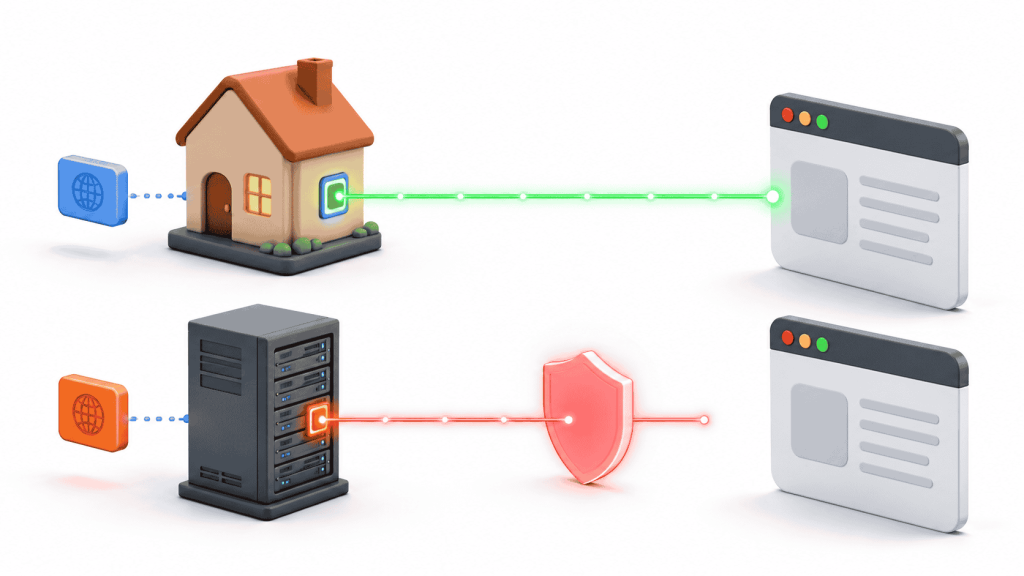
A request from an Amazon AWS, Google Cloud, or DigitalOcean address resolves as datacenter infrastructure in MaxMind’s GeoIP2 database. A request from a Comcast, BT, or Vodafone residential allocation resolves as a consumer ISP connection. A website applying IP-type-based rules acts on that classification before evaluating any other part of the request.
| Property | Residential IP | Datacenter IP |
|---|---|---|
| Assigned by | ISP (Comcast, BT, Vodafone) | Hosting provider (AWS, GCP, DigitalOcean, Hetzner) |
| Appears in datacenter IP databases | No | Yes, by ASN range |
| MaxMind connection type classification | Residential / ISP | Hosting / Data Center |
| Reputation baseline on arrival | Lower risk score | Higher risk score, regardless of request content |
| Cost per GB on proxy networks | $3–4 typical | $0.10–0.50 typical |
The cost gap between residential and datacenter is significant. A datacenter IP on a target site that filters by IP type produces blocked or altered responses regardless of how the request is constructed, which makes the cost comparison irrelevant for those targets.
Why Do Websites Filter Datacenter IPs Before Looking at Anything Else?
Websites filter by IP type first because it is the cheapest check in the stack. Querying an IP reputation database adds single-digit milliseconds to request evaluation. Evaluating JavaScript execution, session behavior, or browser fingerprinting requires more processing and only runs on requests that have already passed the IP check.
What Residential IPs Do Not Fix in a Scraping Workflow
Residential IPs pass the IP reputation check. Every other detection signal stays active regardless of IP type.
Request timing
A scraper sending 60 requests per minute at uniform 1-second intervals produces a timing signature that behavior-based detection identifies as automated. Real browsing produces variable intervals: a product page held open for 45 seconds, a category page for 8, a search result for 3 minutes. Uniform timing is a bot signal independent of IP classification.
TLS and HTTP fingerprinting
A real Chrome browser on macOS sends headers in a specific order with a specific cipher suite in the TLS handshake. A Python requests call produces a different header set and a different JA3 fingerprint.
Cookie and session state
A first browser visit to most sites receives a session cookie. Subsequent requests from that browser include the cookie. A scraper sending no cookies, or a fresh cookie on each request, signals no real session is in progress. This check applies per session, not per IP.
JavaScript execution
Headless browsers including Puppeteer and Playwright execute JavaScript, but certain challenges test for properties specific to real browser environments: hardware concurrency values, screen dimensions, WebGL renderer strings, and timing APIs. A residential IP does not affect whether those tests pass.
| Signal | Affected by IP type | What actually fixes it |
|---|---|---|
| IP reputation score | Yes | Residential IP |
| Datacenter ASN classification | Yes | Residential IP |
| Request timing patterns | No | Randomized delays, variable pacing |
| TLS / JA3 fingerprint | No | Real browser or browser-matched cipher suite |
| Cookie and session state | No | Persistent cookie jar per session |
| JavaScript challenge response | No | Full browser execution environment |
| Navigation behavior patterns | No | Realistic page traversal logic |
Use this table to diagnose a failing scraping workflow. If switching from datacenter to residential resolves the issue, IP reputation was the blocking factor. If residential IPs do not resolve it, the failure is in one of the remaining signals.
Related Read: Why Websites Block Scrapers and How They Detect Them
How Rotation and Sticky Sessions Work Differently With Residential IPs
Residential proxy pools operate in two session modes. Using the wrong mode for a task produces failures that look like IP blocks but are actually session continuity errors.
Rotating residential IPs assign a different exit node per request or per configurable interval. Rotation suits tasks where requests are independent: fetching individual product pages, collecting search result pages with no login dependency, or pulling publicly available data that carries no session state between requests.
Sticky residential sessions hold the same exit node for a configured duration. The session identifier embeds in the proxy credentials as a parameter, for example username-session-abc123. The proxy gateway reads that identifier and routes every request through the same exit node until the session expires. Standard durations run from 1 to 30 minutes depending on provider. ISP proxy plans hold the same address indefinitely.
Sticky sessions suit tasks that require continuity: logging in and then fetching authenticated pages, moving through a multi-step checkout flow for price verification, or any workflow where the server tracks the visitor’s IP across a sequence of requests. Rotating the IP mid-session on those workflows breaks continuity and produces errors that look like access restrictions.
| Mode | IP behavior | Use when | Avoid when |
|---|---|---|---|
| Rotating residential | New IP per request or interval | Independent, stateless requests | Login flows, multi-step sessions |
| Sticky residential | Same IP for 1–30 min (standard) | Authenticated sessions, stateful flows | High-volume parallel independent requests |
| ISP / static residential | Same IP indefinitely | Long-running tasks, API whitelisting | Tasks needing IP diversity across requests |
- Related Read: What Is a Sticky Session?
How Geo-Accuracy Differs Between Residential and Datacenter IPs
A residential IP from the United Kingdom is an address allocated by a UK ISP to a connection physically in the UK. A datacenter IP from a UK-based server is an address allocated to hosting infrastructure that sits in the UK geographically but does not represent a UK consumer connection.
For scraping tasks where the localized version of a page matters, such as regional pricing, localized search results, or geo-targeted content, a residential IP from the target country produces a more accurate starting point than a datacenter IP from the same country. Websites also read Accept-Language headers, stored cookies, and account locale settings alongside IP geolocation, so the IP is one input rather than the only one.
- Related Read: Why One IP Is Not Enough for Web Scraping
How Per-Tab IP Routing Applies to Browser-Based Research
Chrome applies one proxy configuration across the entire browser. Switching the proxy for one tab switches it for every tab, which makes simultaneous multi-location checks impossible without an extension that operates at the tab level.
IP Per Tab by PureVPN assigns a residential proxy IP to individual Chrome tabs independently. A tab assigned to a US residential IP and a tab assigned to a UK residential IP run concurrently in the same browser window, each sending requests from its own assigned address. The extension stores each tab’s assignment in chrome.storage.local, so assignments persist across browser restarts without reconfiguration.
The practical use for browser-based research: checking localized pricing across two markets simultaneously, comparing search results from two countries side by side, or verifying that geo-redirects resolve correctly from multiple locations.
Related Read: What Is Per-Tab IP Routing?
Frequently Asked Questions
Yes. Proxy pools reuse the same ISP-assigned addresses across many users. Sites logging IP behavior history can flag the same address appearing across geographically inconsistent sessions. Behavioral history tracking catches this; basic ASN classification does not.
No. IP Per Tab by PureVPN is built for browser-based workflows in Chrome. Automated scripts connect to a residential proxy pool directly via credential-based authentication, without the extension.
No. Websites read Accept-Language headers, cookies, and account locale settings alongside the IP. A UK residential IP paired with Accept-Language: en-US and a USD cookie returns different content than the same IP with matching UK locale signals.
Yes. Proxy pools reuse the same ISP-assigned addresses across many users. Sites logging IP behavior history can flag the same address appearing across geographically inconsistent sessions. Behavioral history tracking catches this; basic ASN classification does not.
Websites check IP reputation before reading anything else. Datacenter ranges (AWS, Google Cloud, Hetzner) are indexed by ASN in MaxMind and IPQualityScore. That classification happens before headers, cookies, or timing are evaluated. Residential IPs carry no ASN flag and pass that check by default.

Arsalan Rashid

September 2, 2026

12 hours ago