How to forward ports for Pokémon Shining Pearl
Pokémon Shining Pearl is the latest remake of Nintendo DS’ Pokémon Diamond and Pearl video games. Developed by ILCA and released by the Pokémon Company and Nintendo for the Nintendo Switch, the game is part of the Pokémon video game series’ eighth generation and was released on November 19, 2021.
The gameplay of Pokémon Shining Pearl is quite similar to the original Diamond and Pearl games, as well as prior remakes like Omega Ruby and Alpha Sapphire. As with the original games, Pokémon Shining Pearl is set in Sinnoh, a fictitious territory based on the Japanese island of Hokkaidō.
Ports needed to play Pokémon Shining Pearl
It’s frustrating to experience issues like high ping and sudden disconnects when playing Pokémon Shining Pearl. You can enjoy smoother gameplay via port forwarding, but you must first determine which ports Pokemon Shining Pearl requires. We’re here to assist you with this.
Pokémon Shining Pearl – PC
How to port forward Pokémon Shining Pearl
Before configuring your router, make sure you have the following details:
- Your router’s IP address
- Your Switch’s IP address
- The TCP and UDP ports for Pokémon Shining Pearl, which have been outlined below
After noting down these details, go ahead and open the necessary ports for Pokémon Shining Pearl via your router. Just follow these steps:
- In the URL bar of your selected browser, enter the IP address of your router
- To view the settings, log in with your router’s admin credentials
- Navigate to your router’s port forwarding section
- In the appropriate box, enter your Switch’s IP address
- Type the Forza Horizon 4 TCP and UDP ports in the relevant boxes
- Once done, restart your router
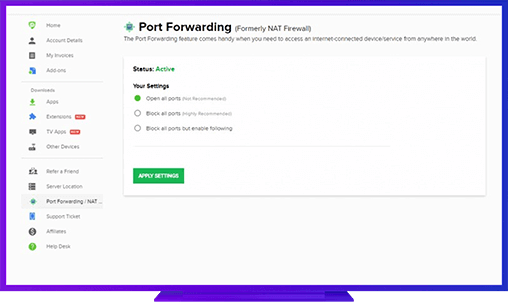
PureVPN’s Port Forwarding Add-on
The Easiest & Secure Way to Open All Ports
If you’re new to Port Forwarding, you might have difficulties finding the correct settings when taking the manual configuration route. What if we told you there is a simple Port Forwarding option available? As a gamer, you’ll like this add-on as it lets you quickly:
- Open specific ports
- Block all ports
- Open all ports
Play Pokémon Shining Pearl using PureVPN and enjoy a seamless gaming experience!
Benefits of Using PureVPN Port Forwarding Add-On
Many people find manually configuring ports on a router difficult and complex. By simplifying the procedure, PureVPN’s Port Forwarding add-on saves you time and effort. It also:
- Improves P2P upload and download speeds
- Block all ports
- Helps you get around CGN (Carried-Grade NAT)
- Lets you use PureVPN and Port Forwarding add-on at the same time