
How to Port Forward Back 4 Blood at home
Port forwarding is a method of allowing remote devices to easily access applications on your local network. You can ensure seamless communication between devices on your network and outside servers by opening ports. Here’s how you can Port Forward for Back 4 Blood:
Which ports to open for Back 4 Blood
Here are the port numbers, TCP and UDP, you need to open for Port Forwarding Back 4 Blood:
Back 4 Blood – Steam
Back 4 Blood – PlayStation 4 and 5
Back 4 Blood – Xbox One and Series X
How to open ports for Back 4 blood
You may have to configure your router to forward some ports to play Back 4 Blood. Secondly, Forwarding ports are best-suited for online gaming because they can enhance internet stability and speeds. Most games will perform better speed-wise when an incoming request is forwarded to the game via router with the help of Port Forwarding.
To forward ports, you need to know the:
- IP address of the router
- IP address of the gaming device (console or PC)
- Port numbers (TCP and UDP)
Once you know the IP address and port numbers, here’s what you need to do to open ports for Back 4 Blood:
- Login to your WiFi router.
- Visit your Port Forwarding section.
- Enter the IP address of the router and gaming device (console or Windows PC).
- Submit the TCP and UDP numbers.
- Restart the router and start Port Forwarding.
Use a Port Forwarding add-on for Back 4 Blood
Back 4 Blood gaming necessitates the use of Port Forwarding, and it can provide numerous advantages to the gamer. Port Forwarding allows players to enhance their online gaming performance by reducing latency and lag. Further, Port Forwarding can improve game performance and provide a more stable connection. Also, opening ports may result in fewer disconnects during online gaming. Therefore, players can use port forwarding to ensure a more enjoyable online gaming experience.
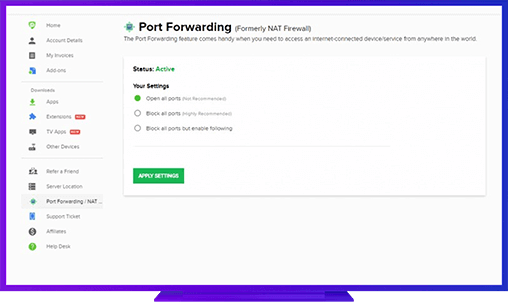
PureVPN’s Port Forwarding add-on
Port Forwarding is a fantastic tool for enhancing your internet experience. You can boost your connection speed, reduce lag, and even increase your security by opening specific ports on your router. PureVPN’s Port Forwarding add-on makes it simple to take advantage of these advantages. Further, Port Forwarding add-on enables you to easily view and manage all of your rules in a single location. As a result, it’s an excellent way to make the most of their internet connection.
Further Port Forwarding Guides
- PC Gaming Port Forwading
- Players Unknown Battleground
- Fortnite
- Apex Legends
- Call Of Duty: Black Ops 4
- Battlefield V: Firestorm
- Minecraft
- Arma 3
- Destiny 2
- Fantasy Grounds
- Overwatch
- Warframe
- Steam
- For Honor
- Rocket League
- League of Legends
- Port Forwarding For Games
- Dead by Daylight
- Among Us
- Call of Duty: Black Ops II
- Call of Duty: Black Ops III
- Call of Duty: Warzone
- Dota 2
- ARK Survival Evolved
- Age of Empire 3
- Roblox
- Call of Duty: Black Ops 3
- eFootball PES 2020
- Terraria
- Counter-Strike: Global Offensive
- Call of Duty: Modern Warfare 3
- Diablo III