
How to Open Ports for Rainbow Six Extraction Using Port Forwarding
If you like playing tactical first-person shooting games, then you must have played a Tom Clancy game at least once in your life. The upcoming Rainbow Six Extraction is the upcoming Tom Clancy game that is sure to take the world by storm.
Rainbow Six Extraction is a great game, but it’s even better when played online. You might face connection problems though, but these can be easily resolved by learning how to play Rainbow Six Extraction using port forwarding.
If you’re not sure what Port Forwarding is, then follow this guide to learn more.
Ports Needed To Run Rainbow Six Extraction
To play Rainbow Six Extraction with port forwarding, you will need to know which ports the game uses. You can check out these ports from here:
Rainbow Six Extraction – Windows
Rainbow Six Extraction – PlayStation 4
Rainbow Six Extraction – PlayStation 5
Rainbow Six Extraction – Xbox One
Rainbow Six Extraction -Xbox Series X
How To Enable Rainbow Six Extraction Port Forwarding
The process for forwarding your ports, whether for Rainbow Six Extraction or for any other game, is easy enough. You just need to open the settings of your router and instruct it to forward (redirect traffic to) the right ports.
Before you begin, make sure to collect some extra pieces of information. To forward ports for Rainbow Six Extraction, you need to take notes of the following:
- The IP address of your PC or your console
- The IP address of your router. You can learn how to find your router IP address from here.
- The ports used by Rainbow Six Extraction that you want to forward. You can get these from the list above.
If you are in need of this data but do not know how to collect it, then fret not, because we’ve made a guide that would teach you How to Forward Ports on your Router for Online Games. This would show you how to collect this information. You can also check how to forward ports for loads of other games, not just Rainbow Six Extraction.
The process for forwarding ports is easy. You just need to follow these steps:
- Open a web browser on either your console or your PC.
- Now, type or paste the address of your router.
- You will now be guided to the router’s settings. Scroll through a bit until you find “port forwarding” somewhere on the page. When you do, click on it.
- You will now need to enter a few details on the next screen. You can now paste the IP address of your console or your PC into the correct boxes.
- Now you will be asked for the ports to forward for Rainbow Six Extraction. You can find these from the list above.
- Restart your router for the process to work, That’s it!
PureVPN’s Port Forwarding Add-on
Easy & Secured Way to Open All Ports
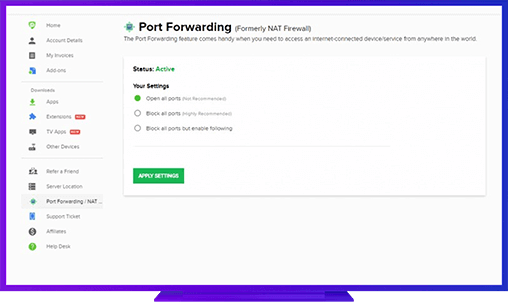
You can now forward the ports for Rainbow Six Extraction in just a few clicks by using PureVPN’s port forwarding add-on. With the add-on, you won’t feel the need to open your router settings and scrabble around with a bunch of local IP addresses.
If you plan on playing Rainbow Six Extraction a lot, then it’s better to invest in a convenient solution like PureVPN port forwarding add-on to save yourself from the hassle of setting multiple port forwarding rules.
Benefits of Using PureVPN Port Forwarding Add-On
PureVPN’s port forwarding add-on improves performances and offers benefits in several different areas. Here are a few reasons why you should go for the PureVPN port forwarding add-on:
- The add-on works on all kinds of devices. You will be able to forward ports from any device you want.
- The add-on speeds up P2P download speeds. This would massively improve torrenting speed.
- More advanced users can use CGNAT (Carrier Grade Network Address Translation) with the add-on.
Further Port Forwarding Guides
- PC Gaming Port Forwading
- Players Unknown Battleground
- Fortnite
- Apex Legends
- Call Of Duty: Black Ops 4
- Battlefield V: Firestorm
- Minecraft
- Arma 3
- Destiny 2
- Fantasy Grounds
- Overwatch
- Warframe
- Steam
- For Honor
- Rocket League
- League of Legends
- Port Forwarding For Games
- Dead by Daylight
- Among Us
- Call of Duty: Black Ops II
- Call of Duty: Black Ops III
- Dota 2
- ARK Survival Evolved
- Age of Empire 3
- Roblox
- Call of Duty: Black Ops 3
- eFootball PES 2020
- Terraria
- Counter-Strike: Global Offensive
- WWE 2k18
- Call of Duty: Modern Warfare 3
- Diablo III